




Ready to Unlock True ChatGPT Mastery? How Can You Leverage Agent Mode and Deep Research in 2026?
Have you ever stared at a blank chat interface, knowing the AI is capable of incredible things, but feeling unsure how to consistently unlock its full potential? You are definitely not alone in that experience. Over the first quarter of 2026, the platform has rolled out massive updates, and I have rigorously tested these new features to bring you this definitive guide to ChatGPT Mastery. Initially, many people treat this tool as a simple search alternative, but it has evolved into a highly robust digital ecosystem.
Consequently, mastering its interface requires much more than just typing basic questions. Furthermore, to truly leverage its power, you need to understand the distinct nuances of the latest models, seamlessly navigating between Auto, Instant, Thinking, and Pro modes. Specifically, this guide will walk you through highly practical, real-world applications, moving far beyond basic theory.
For instance, we will thoroughly explore the game-changing Agent Mode for seamless task automation, alongside the highly anticipated Deep Research Mode for gathering complex, high-level data. Additionally, I will break down exactly how to use the RTCROS prompting framework to guarantee precise, high-quality outputs every single time.
In the meantime, you will also discover how to navigate advanced personalization options, set up Custom GPTs, and organize your projects efficiently. Ultimately, whether you want to implement Voice and Audio features for hands-free brainstorming or integrate external apps to streamline your daily workflow, this step-by-step Standard Operating Procedure (SOP) will completely transform the way you work. Let’s dive right into the real-world examples and elevate your productivity!
ChatGPT Models & Modes
ChatGPT offers multiple models and modes to fit different tasks. In the model picker (top of the chat window), you can choose:
- Auto (GPT-5): The default mode that automatically switches between fast and deep thinking as needed. It aims to pick the best response approach for your prompt. Know more.
- Thinking: Uses extra reasoning time for complex problems or detailed answers. ChatGPT will “think longer” on challenging questions.
- Pro: A research-grade mode available to Pro and Business subscribers. It takes longer to process but delivers highly accurate, in-depth answers. (Note: Canvas and image generation aren’t available in Pro.
- Legacy Models: If you enable “Show additional models” in settings, you can access older GPT versions (like GPT-4o, GPT-4.1, GPT-4.5) and special options like Thinking-mini. These appear in a Legacy section of the model picker. Unless needed for compatibility, most users can stick with GPT-5’s modes.
How to switch models: Click the model name (e.g. “GPT-5”) at the top of the chat. A dropdown will appear with the modes above. Select Fast, Thinking, or Pro as needed. If you leave it on Auto (GPT-5), ChatGPT will dynamically use the best mode for each query. For example, choosing Thinking on a math problem or research prompt yields more thorough reasoning, whereas Fast is ideal for quick facts. Remember: higher-power modes use more quota and may respond slower, so match the mode to your task’s needs.
Navigating the ChatGPT Interface
Getting around ChatGPT’s interface is key to using all its tools. Here’s what you’ll see and where to find things:
- Left panel: Shows your chat history and projects. Click + New chat (or + New project) to start fresh. Each chat has its own context.
- Profile icon (top right): Opens settings and personalization. Here you can set Custom Instructions, manage Memory, toggle Personalities, and connect apps (Gmail, Google Calendar, etc.).
- Model picker (top center): Click to choose your model/mode (GPT-5 Auto, Fast, Thinking, Pro, or Legacy).
- + (Plus) icon (in chat input area): Reveals a menu of advanced tools and features. For example:
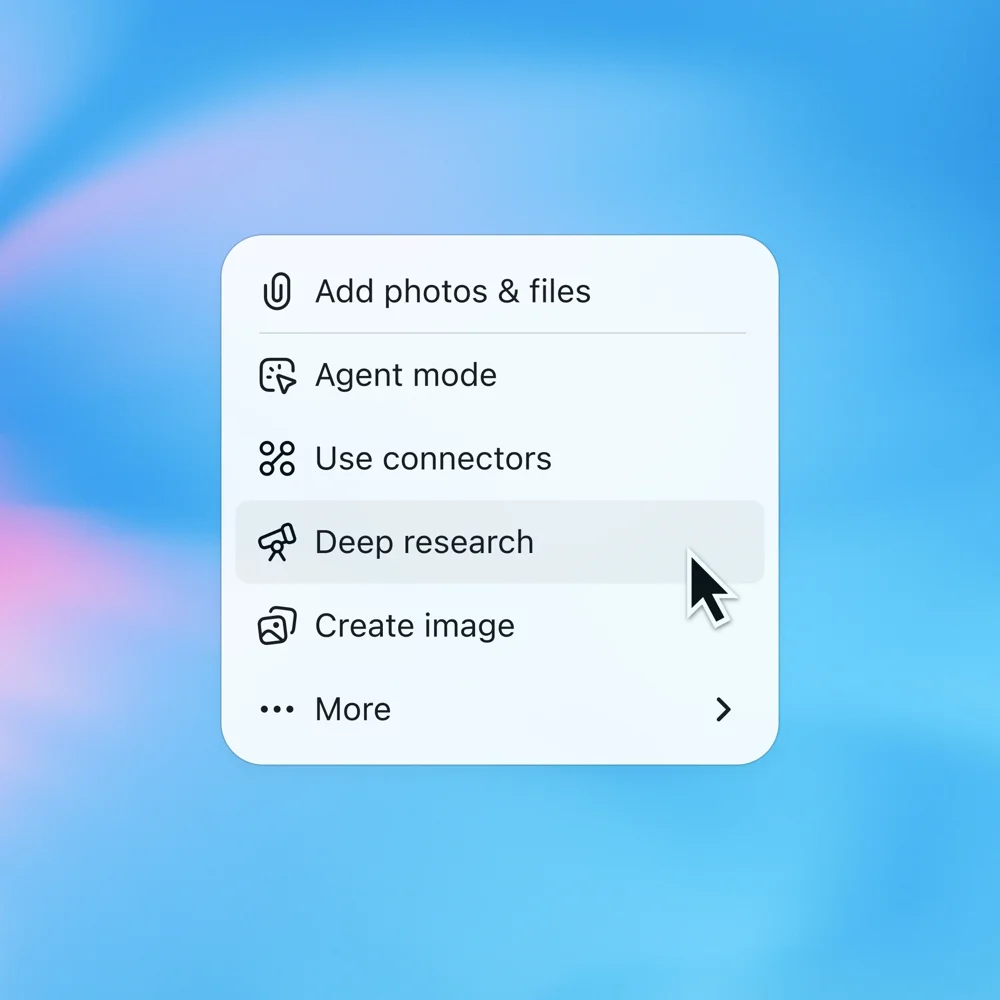
- Add photos & files: Upload images or documents for ChatGPT to analyze.
- Agent mode: Activate an AI assistant that can browse the web, use connected apps, and perform complex tasks (more below).
- Use connectors: Access data from apps like Google Drive, GitHub, Gmail, etc. This turns ChatGPT into a research assistant with your own data.
- Deep research: Launches a long-running analysis across hundreds of web sources. ChatGPT will compile and cite information in a report (see Deep Research section).
- Create image: Generate an image from a prompt (image styles like cyberpunk, anime, etc.).
- Web search: Let ChatGPT search the internet live for your query.
- Canvas: An interactive whiteboard for free-form text, code, or layouts.
- More: Includes Study mode (guided learning), Voice mode, and other tools.
– Chat input area: Where you type (or speak) your prompt. On mobile or voice-capable devices, you’ll see a microphone icon here (bottom right). Tap it to start voice mode (see Voice section).
With these navigation cues, you can quickly access ChatGPT’s power tools. For instance, to do deep research, click + ➔ Deep research. To attach a file, click + ➔ Add photos & files. Hover over icons and explore dropdowns to discover new features.
Example Prompting with RTCROS Framework
To get the best results from ChatGPT, a clear, structured prompt helps a lot. One effective method is the RTCROS framework, which stands for Role, Task, Context, Reasoning, Output format, Stopping condition. This means you explicitly specify each part of your request. For example:
- Role: Who or what you want ChatGPT to be (e.g. “Act as a social media manager” or “Pretend you are a luxury real estate agent”).
- Task: The action to perform (e.g. “Write an Instagram post announcing a new product launch”).
- Context: Relevant details or background (e.g. “Our brand is a sustainable fashion startup aimed at young urban professionals” or “Our audience are first-time home buyers” or domain-specific info).
- Reasoning: How to approach it – what style, focus, or logic to use (e.g. “Emphasize the product’s eco-friendly features” or “Use a friendly, conversational tone” or “Highlight benefits of investing in luxury homes”).
- Output Format: The form of the answer (e.g. “A bullet list of 3 post ideas” or “Write a press release” or “A 4-line rhyming poem”
- Stopping Condition: When or how to end (e.g. “End after 200 words” or “Stop after 3 social media captions”).
By giving these elements, ChatGPT knows exactly what you expect. For example, in social media marketing, you might say:
Role: Act as a marketing specialist.
Task: Create three LinkedIn posts.
Context: We are launching a luxury skincare product in summer.
Reasoning: Target young professionals, emphasize luxury and results.
Output Format: Three bullet points, each a LinkedIn-ready caption.
Stopping Condition: End after the third bullet point.
This tells ChatGPT to behave like a marketer and produce the right style of output.
Here are some real-world RTCROS examples across domains:
- Luxury Real Estate:
Role: Act as an upscale real estate agent.
Task: Write a property listing description.
Context: The property is a $5M ocean-view villa in Miami.
Reasoning: Highlight opulent features and lifestyle (e.g. marble floors, private beach access).
Output: A persuasive listing paragraph.
Stop: End after 100 words. - Fashion Marketing:
Role: Act as a trendy fashion influencer.
Task: Draft an Instagram caption.
Context: Promoting a new line of eco-friendly sneakers.
Reasoning: Use casual, upbeat tone and mention sustainability.
Output: One engaging Instagram caption.
Stop: End after one caption. - Apple Music / Music Apps:
Role: Act as a music curator.
Task: Suggest five songs similar to Michael Jackson’s “Thriller.”
Context: Use Apple Music data.
Reasoning: Include song title, artist, and a one-line reason for each (e.g. vibe or era).
Output: A numbered list of five songs.
Stop: Stop after listing five songs.
Voice and Audio Features
ChatGPT isn’t just text – it can listen and speak too! Here’s how to use voice features:
- Voice Mode (Conversation): ChatGPT can talk with you. This is great for hands-free help, language practice, or brainstorming. According to OpenAI, you can “talk to ChatGPT, hands-free,” and it will give instant answers while you move. For example, you might say, “Help me practice ordering a latte in Japanese,” and ChatGPT will respond vocally.

How to start: Open ChatGPT (mobile or desktop) and tap the microphone icon in the input bar chatgpt.com. If you’re on desktop and don’t see it, you may need the ChatGPT mobile app (iOS/Android has full voice). After tapping, select a voice personality (e.g. “Spruce” or “Clover”), then speak your query. ChatGPT will show a waveform as it records and then respond with spoken and written text. You can interrupt or guide it anytime to adjust the response. To continue the voice chat, just tap the mic again and keep talking.
Voice Dictation Mode: This is for when you just want to dictate text instead of talking back and forth. Think of it like speech-to-text. On mobile, you may see an option like “Record” or “Voice” in your keyboard. Tapping it converts your speech to text in the chat input. It’s handy for jotting down ideas, drafting long prompts, or transcribing short audio. After dictation, you can ask ChatGPT to refine or act on the transcribed text. For example, record yourself describing your presentation ideas, and then prompt “Summarize this into bullet points.”
Hands-free benefits: As OpenAI notes, voice mode provides “Quick answers, hands-free,” and more natural conversation flow. It’s great for casual use (chatting while walking) or practical tasks (e.g. asking about measurements while cooking).
- Examples: “What’s the weather like today?” or “Translate ‘thank you’ to Spanish” – ask by voice and get instant spoken replies. You can even use voice mode for fun, like brainstorming story ideas or practicing language dialogue.
Voice mode turns ChatGPT into a conversational partner. Tap the mic, choose your voice, and start talking – it’s like Siri or Alexa, but powered by GPT-5 intelligence.
Temporary Chat (Incognito Mode)
Sometimes you want a completely fresh start. Temporary Chat (also known as incognito mode) gives you a blank slate: ChatGPT won’t recall anything from past chats or your saved memories for that session. Use it for private or one-off questions.
- When to use: Quick Q&A, testing ideas, or troubleshooting, without the influence of past context. For example, if you just have a simple query (“How to fix my code bug?”), a temporary chat ensures no personal data is used.
- How to activate: In a new chat, click the “Temporary” pill at the top right. The interface will clearly show you’re in a temporary session. ChatGPT then behaves as if it knows nothing about you.
Key points:
- Temporary chats do not appear in your history and ChatGPT doesn’t use them to learn.
- They won’t use your previous conversations or memories.
- You can still use any tools or modes (like Deep Research or Voice) within a temp chat.
- If you prefer permanent memory off, you can turn off memories in settings (ChatGPT will then treat all chats like temporary by default).
Use Temporary Chat whenever you need anonymity or a fresh perspective. When you’re done, simply close or delete it – no lingering context remains.
Read this article: Gemini 3 AI: Deep Think Changes Everything
Agent Mode (AI Task Automation)
Agent Mode turns ChatGPT into a super-powered assistant that can execute multi-step tasks, browse websites, and use your connected apps on your behalf. It combines the best of browsing and reasoning to bridge research and action. In agent mode, ChatGPT can literally click, scroll, and type on the web for you – think of it as a virtual helper.
- How it works: Under the hood, Agent Mode gives ChatGPT a “virtual computer” with tools like a visual browser, a text browser, and a terminal. It also integrates connectors (APIs) for services like Gmail or Google Calendar. For example, the agent could open a browser page, log into a site, download data, analyze it with code, then compile a report – all in one conversation.
- Use cases:
– Research and data gathering: Ask the agent to find the latest market reports on solar energy. It can search, open articles, and summarize them.
– Web tasks: “Book me a flight from NYC to Paris next Friday under $500” – the agent could browse a travel site, filter options, and even make a booking (if the site allows it).
– Email and scheduling: With connectors, you can say “Draft an email in Gmail proposing a meeting next week” – ChatGPT can fetch your calendar, suggest times, and format the email for you.
– Complex workflows: “I have a spreadsheet with sales data – analyze it and plot a chart.” The agent can open the spreadsheet (via text browser or terminal), run analysis code, and return the result. - How to activate: Click the + icon in the chat input and select “Agent mode”chatgpt.com. (It may be labeled “Operator” in some interfaces.) ChatGPT will then notify you that it’s switching to agent. You may need to allow it to use tools or sign in to certain services. Once on, just give it instructions as if you’re talking to an assistant.
- Limitations: Agent Mode is powerful but sometimes experimental. It works best for tasks on websites that don’t block bots. Always review its actions and be cautious with sensitive logins. You can pause or stop the agent anytime.
Agent Mode brings your instructions to life by acting on the web. As OpenAI puts it, ChatGPT now “actively engages websites—clicking, filtering, and gathering precise results” to carry out tasks. Imagine saying “ChatGPT, act as my travel agent” and watching it do the web browsing and booking for you!
Deep Research Mode
Deep Research is designed for serious investigations. It lets ChatGPT browse, read, and synthesize hundreds of sources on a topic, then compile a comprehensive report with citations. Instead of asking one question, you set up a research project and let ChatGPT dig deep.
1. Start Deep Research: Click + ➔ Deep research (from the chat input menu)
2. Define the task: Type a detailed request of what you want researched. The more specific, the better. For example: “Give me a detailed report on 5 US cities that have great weather, low cost of living, and vibrant art scenes.” The prompt will show a “Research” tag. (You can also include “Sources” to get linked references, as shown below.)
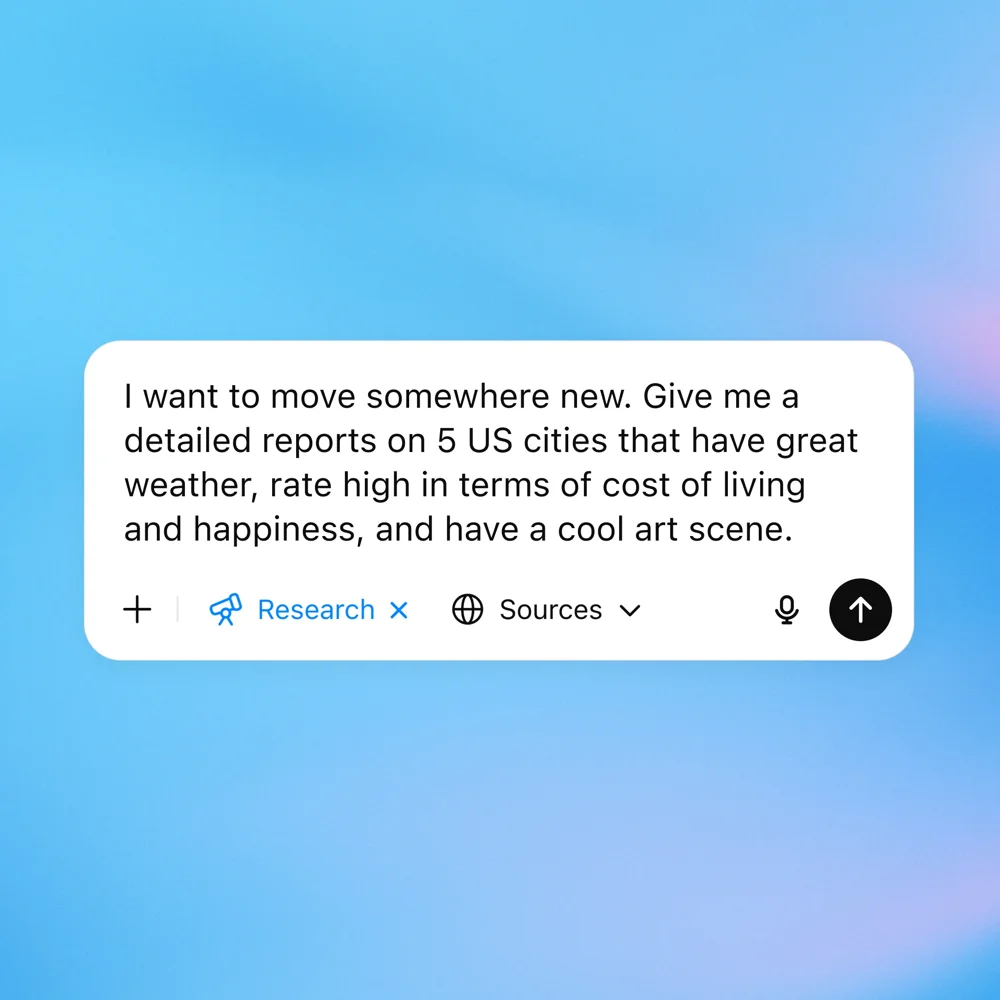
3. Wait for results: Deep Research can take minutes to complete because ChatGPT is crawling the web. Once done, you’ll get a notification and see the compiled report.
- The result is usually a formatted report with headings, summaries, and citations. For example, ChatGPT produced a “Top 5 U.S. Cities for Pleasant Weather and High Quality of Life” report with an overview and city-by-city details.

4. Share or download: When the report appears, you can download it as PDF/DOCX or share a link. If the research is long, ChatGPT will paginate it, and you can scroll through sections.
Benefits & Uses: Deep Research shines for complex projects like market analysis, academic research, or detailed comparisons. For example, a marketer might ask Deep Research to survey consumer trends, or a student might compile an annotated bibliography. Because it cites sources, you can click references to verify facts.
Example: A company founder might prompt Deep Research: “Analyze 2024 funding trends in AI startups, include average deal sizes and key players.” After a few minutes, ChatGPT returns a multi-page report with charts, numbers, and sources.
Deep Research essentially replaces hours of googling and reading. It’s a powerful tool for any task that requires breadth and depth of information.
Study & Learn Mode
Study Mode (also called Study & Learn) is a new way to learn with ChatGPT. It turns the chat into a tutoring session with guiding questions and exercises, rather than just giving direct answers. It’s ideal for students or anyone trying to understand a topic deeply.
- How it works: When Study Mode is active, ChatGPT will break down problems into steps, ask you probing questions, and quiz you on the material. For example, instead of just telling you the answer, it might say “First, what do we know about this topic?” and let you answer. It then gives hints or explains concepts interactively.
- Key features:
– Socratic questioning to encourage critical thinking (not just solutions).
– Scaffolded responses: information is organized in manageable sections (reducing overwhelm).
– Knowledge checks: quizzes or mini-tests to reinforce learning.
– Personalized pacing: it asks about your skill level and adjusts explanations accordingly.
– Toggle on/off: You can turn Study Mode on at any time in a conversation and off if you just want quick answers. - How to enable: Click the + ➔ More ➔ Study and learn (or Study mode) option in the chat input menu. It might also appear as a button below the input if you use the app. Once turned on, ChatGPT will confirm that “Study mode is active” and begin the interactive process.
- Example usage: Ask a question like “Explain Einstein’s theory of relativity.” In study mode, ChatGPT might first ask what you already know about relativity, then walk you through thought experiments (like sitting on a moving train), and quiz you on the principles. It’s more like having a patient tutor.
Study Mode is excellent for learning new concepts, reviewing class materials, or exam prep. According to OpenAI, it’s built “to help students learn something — not just finish something”. Use it whenever you want guided learning instead of just an answer.
Personalization & ChatGPT Personalities
You can customize ChatGPT’s style to match your preference or scenario. Two main customization options are Custom Instructions and Personalities:
- Custom Instructions: This lets you tell ChatGPT about yourself and how you want it to respond. For example, you can say “Always be concise” or “I’m a beginner in coding.” These instructions steer ChatGPT’s tone and content across chats. (Access this via Settings > Personalization > Custom Instructions.) Think of it as permanent context.
- Personalities: ChatGPT offers distinct conversation styles. These are preset “voices” you can choose: Default (neutral), Cynic, Robot, Listener, and Nerd. Changing personality changes the tone of replies but not factual content. For example:
– Default: Clear, neutral, and friendly. (This is ChatGPT’s usual style.)
– Cynic: Sarcastic, dry, witty. It gives blunt, humorous answers and may tease a bit. Best for entertaining yet actionable responses.
– Robot: Precise, concise, emotionless. Gives direct answers with minimal fluff. Great for technical tasks or step-by-step instructions.
– Listener: Warm and laid-back. Echoes your thoughts with empathy and often asks clarifying questions. Good as a supportive sounding board.
– Nerd: Playful and curious. Deep explanations, analogies, and exploration are offered in an enthusiastic tone. Perfect for learning or creative problem-solving.
How to select a personality:
1. Click your profile icon (bottom-right of ChatGPT).
2. Choose Personalization. Make sure “Enable customization” is on.
3. Under ChatGPT Personality, pick one of the options.
After switching, new chats will reflect that voice. For instance, with Robot the AI might start with “Sure. You should do X” in a direct tone, whereas Listener might say “It sounds like you’re feeling X… Let’s think about this” to the same question. You can mix this with custom instructions for even finer control.
- Memories: Relatedly, ChatGPT can remember facts about you over time (age, preferences, projects) to personalize answers. It’s optional – you can turn memory off anytime in Settings. For personal info you want remembered, you can also ask ChatGPT to remember it, and it will recall it in future chats (unless you delete or disable memory). Using memory plus personalities means ChatGPT can tailor not just the style but also the content to you.
By adjusting personalities and instructions, you ensure ChatGPT sounds right for you – whether that’s snarky, studious, or super helpful.
Apps, Connectors, and Integrations
ChatGPT can link up with many external apps and services to bring information into your chat. These are called Connectors (for data sources) and Apps (for interactive tools). Examples include Canva, Gmail, Google Calendar/Contacts, GitHub, Box, Apple Music, and more
- Connectors: Allow ChatGPT to securely access your data. For instance, you can connect your Google Drive or Box account so ChatGPT can search your own documents. Or connect Gmail/Calendar/Contacts – then ChatGPT might auto-fetch info from them. With Use connectors (see + menu), ChatGPT will query selected apps as sources in your answer. For example: “Find last month’s sales report in Box” – ChatGPT will search your connected Box files and even cite the file name in its response.
- Built-in Gmail/Google access: GPT-5 automatically uses connected Google apps in chat (Gmail, Calendar, Contacts). Once you link them in Settings, ChatGPT will pull from these when relevant without extra prompts. For example, if you ask “What meetings do I have tomorrow?” it can check your Google Calendar.
– Gmail example: “Draft an email to my team summarizing today’s meeting outcomes” – the agent could read your latest meeting notes and help you compose and send the email.
– Google Calendar: “What dates do I have free next week for a vacation?” – it will know your schedule.
– Box or Drive: “Summarize the document titled ‘Q2 Results’” – it fetches and reads the file you’ve allowed. - Third-party Apps: ChatGPT now has a built-in Apps section in the sidebar where you can browse and install specialized GPT-powered tools (like a Canva designer, voice-to-text, etc.). When writing this guide, we found apps like “Apple Music” or “BigBasket Grocery” might be available via plugins, letting ChatGPT perform tasks like playing music or ordering groceries. (Availability varies by region and plan.)
- Using Apps: In a chat, you can either mention the app by name or click on the Connectors/Apps menu. For example, type “Use Canva to create a logo with the phrase ‘Fresh Fields Market’” and ChatGPT will launch the Canva app integration.
- Security and permissions: Connecting apps requires you to log in and grant permissions. ChatGPT will clearly show what it can access. You remain in control – you can disconnect any app at any time in Settings. All data fetched through connectors is used to answer your query and is not used to train the model.
Integrations turn ChatGPT into a supercharged assistant that knows your data and can act across tools. Whether you want to brainstorm visuals in Canva, manage your GitHub code, or send emails from Gmail, these connectors make it seamless to include your own information in chats.
Projects, Folders & Organization
As you use ChatGPT more, you’ll generate many chats and documents. Projects (Folders) help you stay organized. A project is a workspace where you group related chats, instructions, and files in one place. Each project has its own context and memory, so ChatGPT “remembers where you left off” in that project.
- Why use projects: Keep work and personal tasks separate. For example, you might have a “Marketing Launch” project with all chats about a campaign, plus brand assets uploaded. Or a “School Project” with lecture notes and a series of study chats. In any project, you can add:
– Project instructions: Click the three dots in the project’s corner and write guidelines (e.g. “Be concise and professional in this project”). These apply to all chats in the project, overriding your global instructions.
– Reference files: Upload PDFs, images, spreadsheets relevant to the project. ChatGPT can cite these in answers.
– Memory: Each project has built-in memory. It will remember things across all chats in that project, keeping continuity. (This is separate from your overall account memory.) - How to create a project:
1. Click New project in the sidebar.
2. Give it a name and pick an icon and color.
3. Start chatting inside it. You can also drag existing chats into a project or create new chats directly in it. - Benefits: Projects let you switch tasks without losing context. For example, you could open your “Fitness Goals” project and see chats, diet plans, and ChatGPT’s tailored advice from last time. All AI responses will consider the project’s context.
- Example Use: In a “Sales Pitch” project, upload product specs and past campaign data. Ask ChatGPT to draft emails or proposals. ChatGPT remembers project details, so it stays consistent on each message.
Using Projects is like having separate notebooks for different subjects. It keeps your workspace tidy and context-rich.
Custom GPTs
Beyond built-in ChatGPT, you can create your own specialized GPTs for specific taskshelp.openai.com. These are custom versions of ChatGPT that combine special instructions, knowledge, and capabilities – essentially mini-apps that you design.
- Why make a Custom GPT: Suppose you often need help writing LinkedIn posts in your personal style. Instead of setting it up each time, you can build a LinkedIn Content Generator GPT. This GPT would be pre-trained with your guidelines and example inputs. Then you just open it and it’s ready. Other examples: a “Grocery Ordering Assistant” that knows your preferences, or a “Programming Tutor” GPT that helps you code.
- How to create a GPT:
1. Go to chatgpt.com/gpts and click + Create (top right).
2. In the Create tab, ChatGPT will ask you questions via a mini-chat (the GPT Builder). You can say things like “Make a friendly LinkedIn post writer that uses my blog’s voice” or “Create a shopping assistant GPT that helps me plan meals.”
3. Switch to Configure tab to name your GPT, write a description, and set its personality. You can also upload sample images or icon, add example prompt starters, and choose capabilities (like web browsing or code execution).
4. (Optional) Add knowledge: upload files or links that this GPT should know. For example, you might upload your resume PDF if you’re making a career coach GPT.
5. When done, click Publish. Your GPT is now available in your sidebar under “GPTs.” You can also share it with others via link. - Using a Custom GPT: It appears just like ChatGPT in a chat. When you open it, the custom instructions and context are already loaded. For instance, a “Travel Planner” GPT might greet you by asking your travel style and then booking flights, all with the voice you configured.
- Example: One user said, “Make me a GPT that helps generate visual concepts for new products.” In practice, they might say that to the GPT Builder, and it would create a GPT with creative prompt examples and perhaps connected image tools.
Custom GPTs are incredibly powerful for recurring tasks. If you have a workflow (like content drafting, coding, or data analysis), building a GPT automates it. And since you own the setup, it “sounds like you” and remembers your preferences by design.
How to Use SOP (Summaries)
For each feature above, here’s a quick SOP-style checklist you can follow on your computer:
- Changing Model:
1. Click the model name (e.g. “GPT-5 Auto”) at top of chat.
2. Select Fast/Instant, Thinking, Pro, or GPT-4o/Legacy as needed. - Voice Conversation:
1. Tap the microphone icon in the chat input (bottom right).
2. Choose a voice (e.g. “Spruce”) when prompted.
3. Speak your question. ChatGPT will listen (waveform appears) and then speak back its answer.
4. To continue the chat, tap the mic again and keep talking. - Temporary Chat:
1. In a new chat, click the “Temporary” button at the top.
2. A label will show “Temporary chat” – ChatGPT won’t use past memory or save this conversation. - Deep Research:
1. Click + below the chat and choose Deep research.
2. Enter a detailed research prompt and press Enter.
3. Wait for the research to run (notifications will appear).
4. Review the report when it’s ready. Use the Download or Share buttons to save results. - Agent Mode:
1. Click + and select Agent mode/Operator.
2. (If prompted) enable tools or log into services you want it to use.
3. Type your task (e.g. “Find me three flights…”). ChatGPT will perform the steps, often showing each step in the chat. You can pause or stop any time. - Study Mode:
1. Click + and select Study and learn.
2. Enter a question or topic (e.g. “Explain photosynthesis”).
3. Engage with ChatGPT’s questions and hints as it guides you through learning.
4. Toggle off Study mode if you just want a straight answer. - Connectors & Apps:
1. Click your profile icon → Settings → Connectors.
2. Enable/connect apps like Gmail, Calendar, Google Drive, GitHub, etc. Follow login prompts.
3. In chat, click + ➔ Use connectors to pick which connected sources to search.
4. Ask a question. ChatGPT will use those apps as sources (e.g. search Drive, read Gmail). Citations/links will appear. - Personalization:
1. Click your profile icon → Personalization.
2. Toggle Enable customization on.
3. Under Personality, pick Default, Cynic, Robot, Listener, or Nerd. Changes apply in new chats.
4. (Optional) Set Custom Instructions about yourself and response style. - Projects/Folders:
1. In the sidebar, click New project. Name it and choose an icon.
2. In that project workspace, chat as usual. All chats, files, and instructions you add stay within the project.
3. To move a chat into a project, drag it or use the chat’s menu “Move to project”
4. Add Project instructions (via the three-dot menu) to set guidelines for all chats in that project. - Custom GPT:
1. Go to chatgpt.com/create or chatgpt.com/gpts and click + Create GPT
2. In the builder chat, tell it what you want (e.g. “Create a GPT that writes blog intros”).
3. In Configure, name your GPT, write a description, set an icon, etc
4. Add example prompts (Prompt Starters) and any knowledge files if needed.
5. Enable any needed capabilities (web search, code, etc).
6. Click Publish. Your new GPT appears in the sidebar under GPTs.
Each section above builds on the last. By following these steps, you can confidently use ChatGPT’s powerful features for any task.
Real-World Examples and Benefits
- Social Media Marketing: Use RTCROS to craft branded posts. For instance, ask:
“Role: Marketing manager. Task: Write an Instagram caption for our sustainable sneakers. Context: Our audience is eco-conscious 18-30 year olds. Reasoning: Highlight comfort, style, and eco-friendly materials. Output: Caption under 100 characters. Stop: End after one caption.”
ChatGPT will produce a snappy, brand-aligned caption. You can even use the Canva app to pair it with a generated image. - Fashion & Design: ChatGPT can sketch ideas. You might say:
“Role: Fashion designer. Task: Generate 5 mood board ideas for a spring collection. Context: Bright colors, floral patterns.”
It will list creative concepts. Then use the Image Create tool to visualize one concept (e.g. “Create image of a summer dress with watercolor flowers”). - Education: In Study Mode, a student learning calculus can type a problem and work through it interactively. Or use Deep Research to gather facts for a history paper.
- Music & Entertainment: Connect the Apple Music app (if available) or use Agent Mode to pull up songs. For example, “Play ‘Thriller’ on Apple Music and show me similar tracks.” ChatGPT can launch the music and list similar song recommendations.
- Professional Workflows: Agents can automate office tasks. E.g., “Reformat this spreadsheet: separate names into first/last columns” – ChatGPT agent (with code interpreter) can do it. Or “Email a project update to my team summarizing today’s meeting action items” – with Gmail connected, ChatGPT drafts and sends the email.
- Daily Life: ChatGPT can even order groceries. You could say: “Order my usual groceries from BigBasket.” With proper connector or agent scripts, it can fill a shopping cart with your items. (At least it can plan the order and give you a list to use.)
Every feature we covered has practical benefits. Models like Pro/Thinking give you research-grade answers for tough problems, while Fast mode or Temporary Chat speed up quick tasks. Voice Mode makes multitasking easy, and Agents save you from manual work by handling web tasks.
Conclusion
ChatGPT is an incredibly versatile assistant. By understanding its models (Auto, Instant, Thinking, Pro, Legacy), special modes (Voice, Temporary, Agent, Deep Research, Study), navigation, and personalization, you can leverage it for nearly any task. This SOP-style guide should help beginners and pros alike explore every feature: clicking the + menu to unlock tools, using RTCROS prompts to get precise results, and managing Projects and Memory for ongoing work. With practice, you’ll go from curious user to ChatGPT expert, able to streamline your workflow and unleash creativity. Happy prompting!
Frequently Asked Questions
What is the most effective way to achieve ChatGPT Mastery in 2026?
True mastery comes from moving beyond basic prompts and utilizing structured frameworks like RTCROS. It also requires a deep understanding of the platform's advanced features, such as setting up Custom GPTs, effectively using Deep Research Mode for comprehensive data gathering, and connecting external apps to automate your daily workflows.
How do the new Auto, Instant, Thinking, and Pro models differ?
Each model is optimized for specific tasks. The Instant model is designed for rapid, straightforward answers, while the Thinking and Pro models allocate more computational power to solve complex logic, coding, or rigorous analytical problems. The Auto model intelligently switches between these capabilities based on the complexity of your current prompt.
What is ChatGPT Agent Mode and how does it save time?
Agent Mode transforms the AI from a simple conversational tool into an active digital assistant. Instead of just giving you instructions on how to do a task, Agent Mode can autonomously execute multi-step workflows, manage external application integrations, and complete complex background processes without needing constant manual guidance.
Can Deep Research Mode be used for professional market analysis?
Absolutely. Deep Research Mode is engineered to securely scan, synthesize, and compile massive amounts of information from the web or uploaded documents. It is an invaluable tool for professionals who need to quickly generate accurate market reports, competitor analysis, or detailed literature reviews with cited sourcing.
Are Temporary Chats truly private and secure?
Yes, Temporary Chat (often referred to as Incognito Mode) is designed for privacy. When this mode is active, your conversations are not saved to your history, and the data from that specific session is not utilized to train future language models, making it ideal for discussing sensitive or proprietary concepts.
Read this article: Kimi K2 AI: The Open-Source Powerhouse Redefining Value
Read more articles

25 Best AI Prompts for Professionals! Save Hours of Work!
The AI Professional Suite: How to Build a C-Suite Team for $0 In the professional…

Best AI Productivity Prompts: 14 Hacks to Work 10x Faster!
The AI Productivity Suite: How to Do a Week’s Work in One Afternoon We all…
Best AI Social Media Prompts: 36 Ways to Go Viral Fast!
The Ultimate AI Social Media Manager: How to Run a Media Empire Solo There is…
Best AI On-Page SEO Prompts: 3 Ways to Rank Higher!
The AI Page Perfector: How to Make Google Fall in Love With Your Content Most…

Want to Dominate Maps? 5 AI Local SEO Prompts!
The AI Local Hero: How to Beat Big Brands in Your Neighborhood If you safely…

Best AI Ecommerce SEO Prompts: 4 Secrets to Scale Fast!
The AI Store Manager: How to Write 1,000 Product Descriptions Without Losing Your Mind Running…









Leave a Reply