


Kling 2.6 AI Video creates 1080p clips with real voices, music & sound effects from one prompt—no editing needed.

Kling 2.6 AI Video: The Day Silent Movies Finally Learned to Speak
A Short Story That Happens to Be True
Maya, a busy bakery owner, wanted a 10-second Instagram clip showing her new chocolate cake.
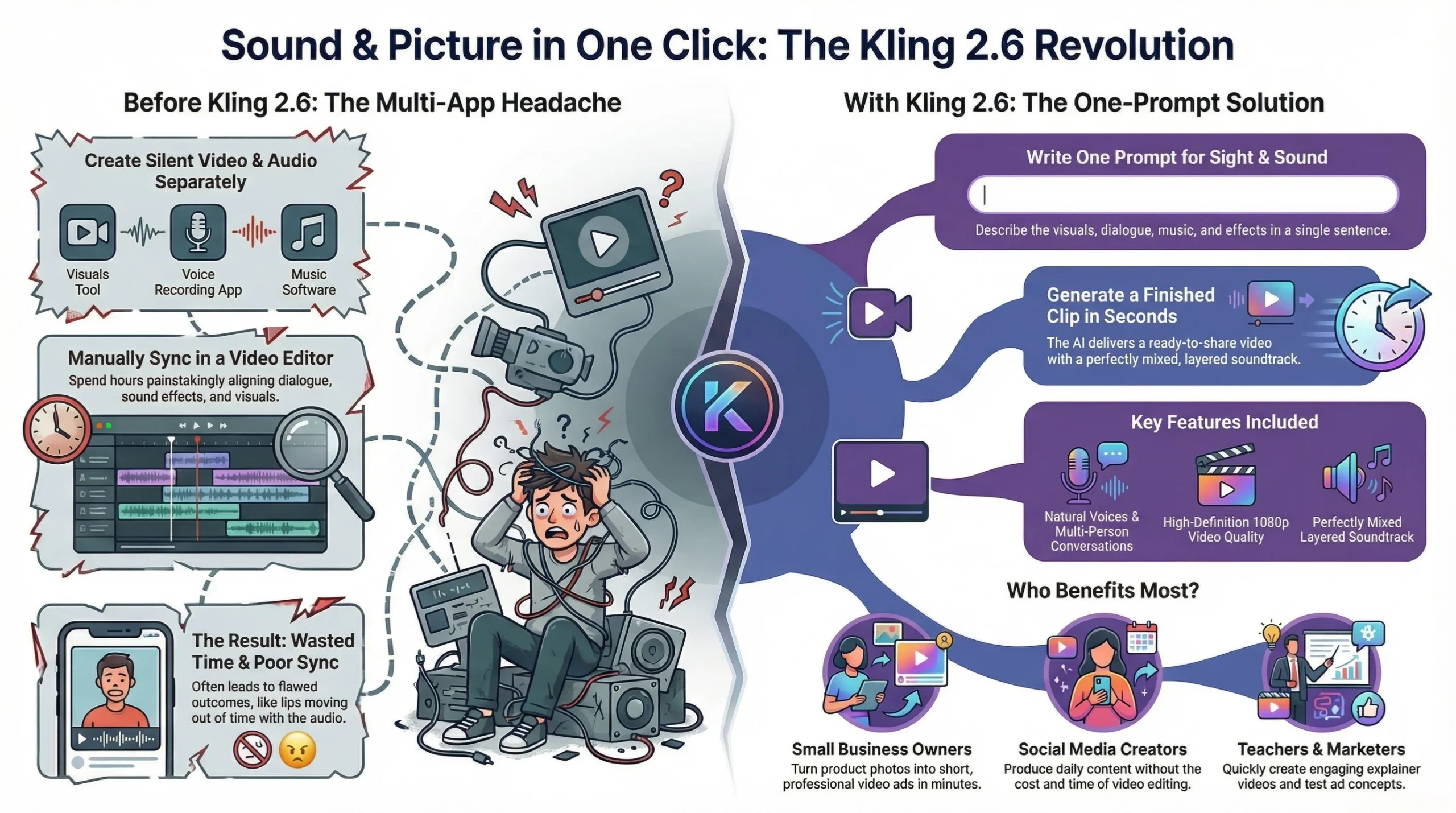
Last month she would have:
1. Generated a silent video in an AI tool.
2. Recorded her own voice on a phone.
3. Hunted for “free” background music.
4. Spent 45 minutes syncing everything in an editor.
5. Still ended up with a clip where her lips moved half a second too late.
This week she opened Kling 2.6, typed:
“A cozy kitchen, warm golden light, a woman in an apron smiles and says, ‘This cake melts hearts,’ while soft jazz plays and the oven timer dings.”
She clicked “Create.”
Ten seconds later she had a 1080p video: the woman’s lips matched the words, the jazz sat perfectly under the voice, and the ding hit right when the cake tray slid out. No timeline, no extra apps, no stress.
That tiny moment is the big promise of Kling 2.6 AI Video: picture and sound born together, like a baby who already knows how to sing.
What Exactly Is Kling 2.6?
Kling 2.6 is the newest version of Kuaishou’s AI video maker.
Earlier versions gave beautiful but mute clips.
Version 2.6 adds native audio—voices, music, sound effects—in the same breath as the visuals.
You can start with:
- Words only (text-to-video)
- One photo plus words (image-to-video)
The model thinks in both sight and sound, so footsteps echo when shoes hit the floor, rain falls louder under umbrellas, and singers breathe between notes.
The Five Magic Tricks
1. One Prompt, One Finished Clip
Type what you want. Press enter. Wait ten seconds. Get a mini-movie ready for TikTok, Reels, or ads.
2. Real Human Voices
The model speaks English and Chinese with natural tone, pitch, and emotion. It can whisper, shout, rap, or sing—whatever the story needs.
3. Layered Soundtrack
Background music, ambient noise, and special effects are mixed automatically. If a character slams a door, the bang lands exactly on the visual.
4. Multi-Person Conversations
Two or three characters can chat in the same scene, each with a different voice. Great for skits, interviews, or product demos.
5. High-Definition Look
Clips come out at 1080p, smooth motion, cinematic framing. Faces stay consistent, objects don’t wobble, and the camera feels alive.
Who Will Love It?
- Small Business Owners – Turn product photos into short ads with voice-over in minutes.
- Social Media Creators – Drop daily stories without hiring editors.
- Teachers – Make quick explainers that speak to students.
- Marketers – Test ad concepts before booking real actors.
- Hobbyists – Finally give life to the stories in their heads.
Real-Life Mini Wins
1. The Coffee Roaster
Liam runs a micro-roastery. He uploaded a photo of his latest beans and typed:
“Close-up of coffee beans tumbling, a warm voice says, ‘Ethiopian sunrise in every cup,’ gentle acoustic guitar, steam hisses.”
He posted the clip on Instagram Stories. Orders jumped 30 % that weekend.
2. The Language Tutor
Priya teaches Spanish online. She made 20 vocabulary clips in one afternoon: each word appears on screen while a friendly voice pronounces it twice, with a tiny bell between examples. Students watch them on the train and arrive to class already practicing.
3. The Indie Band
Three friends needed a lyric video. They fed the first verse into Kling 2.6, chose a dreamy city-night style, and got a 10-second teaser with the lead singer’s AI voice crooning under neon lights. Fans begged for the full song.
How to Try It Yourself
Step 1: Open the Door
Go to the official Kling 2.6 page or open the app inside Kuaishou.
Step 2: Choose Your Starter
- Text – just write.
- Image – upload one photo, then add a short description.
Step 3: Write the Scene
Use plain English. Mention:
- What is happening
- Who is speaking and how they feel
- Background sounds or music
Example:
“A sunny park, a little girl laughs while chasing bubbles, upbeat ukulele, birds chirp softly.”
Step 4: Hit Create
Wait about ten seconds. The clip appears.
Step 5: Download or Share
Save to your phone or post straight to social media. Done.
VIDEO 2.6 Features and Use Cases
VIDEO 2.6 significantly expands the creative boundaries of AI video, supporting precise generation and control of human voices (speaking, dialogue, narration, singing, rap) and environmental & effect sounds (ambient sound effects, composite scene sounds). With its native audio capability, you can easily achieve the following advanced creative scenarios:
1. Solo Monologue
- Product Display
- Lifestyle Vlogs
- News Broadcasts
2. Narration
- Product Demonstrations/Explanations
- Sports Commentary
- Documentaries
3. Multi Character Dialogue
- Interview Programs
- Dramatic Performances (Short Plays)
- Everyday Conversations
4. Music Performances
- Singing
- Rap
- Multi-Character Choirs
5. Creative Scenes
- Creative Scenes
- ASMR
- Creative Ads/Materials
Tips for Better Results
- Keep it short – 5 to 10 seconds looks sharpest.
- Name the mood – words like “cozy,” “dramatic,” or “playful” guide the music.
- Add one sound cue – a doorbell, camera click, or soft rain makes the scene feel real.
- Test voices – try “cheerful woman,” “calm man,” or “robotic narrator” to see what fits.
- Chain clips – make several 10-second pieces and stitch them in any free phone editor for longer stories.
The Limits
- Voice realism – great for short lines; long monologues can sound slightly robotic.
- Length cap – 10 seconds per clip.
- Languages – English and Chinese for now.
- Custom music – you can’t upload your own track yet.
- Fine editing – no frame-by-frame tweaks; if you need pixel-perfect cuts, export to another tool.
The Big Picture
Kling 2.6 is not just a new feature; it is a mindset shift.
Before: AI gave us beautiful but silent puppets.
After: the puppets speak, sing, and laugh on their own.
That means faster stories, lower costs, and more room for creativity.
You no longer need a studio, a sound booth, or a weekend to sync audio. You need an idea and a sentence.
Your Turn
Imagine your next post, ad, or lesson.
Write one sentence that describes what you see and hear.
Feed it to Kling 2.6.
Watch your story come alive with sound.
Press play on stories that already sound complete.
Read more articles

AI Email Writing Prompts: Get 10x More Replies Fast!
The AI Email Engine: How to Write Emails That Actually Get Replies Email is the…
AI Course Writing Prompts: 4 Steps to build 10x Your Empire Overnight!
AI Course Writing Prompts: How to Turn Your Brain into a Business Overnight We are…

AI Content Writing Prompts: 7 Steps to Multiply 10x Faster
AI Content Writing Prompts: How to Publish Like a Media Empire (Solo) AI Content Writing…
Higgsfield Cinema Studio 2.0: Are You Directing AI Movies?
Are You Still Making Basic AI Videos? How Higgsfield Cinema Studio 2.0 Builds Real Hollywood…
AI Book Writing Prompts: 4 Steps to a Best-Seller (2026)
AI Book Writing Prompts: Can You Write a Best-Seller in a Weekend? AI Book Writing…

AI Blog Writing Prompts: 7 Steps to Viral Content (2026)
The Ultimate AI Blog Writing Workflow: Are You Using the Right Prompts? AI Blog Writing…



Leave a Reply