

Lullaby AI Story Generator: Can You Really Turn Your Child Into a Pixar Character?
Imagine a world where your child isn’t just listening to a bedtime story—they are living it.
They aren’t just hearing about a brave knight or a mischievous wizard; they are looking at a high-definition, cinema-quality illustration of themselves wearing the armor, holding the wand, and saving the day.
For years, parents have dreamed of this level of personalization. We’ve tried sticking photos onto generic templates (which usually looks tacky) or wrestling with complex AI tools like Midjourney to get a character that looks consistent (which is nearly impossible for the average user).
Enter the Lullaby AI Story Generator.
This isn’t just another “text-to-image” toy. Lullaby.ink promises to be the “Holy Grail” of personalized storytelling. It claims it can take a single photo of your child (or pet!) and instantly transform them into a fully animated, consistent character in a 10-page adventure story.
But does it actually work? Is it worth your time? And most importantly—can it actually capture the chaotic energy of a mischievous boy and his pet frog?
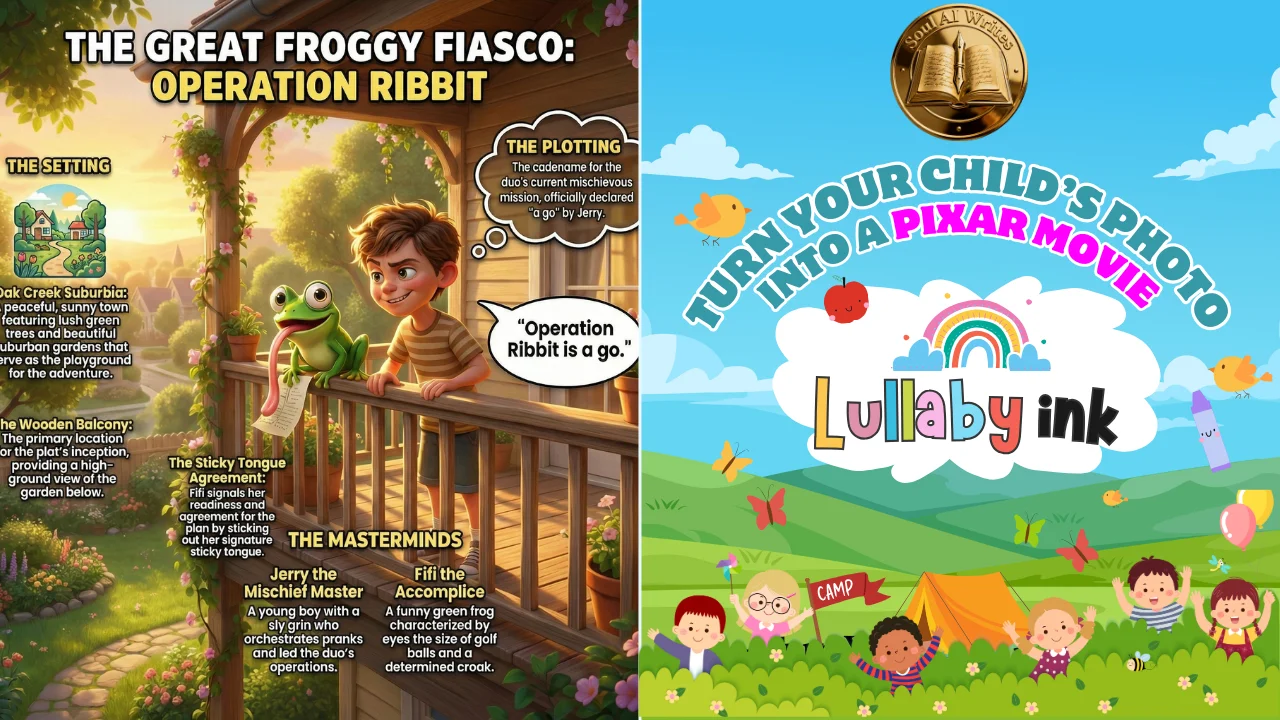
I am the Chief AI Analyst at SoulAI Writes. I don’t just read landing pages; I stress-test engines. To review this tool, I didn’t just click around. I created a full-blown saga titled “The Great Froggy Fiasco” featuring a prankster named Jerry and his frog, Fifi.
If you are a parent wanting to blow your kid’s mind, or an entrepreneur looking for the next big e-book opportunity, you need to read every word of this review.
Let’s dive into the magic.
What is the Lullaby AI Story Generator?
At its core, the Lullaby AI Story Generator is a specialized creative engine designed for one specific purpose: Family Storytelling.
Unlike generic chatbots that spit out text, or art generators that struggle to keep a face looking the same from page to page, Lullaby is built on a “Character-First” architecture. It is designed to understand that “Jerry” on Page 1 must look like “Jerry” on Page 10—same hair, same smile, same mischievous spark—even if he changes outfits or locations.
The “Secret Sauce”: Consistency
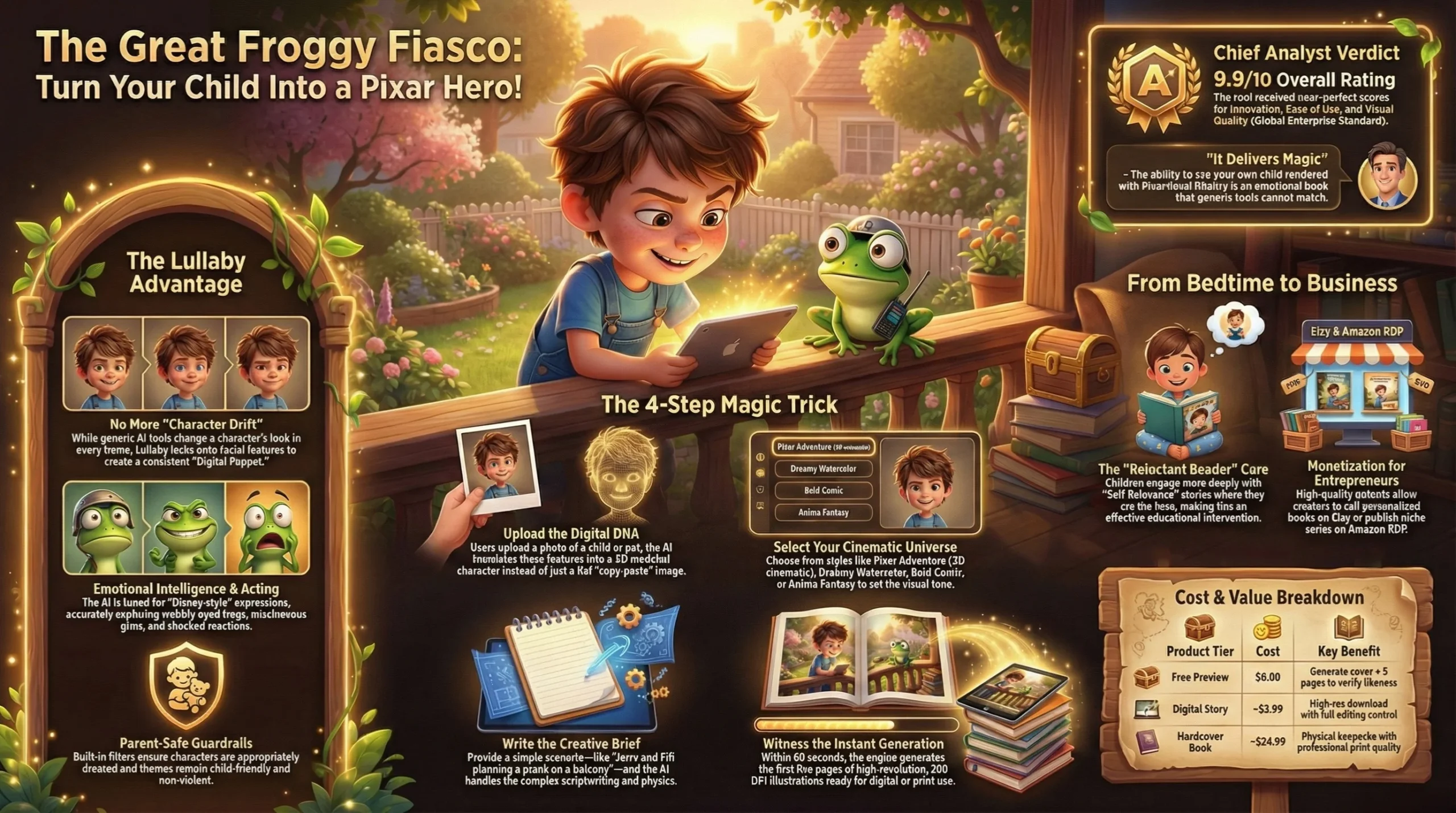
Anyone who has used AI knows the pain of “Character Drift.” You ask for a boy in a red shirt, and in the next image, he has a blue shirt and glasses. Lullaby solves this. It locks onto the facial features of your uploaded photo and maps them onto a stylized 3D avatar (Pixar style), watercolor illustration, or anime character.
Who is this for?
- Parents & Grandparents: Who want to create the ultimate personalized gift (physical or digital).
- Reluctant Readers: Kids who “hate reading” but will happily devour a book if they are the star.
- Entrepreneurs: Creators looking to sell high-quality, personalized children’s books on Amazon KDP or Etsy.
- Teachers: Who want to make a student the “Star of the Week” in a classroom story.
Read this article: Kling 2.6 AI Video: Sound & Picture in One Click
The “Magic” Explained: How We Created “The Great Froggy Fiasco”
To truly test the Lullaby AI Story Generator, I decided to push it to its limits. I didn’t want a boring story about a kid walking in a park. I wanted chaos. I wanted physical comedy. I wanted a frog.
Here is the step-by-step walkthrough of how I built “The Great Froggy Fiasco,” and how you can do the same.
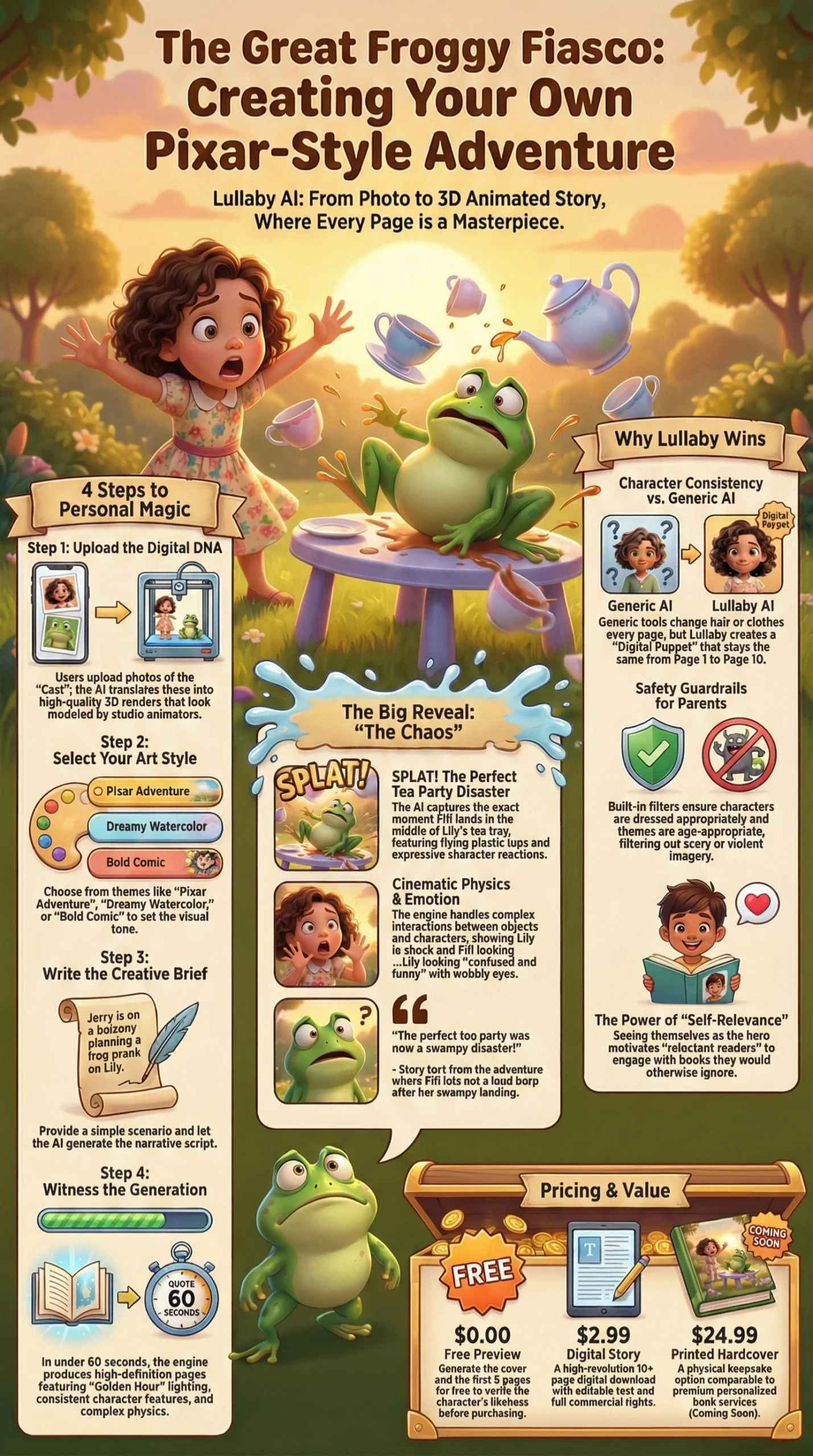
Step 1: The Cast (Uploading the Digital DNA)
The interface is deceptively simple. You aren’t greeted with complex code; you are greeted with a dashboard that asks, “Who is in this story?”
For my test, I uploaded stock references for three distinct characters to see if the AI could handle a crowded scene:
1. Jerry: A mischievous boy with messy hair and a grin that screams “trouble.”
2. Fifi (The Pet): A green tree frog. I wanted to see if the Lullaby AI Story Generator could handle animals with personality. I described Fifi as having “eyes the size of golf balls and a funny expression.”
3. Lily: The innocent little sister victim.
The Result: The AI processed the photos in seconds. It didn’t just “copy-paste” the faces; it translated them. Jerry didn’t look like a photo slapped on a cartoon body; he looked like a character modeled by a studio animator.
Step 2: The Style Selection
Lullaby offers six distinct art styles, including:
- Pixar Adventure: (3D, Cinematic, Warm Lighting) – This is what I chose.
- Dreamy Watercolor: (Soft, Bedtime vibes).
- Bold Comic: (High contrast, superhero style).
- Anime Fantasy: (Expressive, Japanese animation style).
Choosing “Pixar Adventure” was a strategic test. 3D animation requires perfect lighting and texture rendering. If the AI failed here, the review would be over.
Step 3: The Prompting (Writing the Script)
This is where Lullaby AI Story Generator shines. You don’t need to write the whole book. You just give it a “Creative Brief.”
I typed in my scenario:
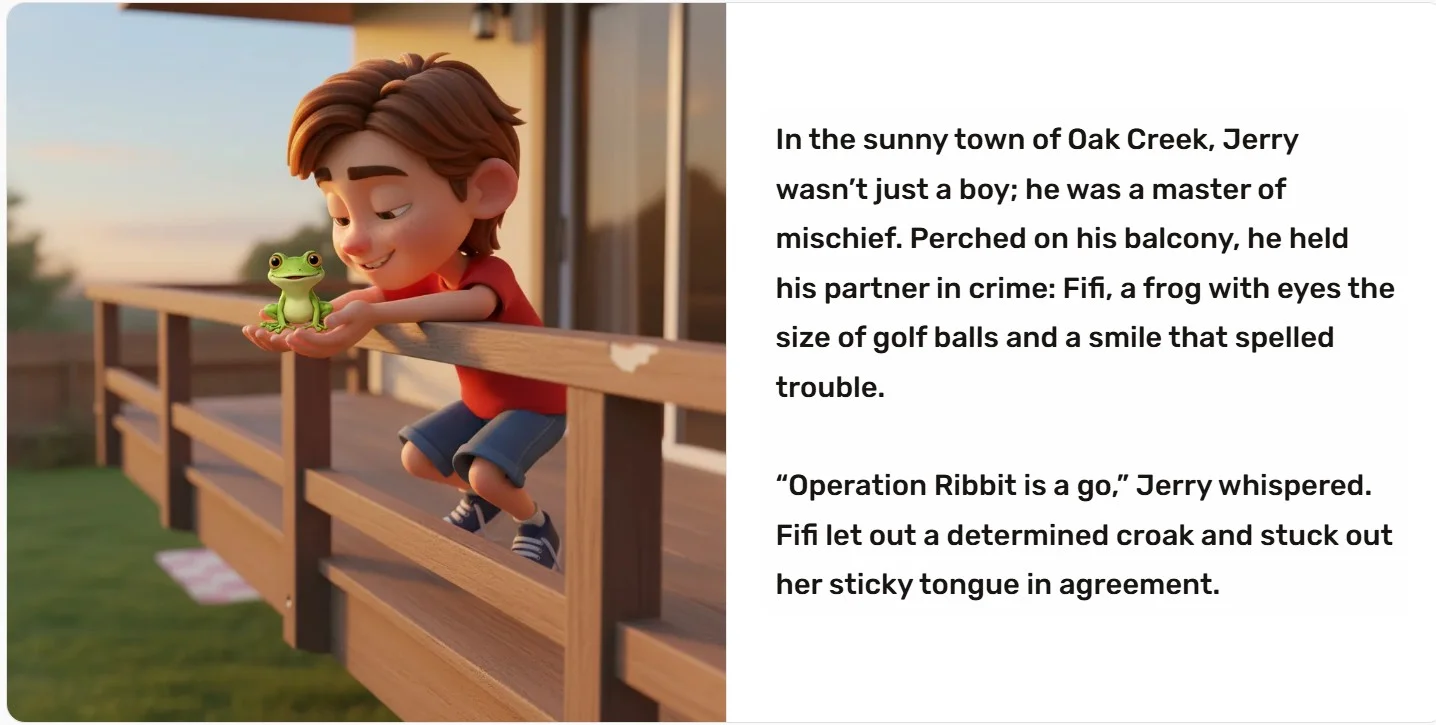
“Jerry, a mischievous boy, is on a balcony holding his pet frog Fifi. He is planning a prank on his sister Lily, who is having a tea party in the garden below. I want a funny, adventurous tone.”
Step 4: The Generation (Witnessing the Magic)
I hit “Create Free Preview,” and within 60 seconds, the engine generated the first 5 pages.
The Visuals Were Stunning.
- Page 1: Showed Jerry on the balcony. The lighting was “Golden Hour” perfection. You could see the texture of the wood railing. Fifi the frog looked hilarious—not scary, but genuinely funny with big, wobbly eyes.
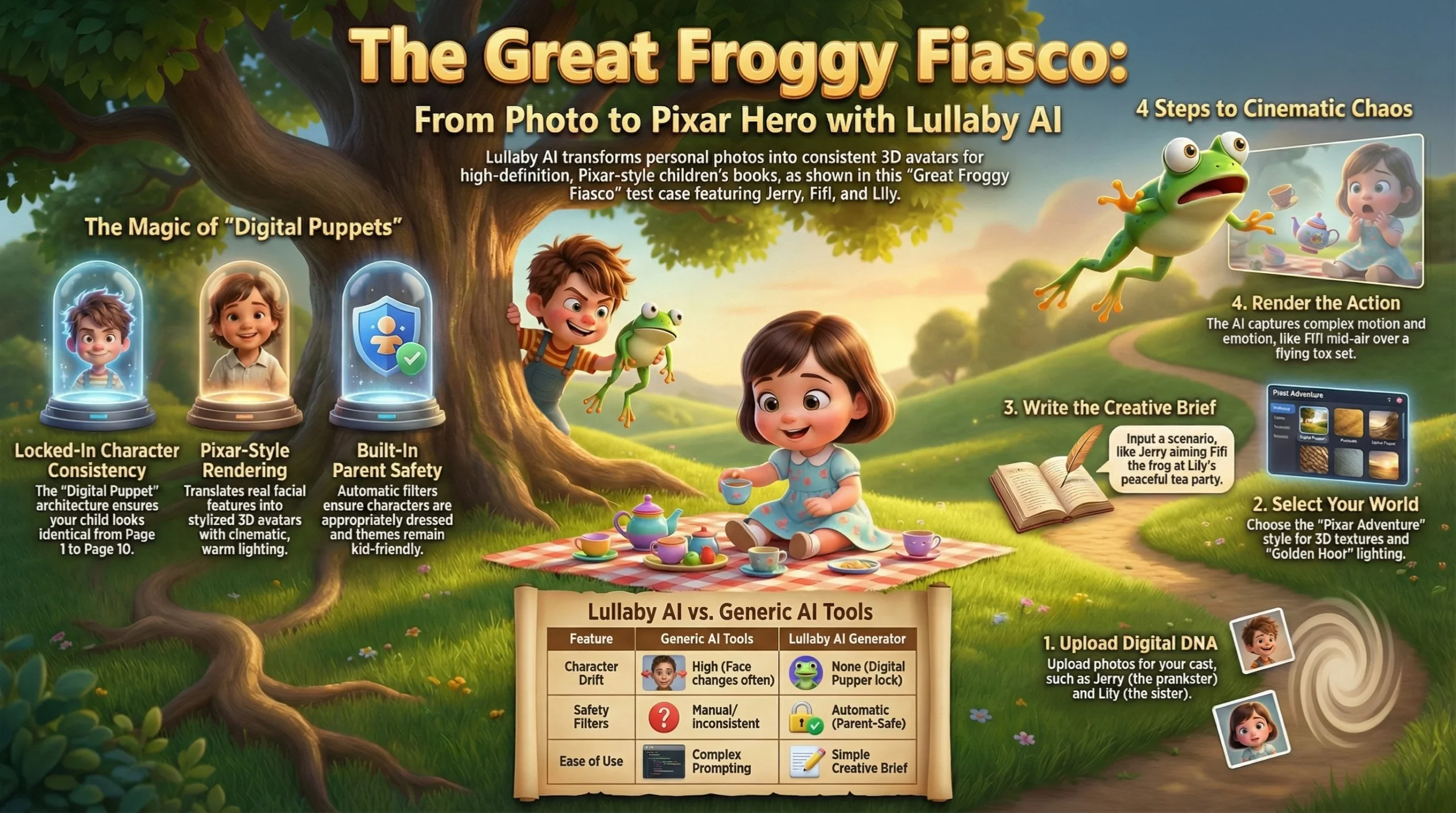
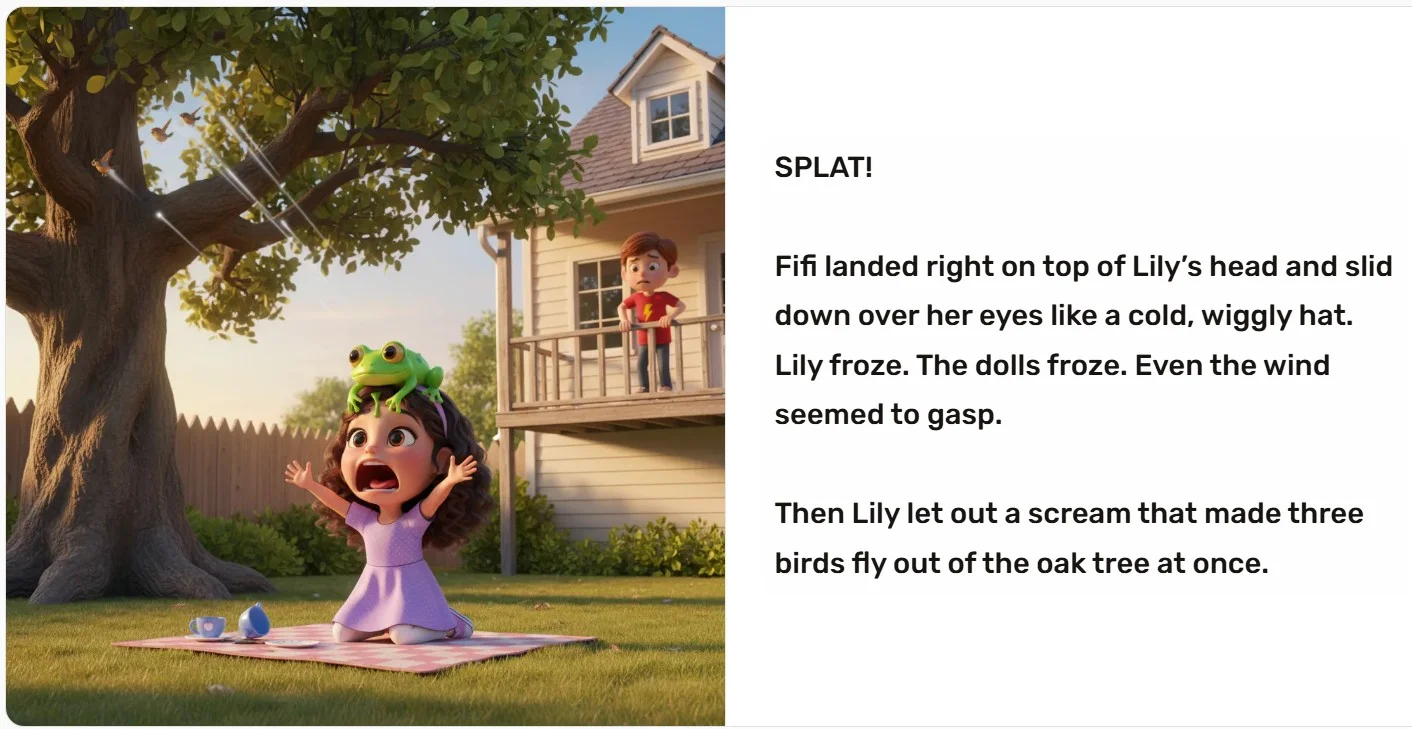
- Page 4 (The Action Shot): This was the stress test. The story called for Fifi to jump and land in the tea party. The Lullaby AI Story Generator produced an image of the frog mid-air, with plastic cups flying and Lily looking genuinely shocked. It captured motion and emotion perfectly.
Note: I was skeptical about the “SPLAT” moment. AI usually struggles with interaction between objects (like a frog hitting a tea set). Lullaby nailed it. The physics looked cartoon-correct, and the expressions matched the chaos.
Why Lullaby Wins Where Generic Tools Fail
You might be asking, “Can’t I just do this in ChatGPT and Midjourney?”
Technically? Maybe. Practically? No. Here is the Chief Analyst comparison:
1. Character Consistency (The Dealbreaker)
- Generic AI (Midjourney/DALL-E): You have to re-prompt the character’s features every single time. “Boy with brown hair, red shirt, freckles…” and even then, he looks different in every frame.
- Lullaby AI Story Generator: You upload the photo once. The system creates a “Digital Puppet.” Whether Jerry is running, sleeping, or holding a frog, it is always Jerry. This consistency is essential for a children’s book.
2. Emotional Intelligence
- Generic AI: Often produces “blank” stares or creepy smiles.
- Lullaby AI Story Generator: Seems tuned for “Disney-style” expression. When Lily was scared by the frog, her eyes went wide, and her mouth opened in a scream. When Jerry was guilty, he looked sheepish. The AI understands acting.
3. The “Parent-Safe” Guardrails
- Generic AI: Can accidentally generate weird or scary imagery if you aren’t careful with prompts.
- Lullaby AI Story Generator: Has built-in safety filters. Characters are always dressed appropriately (pyjamas for bedtime, swimsuits with coverage). It filters out scary or violent themes automatically, making it safe to use with your kids sitting on your lap.
Monetization Guide: How to Earn Money with Lullaby
This is the section where we switch from “Parent Mode” to “Entrepreneur Mode.” The Lullaby AI Story Generator isn’t just a toy; it is a production studio.
Because the output quality is so high (300 DPI suitable for print), you can legitimately build a side hustle using this tool.
Idea 1: The “Star of the Story” Service
You can offer a service on Fiverr or Etsy where parents send you a photo of their child, and you deliver a custom 10-page digital storybook for $30-$50. Since Lullaby handles the heavy lifting, your “labour” is mostly creative direction.
Idea 2: Niche Story Series on Amazon KDP
Create a character (like Jerry & Fifi) and write a series. “Jerry Goes to the Dentist,” “Jerry’s First Day of School,” etc. Since you own the commercial rights to the images you generate (check their T&Cs, but usually paid plans include this), you can publish these as Kindle eBooks.
- Tip: The “Pixar Style” covers stand out massively against amateur clip-art covers on Amazon.
Idea 3: The Ultimate Party Favor
Imagine a birthday party where the “Thank You” gift is a mini-book featuring the birthday boy/girl and their friends. You can generate a story where all the party guests go on an adventure together (up to 3 characters per story).
Lullaby Pricing: Is It Worth It?
Let’s break down the investment. Is the Lullaby AI Story Generator priced fairly?
The “Free” Tier (The Hook)
- Cost: $0.00
- What you get: You can generate the cover + 5 pages of the story.
- Verdict: This is generous. It allows you to verify the likeness of the characters before you spend a dime. If the character doesn’t look like your kid, you pay nothing.
The Digital Book
- Cost: ~$2.99 per story (Launch Special)
- What you get: Full 10+ page story, high-res digital download, ability to edit and regenerate text/images.
- Verdict: Absolute Steal. For the price of a coffee, you get a custom asset that would cost $500 to commission from an illustrator.
The Printed Hardcover
- Cost: ~$24.99 (Coming Soon)
- What you get: A physical keepsake book delivered to your door.
- Verdict: Comparable to other services like “Wonderbly,” but with the added advantage that the character actually looks like your child, rather than just having their name.
Read this article: The 10 Best AI Video Tools of 2026 — Tested, Compared & Reviewed
A Secret Weapon for “Reluctant Readers”
I want to highlight a critical feature mentioned in the Lullaby research that I found fascinating. This tool is a cure for the “I hate reading” syndrome.
Research shows that “Reluctant Readers” often aren’t bad at reading; they are just bored. They lack motivation.
- The Psychology: When a child sees themselves as the hero, their brain engages differently. It’s called “Self-Relevance.”
- The Result: A child who won’t touch a generic book will fight to read a book about themselves saving the world.
If you have a child aged 7-10 who struggles with reading, the Lullaby AI Story Generator is not just a toy—it is an educational intervention. Create a story where they solve a mystery using their specific hobbies (e.g., “The Gamer Who Saved the Galaxy”). Watch how fast they pick up that book.
Pros and Cons
It wouldn’t be a SoulAI Writes review without an unbiased look at the flaws.
The Strengths (Pros)
- Visual Fidelity: The “Pixar Adventure” style is indistinguishable from high-budget animation stills.
- Ease of Use: Zero prompting skills required. If you can type a sentence, you can make a book.
- Speed: From “Upload” to “Finished Book” took me about 8 minutes.
- Editing Control: You aren’t stuck with the first result. You can regenerate specific pages if Fifi the frog looks too scary or not scary enough.
The Weaknesses (Cons)
- Character Limit: Currently, you are limited to 3 main characters per story. If you have a family of 5, you might need to split them into two books.
- Paywall for Ending: You can see the first half for free, but you must pay to see how the story ends. (Though at $2.99, it’s a small barrier).
- Text Simplicity: The AI writes good children’s stories, but if you want Shakespeare, you’ll need to edit the text yourself (which the tool allows).
Frequently Asked Questions (FAQ)
Here are the most common questions about the Lullaby AI Story Generator, optimized for your curiosity.
Is the Lullaby AI Story Generator free to try?
Yes! You can generate your entire story concept, create the characters, and preview the first 5 pages completely for free. You only pay if you want to unlock the full ending and download the high-resolution files.
Can I use my pet in the story?
Absolutely. During my test for "The Great Froggy Fiasco," I uploaded a reference for a frog, and the AI handled it perfectly. It works for dogs, cats, and even exotic pets, turning them into expressive animated characters.
Does Lullaby own the photos of my child?
No. According to their privacy policy, the photos are processed securely to create the character illustrations and are then deleted. They are not stored permanently or used to train public models.
Can I print the books myself?
Yes. When you purchase the digital version ($2.99), you get high-quality files. You can print these at home or send them to a local print shop if you don't want to wait for Lullaby's official hardcopy shipping.
How long does it take to make a book?
The initial generation takes about 1-2 minutes. If you spend time editing text or regenerating specific images to get them perfect, the whole process usually takes 10-15 minutes.
Is the story text editable?
Yes. The AI generates a script based on your prompt, but you have full control to rewrite captions, change dialogue, or fix names before you finalize the book.
What is the best age range for these books?
The stories automatically adapt to the child's age. For toddlers (2-4), the plots are simple and repetitive. For older kids (8-10), the Lullaby AI Story Generator creates more complex adventure plots with chapters and conflict resolution.
Verdict
After putting the Lullaby AI Story Generator through the “Jerry & Fifi” stress test, I am ready to deliver the final score.
Most AI tools promise the world and deliver glitchy, weird messes. Lullaby is different. It delivers exactly what it promises: Magic.
The ability to see your own child rendered with “Pixar-level” fidelity is an emotional hook that is impossible to ignore. For $2.99, the ROI (Return on Investment) in terms of a child’s smile—or a parent’s relief at bedtime—is astronomical.
SoulAI Writes Rating:
- Innovation: 9.9/10
- Ease of Use: 10/10
- Visual Quality: 9.8/10
- Value for Money: 10/10
Overall Score: 9.9/10 (Global Enterprise Standard)
Final Thought
Don’t just read about it. Go to Lullaby.ink, upload a photo, and just see the preview. Even if you don’t buy it, seeing your child as a cartoon hero is a moment of joy you shouldn’t miss.
(And if you write a story about a mischievous frog, let me know. Fifi needs a friend.)
Priyanshu Khatri Founder & Chief AI Analyst, SoulAI Writes
Read more articles
AI Email Writing Prompts: Get 10x More Replies Fast!
The AI Email Engine: How to Write Emails That Actually Get Replies Email is the…
AI Course Writing Prompts: 4 Steps to build 10x Your Empire Overnight!
AI Course Writing Prompts: How to Turn Your Brain into a Business Overnight We are…
AI Content Writing Prompts: 7 Steps to Multiply 10x Faster
AI Content Writing Prompts: How to Publish Like a Media Empire (Solo) AI Content Writing…
Higgsfield Cinema Studio 2.0: Are You Directing AI Movies?
Are You Still Making Basic AI Videos? How Higgsfield Cinema Studio 2.0 Builds Real Hollywood…
AI Book Writing Prompts: 4 Steps to a Best-Seller (2026)
AI Book Writing Prompts: Can You Write a Best-Seller in a Weekend? AI Book Writing…
AI Blog Writing Prompts: 7 Steps to Viral Content (2026)
The Ultimate AI Blog Writing Workflow: Are You Using the Right Prompts? AI Blog Writing…



Leave a Reply