


How Does Claude AI Video Editing Turn Raw AI Clips Into a Pro Reel?
What if I told you that Claude AI is fully capable of editing your videos like a professional studio editor? I tested that idea on a real client reel with a tight deadline, and the result changed the way I work. Let me walk you through the exact workflow, step by step, so you save your energy, your time and your money on every reel you make.
Claude AI Video Editing is the workflow I used to turn a folder of raw AI clips, one voiceover and a handful of sound effects into a polished 74 second promo reel for a luxury hotel client. Most creators still treat AI video as a lottery. They type a prompt, download a clip, drop a song on top and hope the result looks professional.
However, a client reel needs far more than a pretty clip. The presenter’s lips must match the voice, every caption must light up on the exact word, the logo must sit in the right corner and the loudness must suit Instagram. As a result, the real job is editing, and that is where Claude changed my process.
In this guide, I am sharing the complete, tested workflow behind my RAMADA Hotels & Suites reel for Kota, Mukundra Hills. I planned it, generated it, lip synced it and finished it with Claude as my editor. Moreover, I am showing you every tool, every setting, every mistake and every fix, in the exact order I followed.
You will see how Google Flow created a consistent AI presenter, how ElevenLabs gave her a Hinglish voice, how Whisper produced word perfect captions and how Claude built the motion graphics, colour grade and sound design frame by frame. Therefore, by the end, you will hold a repeatable system for Claude AI Video Editing that you are able to use for your own brand or your clients.
What Is Claude AI Video Editing, and What Did We Make?
Claude AI Video Editing means you hand Claude your footage, your timing and a written brief, and Claude builds the edit with real code. It writes Python and FFmpeg scripts, analyses every frame, places graphics on exact word timings and renders a finished MP4 back to your computer. In fact, Claude measures instead of guessing, and it checks its output against your original edit before delivery.
The reference project was a 9:16 vertical promo at 1080 × 1920 and 29.97 fps. It runs 74.4 seconds and measures minus 14.6 LUFS, which suits Instagram, Facebook and YouTube Shorts. Additionally, every line carries supporting graphics: a hook title, a logo reveal, lower thirds, count up price cards, a FREE stamp and an end card with the call to action.

Note: I delivered this reel without background music on purpose, because the client wanted to choose the music separately.
Every Tool Behind This Claude AI Workflow
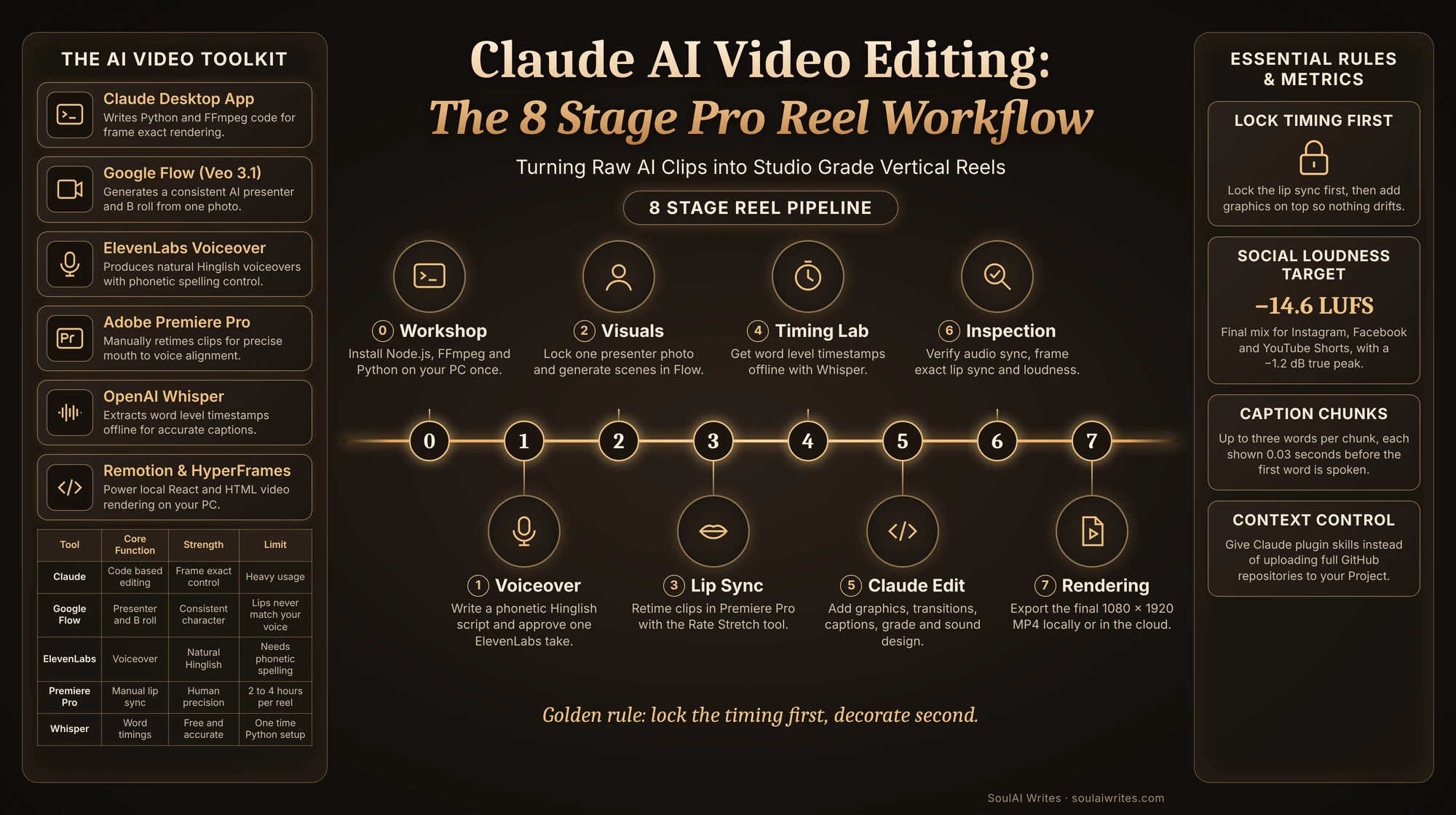
Here is the full toolkit, limited to the tools I used for this reel. The desktop app of Claude acted as the planner and editor. Google Flow generated the presenter and the B roll. Similarly, ElevenLabs produced the voice. Adobe Premiere Pro handled the lip sync. Meanwhile, Whisper, FFmpeg, Python, Node.js, Remotion and HyperFrames ran in the background as free, open source engines.
| Tool | What it does | Standout Features | Strength / Weakness | Best For | Target Audience |
|---|---|---|---|---|---|
| Claude (desktop app) | Plans, edits, renders, verifies | Reads your folders, writes and runs Python and FFmpeg | Strength: frame exact control. Weakness: heavy usage | Full edits with graphics and sound | Creators, Agencies, Digital Marketers |
| Google Flow (Veo 3.1 Fast) | Presenter clips and B roll | Ingredients mode keeps one presenter identical | Strength: consistent character. Weakness: lips never match your voice | Walkthroughs, aerials, interiors | YouTubers, Real Estate Marketers |
| ElevenLabs | Voiceover | Multilingual voices, Stability and Style controls | Strength: natural Hinglish. Weakness: brand names need phonetic spelling | Ads and regional reels | Marketers, Educators |
| Adobe Premiere Pro | Manual lip sync | Razor and Rate Stretch tools | Strength: human precision. Weakness: two to four hours per reel | Matching mouths to a voice | Video Editors, Professionals |
| Whisper (faster-whisper) | Word level timings | Offline and free | Strength: accurate captions. Weakness: one time Python setup | Captions that never lag | Creators, Podcasters |
| Remotion and HyperFrames | Local video engines | React or HTML compositions | Strength: reusable templates. Weakness: technical setup | Batches of similar reels | Agencies, Power Creators |
Stage 0: The Workshop (Claude AI Video Editing Setup on Your Windows PC)
You do this once, and it takes about 45 minutes. Open PowerShell from the Start menu and paste each line. Windows uses a built in installer called winget.
- Create a folder in Documents called Videos Claude with Assets (LUTs, Lottie, Fonts), References, Exports and Whisper inside.
- Install Node.js and FFmpeg with
winget install OpenJS.NodeJS.LTS; winget install Gyan.FFmpeg, then open a fresh PowerShell window and check them withnode -v; ffmpeg -version. HyperFrames needs Node.js 22 or newer. - Install Python 3.12 with
winget install -e --id Python.Python.3.12, or let the Whisper installer do it later. - Create the starter projects with
npx.cmd --yes create-video@latest --yes --blank remotion-videoandnpx.cmd --yes hyperframes@latest init hyperframes-video --example blank --non-interactive --skip-skills.
Pro Tip: Use npx.cmd instead of npx, because PowerShell blocks the plain script on many machines. Moreover, “Error creating git repository” is harmless, and you should never run npm audit fix --force, because it breaks the project.
Why You Should Never Upload GitHub Repositories Into a Claude Project
GitHub is where developers publish code, and a repository is one project’s folder of code. My first attempt was to add Remotion’s GitHub files to a Claude Project as knowledge. A handful of folders filled 70% of the context window. Consequently, every message used more of my plan allowance.
In fact, a full repository is source code for the tool’s own developers, not a guide for making videos. Instead, install the tool on your PC and give Claude its skills, which load only when a task needs them. Keep Project knowledge for short notes such as brand rules and pronunciation.
Why this works: Skills load on demand, while knowledge files sit in every chat and eat your context.
Read this article: Higgsfield Cinema Studio 2.0: Are You Directing AI Movies?
How to Set Up Claude for Video Editing (App, Folders, Plugins and Connectors)
The desktop app matters because video work needs your files and a browser. First, link the chat to your computer and add only the folders a reel needs, such as Downloads and your Videos Claude folder. Claude works on copies and writes finished files back, so your originals stay untouched. Next, create one Claude Project per client. Mine was “RAMADA PROJECT”, and it held the standing rules for that brand.
After that, add the Remotion plugin from the Customize menu under Plugins. HyperFrames was not in the directory yet, so I asked Claude to package the official HyperFrames skills as a plugin, and I added it with one click. Additionally, connect ElevenLabs under Settings, Connectors, and allow the built in browser for Google Flow. You sign in yourself, and Claude never types your passwords.
The Secret: Write your standing rules once inside the Project: 9:16 at 1080p, Veo 3.1 Fast only, never edit my originals, show preview frames first, logo top right only and never change the voiceover speed.
How Does Claude Handle an 8 Stage Video Workflow?
Think of the project as an assembly line. Each stage hands a finished piece to the next one, and if a later stage looks wrong, you return to the stage that made that piece. The stages run in this order: setup, script and voice, visuals, lip sync, word timings, the Claude edit, quality checks, and optional music. You write, approve and lip sync. Claude drafts, builds every effect and verifies the result.
The Golden Rule: Lock the timing first, decorate second. Once I froze the lip sync in Premiere Pro, every effect Claude added sat on top of the existing frames, so the lip sync stayed intact.
Stage 1: The Voice Room (Script and ElevenLabs Voiceover)
I wrote the script in Hinglish like a mini sales pitch: a hook question, the brand and location, the facilities, the investment numbers, a bonus offer, urgency and the call to action. It ran about 1,150 characters, which produced roughly 72 seconds of speech.
However, AI voices often mispronounce brand names and mixed numbers. Therefore, I fixed pronunciation inside the text itself. I wrote रमाडा in Devanagari so the voice would not say “रामदा”, wrote the price as साढ़े अट्ठावन लाख and spelled the phone number digit by digit. I used one ElevenLabs voice, “Monika Sogam, Deep and Clear”, generated two to three takes and approved one by ear.
Note: I once sped the voice up to fit the timing, and the client rejected it because it sounded rushed. Now Claude trims long pauses to about 0.3 to 0.4 seconds and never changes the speed.
Stage 2: The Casting Studio (A Consistent AI Presenter in Google Flow)
I opened Flow inside Claude’s built in browser, created a project called “RAMADA Walkthrough Videos” and uploaded one sharp, front facing presenter photo as an ingredient. The settings were Video, Ingredients, 9:16, Veo 3.1 Fast and two outputs per prompt, so I always had a second take.
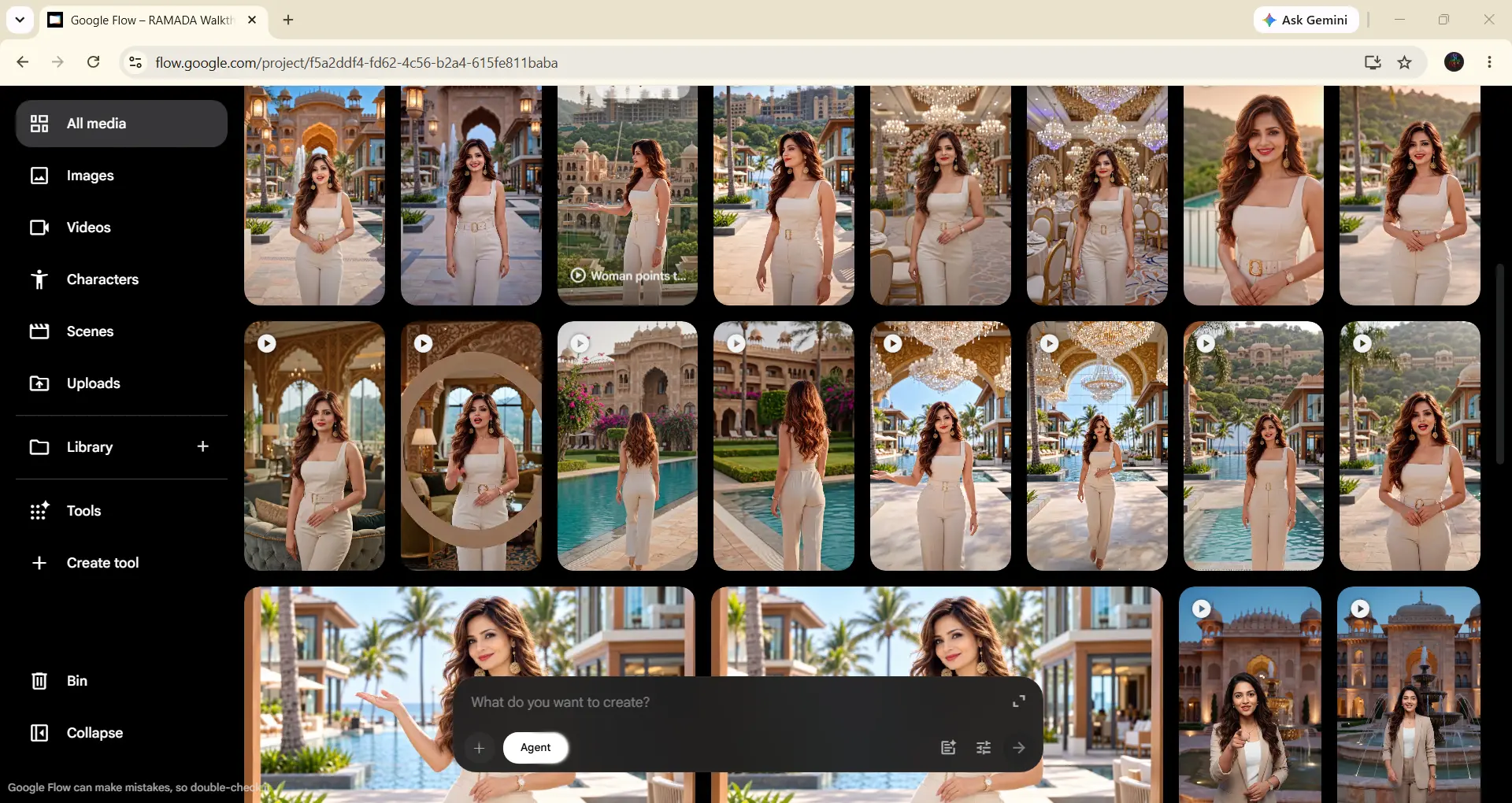
Every prompt had two parts. For example, the common block stayed identical in every shot and described her face, wavy brown hair, cream jumpsuit, gold earrings and red lipstick, ending with “Do not change her face, hair, outfit or jewellery. No subtitles, no on screen text, no logos.” The scene block changed per shot with the setting, camera move, action and her Hindi line. I planned eight scenes, from an infinity pool hook at sunset to a blue hour entrance for the call to action.
Pro Tip: Upscale every clip to 1080p before download, one clip at a time. According to the Google Flow credits help page, 1080p upscaling costs zero credits on paid plans, Veo 3.1 Fast costs 20 credits per video and Quality costs 100. The same page lists Veo 3.1 Fast and Quality for retirement on December 5, 2026, so check which model Flow offers when you start.
Stage 3: The Human Touch (Manual Lip Sync in Premiere Pro)
Veo makes the presenter’s mouth move. However, she speaks Veo’s own words in Veo’s own rhythm. Consequently, this stage turns “AI video with a voiceover” into “she is speaking your words”. It costs nothing extra, though you need two to four hours for a 70 second reel.
- Create a 1080 × 1920 sequence at 29.97 fps and place the voiceover on track A1.
- Cut the voice at every sentence with the Razor tool and mute the AI audio in each Flow clip.
- Place the take whose mouth best fits each sentence above that line, and watch the lips at 50% speed.
- Retime with the Rate Stretch tool in Premiere Pro, usually between 85% and 115%, until the mouth opens on the first syllable and closes on the last.
- Cut away to B roll wherever the mouth refuses to match, such as the phone number, then export one stitched H.264 video.
When you hand the file to Claude, say clearly: “Do not edit or alter the lip synced clips or the voiceover alignment.” Claude then treats your timing as locked.
Stage 4: The Timing Lab (Perfectly Synced Captions With Whisper and Claude)
Captions lag when their timings are guessed. For example, in an earlier reel, Claude estimated word timings from the shape of the audio, and that method drifted by up to 1.5 seconds. Therefore, I switched to OpenAI Whisper, through the faster-whisper version that runs offline and writes the start and end time of every spoken word.
Claude packaged the setup as double click .bat files in my Whisper folder. I ran the installer once, which downloaded the “small” model of about 480 MB, then dragged my stitched reel onto the word timings helper. Meanwhile, Claude matched Whisper’s Hindi letters against my Roman Hinglish captions and anchored every word after a pause to the exact moment the voice resumed.
Note: Do not feed Whisper your script as a hint. My first run did that, and Whisper squeezed the first 19 seconds into invented timings. The fixed helper runs without a prompt, and Claude maps the script afterwards.
Read this article: Claude Project: R8 Music Player Review: Did AI Build This Hi Fi App?
Stage 5: The Editing Bay (Claude AI Video Editing, Effect by Effect)
This is where Claude AI Video Editing shows its value. I gave Claude the stitched video, the word timings and a written brief. Its cut detection found 24 shots and a hidden 3 frame black gap at 5.3 seconds. Its loudness check measured my voice at minus 23.6 LUFS, far too quiet for social media. Additionally, it built contact sheets so we reviewed every shot at a glance.
Next, the grade used the Golden Light LUT at 50% strength with a touch of extra saturation, contrast and a soft vignette, because full strength looked overcooked on AI footage. Presenter shots received a slow push in from 100% to 103.5%, gentle enough to keep attention on the lips. B roll received push and pull zooms of 3% to 9% with a sideways drift for parallax. Speed ramps went on aerial B roll only, and the shot length never changed.
How Do Transitions Work Without Breaking the Lip Sync?
Normal transitions overlap two clips, which shifts timing. Instead, Claude built every transition as an in place effect over about 0.4 seconds around my existing cut. A punch zoom pushed up to 16% with blur and a light leak, paired with a cinematic whoosh. A whip slide used motion blur and a whoosh. A warm cream flash also hid that black gap. A golden light leak swept across with a soft whoosh.
The graphics fired on exact spoken words. The logo revealed on “RAMADA”, a location pill bounced in on “Kota” and lower thirds appeared on features such as “swimming pool”. Similarly, price cards counted up from zero, a FREE stamp slammed in with sparkles and the construction infographic showed a moving hazard stripe with no invented percentage.
What Makes the Animated Captions Feel Professional?
Claude set the captions in Poppins Bold at 74 px with a black outline, placed above Instagram’s buttons. Additionally, each chunk holds up to three words and breaks at punctuation or at any pause longer than 0.35 seconds. The active word sits in a red rounded box, unspoken words show at 60% opacity and keywords such as RAMADA, Lakh and FREE turn gold. Moreover, each chunk appears 0.03 seconds before its first word, so the caption is never late.
For sound, Claude raised the voice by 9.4 dB with a plain gain change, because dynamic processing shifts timing. It placed 37 sound effects at 16% to 32% volume under the voice and finished with a limiter. As a result, the final mix measured minus 14.6 LUFS with a true peak of minus 1.2 dB.
Stage 6: The Inspection Desk (Quality Checks and Export)
Before the final render, Claude produced 38 preview frames for my approval. After the render, it verified the work. It compared the final audio with my stitched voice at five points and found zero offset. It compared every talking shot with my original frame by frame and confirmed the lip sync stayed frame exact. Additionally, it checked caption timing, loudness and the final specs of 1080 × 1920, 29.97 fps and 2,229 frames.
In fact, these checks caught a real bug. A shot list mistake had applied the aerial speed ramp to two talking shots, and the frame comparison flagged it before delivery. Therefore, always ask Claude to verify the lip sync after rendering, not only before.
Pro Tip: The app link accepts about 30 MB per file, so Claude used a two pass H.264 encode at about 2,950 kbps to fit the reel within that size.
Is Claude AI Video Editing Free to Use?
The open source engines are free. Whisper, FFmpeg, Python, Node.js and HyperFrames cost nothing, and Remotion is free for individuals and companies with up to three people. However, the full workflow needs paid plans. On claude.com, verified in November 2026, Claude Free costs $0, Pro costs $20 per month or $17 per month billed annually, and Max starts at $100 per month. Video editing is usage heavy, and my first reel took about three long sessions.
Meanwhile, my batch of 24 Veo 3.1 Fast videos used about 480 of the 1,000 monthly Flow credits on Google AI Pro. ElevenLabs used about 1,150 credits per take, so three to five takes came to roughly 3,500 to 6,000 credits. Premiere Pro runs on your existing Adobe subscription.
The Secret: Approve every Flow prompt before you generate, fix pronunciation before every voice take and ask for preview frames before any full render.
Is It Safe to Use Claude for Client Video Work?
Yes, with sensible rules. Claude works on copies inside the folders you approve, and it never moves or edits your originals. You sign in to Google and ElevenLabs yourself, so Claude never handles your passwords. Additionally, I kept the client’s brand facts, pronunciation and logo rules inside the Project, which kept every revision consistent.
However, licensing still sits with you. Check every LUT pack, Lottie animation and music track for commercial terms, because some free packs allow personal use only. When I copy a reference video’s style, I copy the pacing and grade, never its footage or music. As a result, the final reel stays safe to deliver to a client.
Why Claude Wins Where Generic Tools Fail
Template editors give you fixed transitions and auto captions that guess word timings. Claude worked on my actual frames. It found a black gap I missed, cropped letterboxed aerials, and moved a call to action banner above the presenter’s face when it covered her. Most importantly, it proved its work with sync checks, frame comparisons and loudness numbers.
On the other hand, Claude does not replace human eyes. The lip sync stayed my job, because matching a mouth to a voice needs taste and patience. Claude AI is the editor and the quality inspector, and you remain the director.
Read this article: Lullaby AI Story Generator Review: Turn Kids into Pixar Heroes?
Stage 7: The Local Studio (Rendering With HyperFrames or Remotion)
My reference reel rendered in Claude’s cloud workspace. If you prefer rendering on your own machine, ask Claude to build the reel as a HyperFrames or Remotion project inside your Videos Claude folder. Claude writes the composition files and copies your assets in, and you run the preview and render commands in PowerShell.
Whichever engine renders, the process stays the same: lock the timing, get word timings, write the brief, approve preview frames, render and verify. The engine is only the printer.
Monetization Guide: How to Earn With Claude AI Video Editing Skills
This workflow is a sellable service, because hotels, resorts and real estate developers need vertical promos every month.
Idea 1: Property Walkthrough Reels. Offer hotels and real estate projects a monthly reel package, and reuse the same presenter and B roll to lower your credit cost.
Idea 2: Regional Language Promos. Sell Hindi, Hinglish or Punjabi ads, where Devanagari pronunciation and Whisper captions give you an edge.
Idea 3: Template Batches for Agencies. Build one Remotion template and render batches of similar reels with new prices or offers.
My Honest Score Card
After building the full reel from setup to delivery, here is my honest score for this Claude AI workflow.
| Criterion | Score |
|---|---|
| Innovation | 9.5/10 |
| Ease of Use | 7.5/10 |
| Output Quality | 9.4/10 |
| Control and Accuracy | 9.6/10 |
| Value for Money | 8.8/10 |
| Overall Score | 9.0/10 |
Ease of Use scores lowest because the one time setup and the manual lip sync demand patience from non technical creators. Similarly, Value for Money loses points because video work uses a large share of Claude usage limits. Everything else, from the frame exact checks to the word perfect captions, earned its score.
Frequently Asked Questions
Here are the most common questions about Claude AI Video Editing, answered from my own reel build and testing.
Does Claude edit videos by itself?
Claude edits videos through code rather than a traditional timeline. In the desktop app, it reads your clips from approved folders, writes Python and FFmpeg scripts, adds graphics, captions, transitions and sound effects, renders an MP4 and saves it back to your PC. However, Claude does not generate the footage or the voice. For my reel, Google Flow created the presenter, ElevenLabs created the voice and I handled the lip sync in Premiere Pro. Claude then acted as the editor and quality inspector, verifying audio sync, frame exact lip sync, caption timing and loudness before delivery.
Which Claude plan is best for AI video editing?
A paid plan is the practical minimum, because video editing uses far more of your allowance than chat. As verified on claude.com in November 2026, Pro costs $20 per month or $17 per month billed annually, and Max starts at $100 per month with five times the Pro usage. My first reel took about three long sessions, and one session used roughly 92% of a usage window. If you plan to edit reels every week for clients, Max gives you far more room. If you edit one or two reels a month, Pro is a sensible starting point.
How do I make AI presenter lips match my own voiceover?
Generate the presenter in Google Flow, then match the mouth by hand in Premiere Pro. Cut your voiceover at every sentence, mute the AI audio in each clip, place the take whose mouth movement fits best above each line and retime it with the Rate Stretch tool, usually between 85% and 115%. Where the mouth refuses to match, such as on long numbers, cut away to B roll. Plan two to four hours for a 70 second reel. Afterwards, tell Claude not to alter the lip synced clips, so every effect lands on top of your locked timing.
How do I add word by word animated captions to Instagram Reels with Claude?
Run Whisper on your PC to get the exact start and end time of every spoken word, then give that timing file to Claude with your caption style. Claude groups the words into short chunks, highlights the active word, colours your keywords and places the captions above the Instagram buttons. In my reel, captions used Poppins Bold at 74 px, up to three words per chunk, with each chunk appearing 0.03 seconds before its first word. Avoid giving Whisper your script as a hint, because it invents timings when you do.
What is the difference between Remotion, HyperFrames and Claude’s cloud pipeline?
All three render video, but each suits a different job. Remotion builds every frame as a React web page and suits reusable templates and batches, and it is free for individuals and companies with up to three people. HyperFrames, from HeyGen under the Apache 2.0 licence, turns ordinary HTML and CSS into frame perfect MP4 files and ships with hundreds of ready made blocks for fast iteration. Claude's cloud pipeline, which I used for this reel, runs Python and FFmpeg in Claude's workspace and gives frame exact control over an existing lip synced edit with no load on your PC.
Your Next Reel Starts With One Brief
Great reels come from a clear system, not from luck. Lock your timing, give Claude real word timings and a written brief, and let it build and verify every effect while you stay the director. Start small. Pick one product, one presenter photo and one 30 second script, then follow the stages in order.
Moreover, save your standing rules in a Claude Project so every new reel starts faster than the last. Experiment with LUTs, caption styles and transitions until the look feels like your brand. Once the workflow clicks, you will deliver client ready reels in days instead of weeks, and you will save your time and money on every single video you publish.
Priyanshu Khatri Founder & Chief AI Analyst, SoulAI Writes
Read more articles
Claude AI Video Editing: Is This the Smartest Reel Workflow?

Claude Project – R8 Music Player Review: Did AI Build This Hi Fi App?
Is R8 Music Player the Ad Free Hi Fi Android App Your Phone Has Been…
25 Best AI Prompts for Professionals! Save Hours of Work!
The AI Professional Suite: How to Build a C-Suite Team for $0 In the professional…
Best AI Productivity Prompts: 14 Hacks to Work 10x Faster!
The AI Productivity Suite: How to Do a Week’s Work in One Afternoon We all…
Best AI Social Media Prompts: 36 Ways to Go Viral Fast!
The Ultimate AI Social Media Manager: How to Run a Media Empire Solo There is…
Best AI On-Page SEO Prompts: 3 Ways to Rank Higher!
The AI Page Perfector: How to Make Google Fall in Love With Your Content Most…









Leave a Reply