



Are You Only Chatting With Claude AI When It Is Ready to Run Your Entire Workflow?
What if I told you that the chat box you open every morning is only the front door to a full digital office? It is true, because the same Claude AI window now plans research, builds slide decks, remembers your rules and runs tasks while your laptop sleeps. Let me walk you through every desk inside that office, step by step, so you save your energy, your time and your money on every project you hand to it.
Claude AI is the assistant built by Anthropic, and in November 2026 it looks nothing like the simple chatbot many people tried a year ago. Most beginners still type one question, copy the answer and close the tab. As a result, they miss Projects, Memory, Skills, Connectors, Research, Artifacts and Scheduled Tasks, the exact features that turn Claude into a working partner.
I run my entire SoulAI Writes article workflow inside a Claude Project, and this guide is the playbook I wish I had on day one.
This is Part 1 of a two part series. Here you learn every function and every important setting, from the first message to full automation, in plain language with examples you will recognise, like comparing the new iPhone 18 Pro or planning a festive sale campaign. Part 2 covers the four models, Opus 5.5, Fable 5.1, Sonnet 5.5 and Haiku 5.5, with their strengths, token costs and best projects. Every price and plan detail below was verified on 9 November 2026 against official Anthropic pages.
What Is Claude AI and Why Does It Feel Different in 2026?
Claude is a family of large language models and an app that runs on the web, the desktop and your phone at claude.ai. The biggest change this year is simple. According to the Claude Help Center, Anthropic merged the old Chat and Cowork modes into one conversation, so you no longer choose a mode before you start.
You describe the outcome, and Claude decides whether to answer, search the web, read your files, run code or build a finished document. Moreover, longer tasks keep running in the cloud after you close the page.
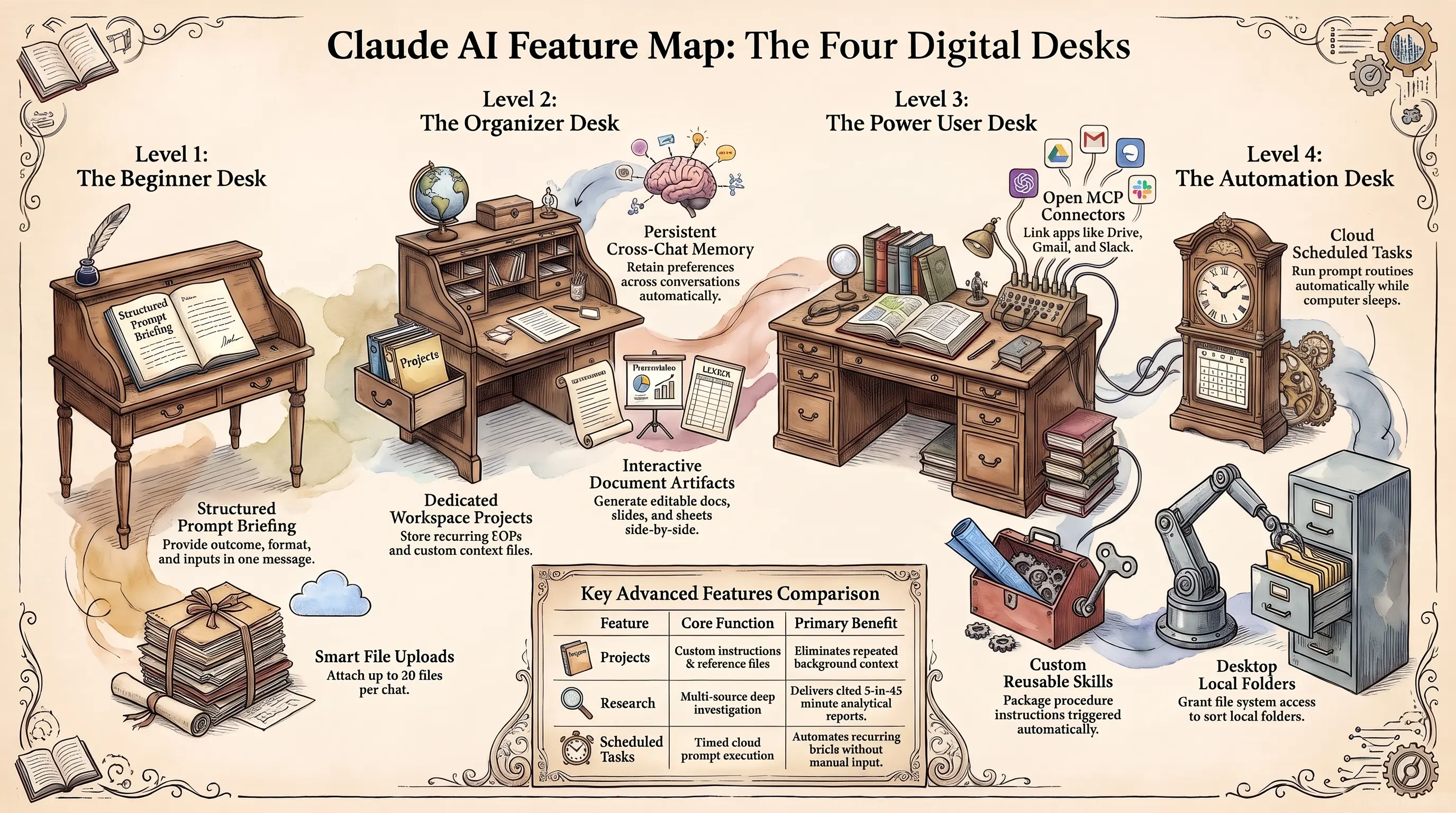
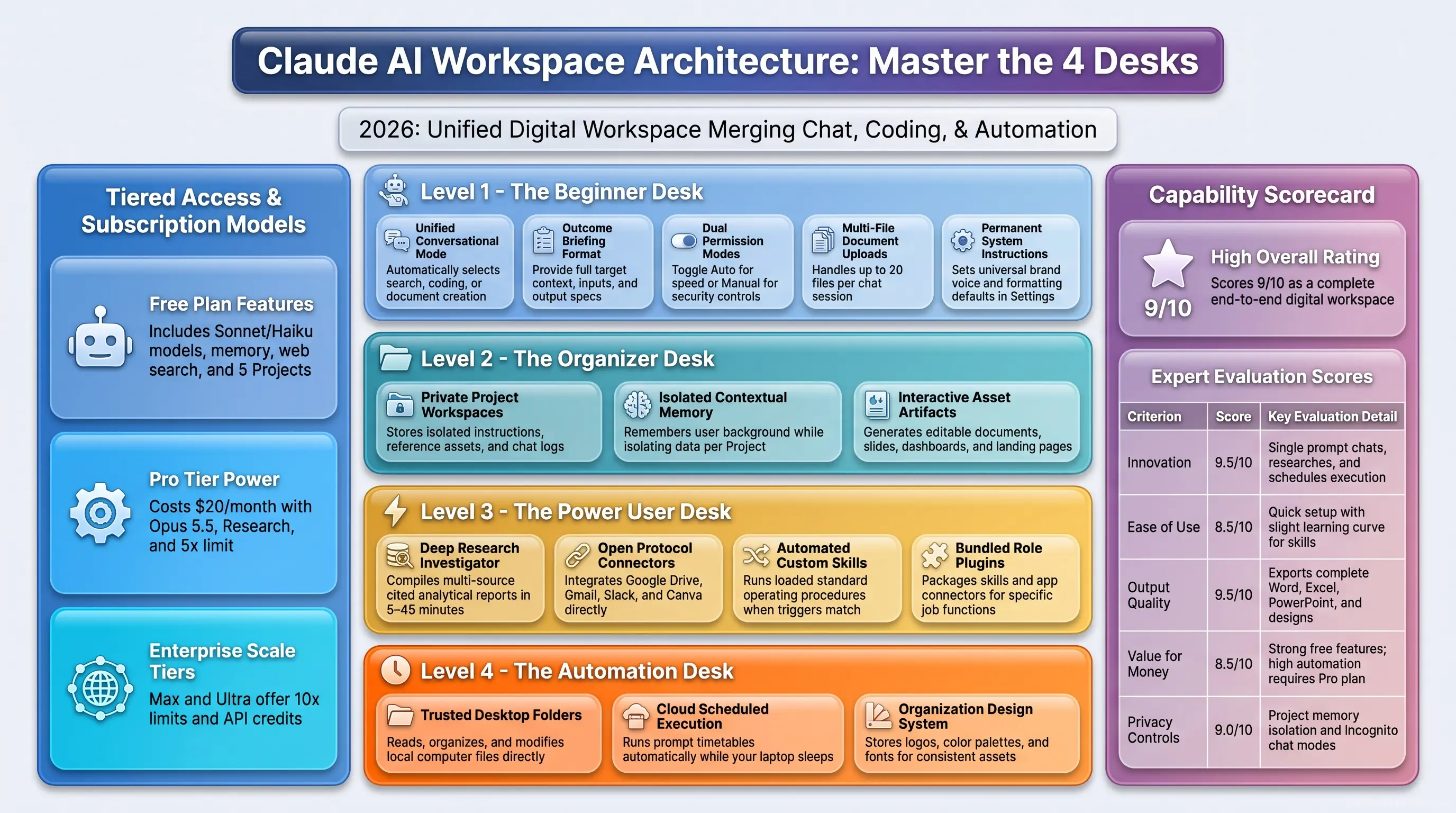
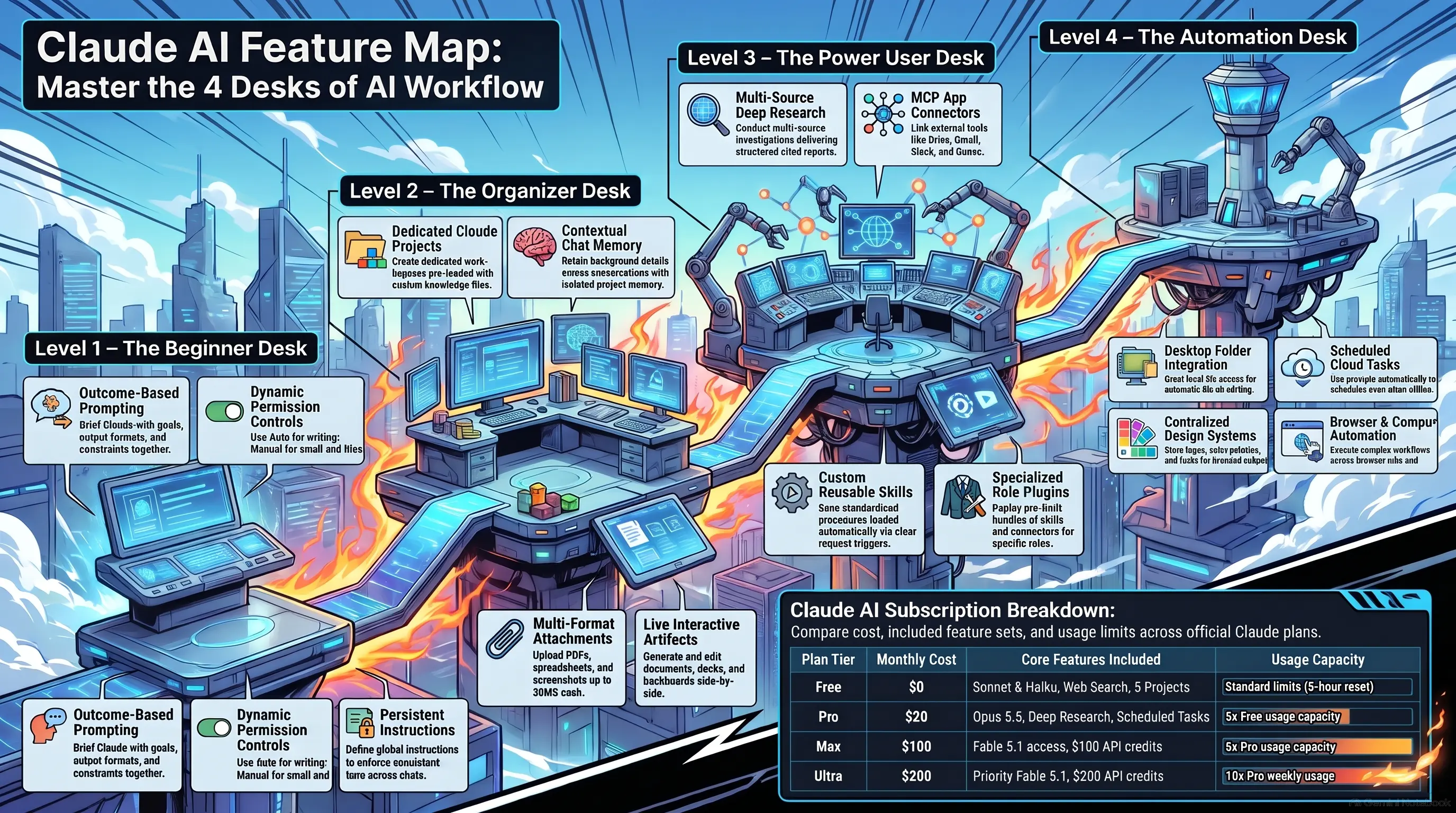
Think of the app as an office with four desks. The Beginner Desk covers chatting, attachments and settings. The Organizer Desk covers Projects, Memory and Artifacts. The Power User Desk covers Research, Connectors, Skills and Plugins. Finally, the Automation Desk covers folders on your computer, Scheduled Tasks, the Design System and the browser.
You do not need every desk on day one. However, knowing each desk exists changes the way you ask, because you stop asking for answers and start asking for outcomes.
Is Claude AI Free to Use? The Plans in Plain Language
Yes, there is a free plan, and it is generous for daily questions. Based on the official Claude pricing page, checked on 9 November 2026, the Free plan includes the Sonnet and Haiku models, web search, file uploads, memory, voice and up to five Projects.
Pro costs $20 a month, or $17 a month billed yearly, and adds Opus 5.5, unlimited Projects, Research, Claude Code, Claude in Chrome and scheduled tasks, with at least five times the Free usage in every five hour window.
Above Pro, Max costs $100 a month for five times the Pro usage, and Ultra, formerly called Max 20x, costs $200 a month for ten times the Pro weekly usage. Both include Fable 5.1 for up to half of the weekly limit, plus monthly API credits of $100 and $200.
Meanwhile, Team seats start at $25 a month, and Enterprise is priced per seat plus usage. Prices exclude tax, and app store prices in India differ.
Note: Every action counts toward your limits. A long research or file building task uses far more than a quick question, so watch Settings > Usage during your first week.
Level 1: The Beginner Desk
Your First Conversation: How Do You Use Claude Properly?
Open Claude, sign in with Google or your email, and you land on one message box. Below it sits the model picker and a + button for files, Research, Connectors and Skills. Instead of a short question, brief Claude the way you brief a colleague, with the outcome, the format and the inputs.
For example, “Compare the iPhone 18 Pro and the iPhone 17 Pro for a vlogger. Give me a one page table with price in India, camera, battery and my final pick.”
You also see a permission setting. Auto lets Claude work without asking about each step, while Manual asks before every action. Keep Auto for research and writing, and switch to Manual when Claude touches email or important files.
Attachments: How Do You Upload or Add Files to Claude?
Click the + button or drag a file into the message box. Claude reads PDFs, Word files, spreadsheets, slides, screenshots and photos, with up to 20 files per chat and about 30 MB per file.
For example, drop a CSV export from your Instagram Insights and ask which Reels kept viewers the longest, or upload a whiteboard photo after a meeting and get clean notes. Therefore, always tell Claude what the file is and why you shared it.
Moreover, ask for a file back when you need one, because Claude now creates Word documents, Excel sheets with working formulas and PowerPoint decks.
Pro Tip: Files in a normal chat stay in that chat. If you will reuse a file next week, put it inside a Project instead.
The Settings You Should Change on Day One
Open Settings. Under Settings > Your Claude, fill Instructions for Claude, a box that applies to every conversation, for example “I run a digital marketing agency in Rajasthan. Explain technical topics in simple English. Prefer tables for comparisons.”
Next, open Settings > Memory and choose whether Claude should generate memory from chats and search and reference past chats. Then open Settings > Capabilities and switch on Code execution and file creation, because Skills and downloads depend on it.
Finally, check Settings > Usage. In my own account, the instructions box holds my brand voice, so every draft starts in the SoulAI Writes tone.
Level 2: The Organizer Desk
Claude Projects: Your Private Workspace for Repeat Work
A Project is a workspace with its own instructions, knowledge files and chat history, and every chat inside it inherits them. Free accounts get five Projects, and paid plans get unlimited Projects with a retrieval mode that expands capacity when files grow large.
My Project “Blog Posts for SoulAI Writes” holds my Final Master SOP as instructions and two published articles as references. Therefore, every new article starts in a fresh chat that already knows my voice, my banned words and my format, which also keeps usage low.
To create one, click Projects, choose New project, add instructions and upload files. On Team and Enterprise plans, you share a Project with colleagues.
Memory: How Does Claude Remember You?
Memory carries useful context from one chat to the next, so you stop explaining your job and your preferences. Switch it on in Settings > Memory with Generate memory from chats. According to Anthropic’s memory announcement, each Project keeps its own memory space, so client details never leak into personal chats.
You pause memory to stop new entries or reset it to delete everything. Moreover, the help center states that some data is never saved, including government ID numbers and financial account numbers. For a private talk, open an Incognito chat from the ghost icon, which skips history and memory entirely.
Artifacts: Docs, Slides, Designs, Dashboards and Motion
An Artifact is anything Claude makes that you would put in front of someone. It opens beside the chat, saves to the Artifacts tab, and you edit it directly or through Claude. According to the Claude Help Center, Docs, Slides and Design templates are available on all plans.
Docs export to Word, PDF and Google Docs, Slides export to PowerPoint and Google Slides, and Design covers posters and landing pages. Additionally, Dashboards sit in beta on Pro and above, and Motion sits in beta on Team and Enterprise.
In a Doc, highlight a paragraph and choose Edit with Claude to change only that part.
Read this article: Claude AI Video Editing: Is This the Smartest Reel Workflow?
Level 3: The Power User Desk
Research: How Does Claude AI Run Deep Research?
Research turns Claude into a systematic investigator. Type /deep-research or click the + button and choose Research. Claude splits your question into parts, searches many sources, cross checks them and returns a cited report.
Anthropic states most reports finish in five to 15 minutes, while complex ones take up to 45 minutes. Research needs Pro or higher.
Additionally, add constraints for focus, for example “Research the best laptops under ₹80,000 for video editing in India, launched in 2026, and exclude refurbished models.” However, your connected apps do not join a Research run, so research first and act with connectors next.
Connectors: How Do You Connect Claude to Gmail, Drive and Your Apps?
Connectors link Claude to Google Drive, Gmail, Calendar, Slack, Notion, Canva, WordPress and many more, through the open Model Context Protocol. Go to Customize > Connectors, pick an app and sign in to approve access.
Next, ask naturally, for example “Find last month’s client invoices in my Drive and list the unpaid ones.” I keep Google Drive, Gmail, Canva and WordPress connected, so a brief from Drive becomes a Canva draft in one conversation.
However, each connector widens what Claude reads and changes, so connect only what you trust. With more than ten apps, set Tool access to On demand to protect your context space.
Skills: Teach Claude Your Process Once
A Skill is a folder of instructions, and sometimes scripts, that teaches Claude how you like a task done. Claude loads it automatically when a request matches its description, which is why the built in PowerPoint Skill fires when you ask for a deck.
According to the official Skills guide, you switch on Code execution and file creation first, then manage Skills under Customize > Skills. To build one, turn on the skill creator example and type “Help me build a skill that formats my YouTube descriptions with chapters and hashtags.”
The Secret: Write the description as a trigger, for example “Use when the user asks for a YouTube description.” A vague description means Claude never knows when to use it.
Plugins: A Ready Made Toolkit for Your Role
A Plugin bundles Skills, Connectors and sub agents into one package for a role such as sales, finance, legal, marketing or design. Plugins are available on all paid plans. Open Customize, go to the Plugins tab and click Browse plugins.
After installation, type a forward slash or click the + button to see the new Skills. My account runs a social media plugin and a WordPress developer plugin, so caption writing and plugin audits work from the same chat.
Note: Some plugins run local servers on your computer, so install them only from sources you trust.
Level 4: The Automation Desk
Add a Folder: Let Claude Work on Your Computer Files
In Claude Desktop for Windows and macOS, you give Claude access to a folder so it reads, organises and creates files there. Click the + button and choose Add folder, or set one in a Project’s settings. Additionally, approved folders appear under Trusted folders in Settings.
However, Claude reaches local files only while the desktop app is open, and by default it asks before permanently deleting anything. For example, point Claude at Downloads and ask it to sort files by type and month. Instead of opening your whole drive, connect one focused folder per task.
Scheduled Tasks: How Do You Make Claude Work While You Sleep?
A Scheduled Task runs a prompt on a timetable. Ask in plain words, for example “Every weekday at 8 AM, summarise new client emails and list the ones that need a reply today.”
According to the help center, scheduled tasks run in the cloud, so they keep going when your computer is off. However, a task that writes into a local folder needs the desktop app open.
Each run starts fresh with your connectors, Skills and Plugins, so write the prompt as a complete instruction. Scheduled tasks need Pro or higher, and you should test every prompt by hand before you schedule it.
Design System: Keep Every Design on Brand
Claude Design creates visuals, mockups and landing pages, and its Design System stores your logo, colours, fonts and components so every design starts on brand. It is in beta on Pro, Max, Team and Enterprise plans.
Open Claude Design, choose Set up design system and upload brand guidelines, a polished deck, website code or screenshots. Moreover, on Team and Enterprise plans, a published system applies to every new project automatically.
For example, a cafe owner uploads a logo and two menus, then asks for a Diwali offer poster and an Instagram post that share the same fonts and colours.
Browser, Computer Use and Mobile
Claude acts on live websites through the built in browser inside Claude Desktop or through Claude in Chrome, which uses your own Chrome sign ins. It opens pages, clicks and fills forms. Additionally, computer use, in beta on Pro, Max and Ultra, lets Claude operate desktop apps by clicking and typing.
These tools work only while Claude Desktop is open. On your phone, a task you start at your desk appears in the Claude mobile app, where you answer questions and redirect the work. Similarly, voice mode lets you talk through a video script hands free while you walk.
Read this article: Higgsfield Cinema Studio 2.0: Are You Directing AI Movies?
Claude AI Feature Breakdown Table
| Feature | What It Does | Standout Features | Strength / Weakness | Best For | Target Audience |
|---|---|---|---|---|---|
| Projects | Workspace with instructions, files and chats | Retrieval mode, team sharing | Strength: no repeated context. Weakness: five on Free | Repeat work | Bloggers, Agencies, Students |
| Memory | Carries context across chats | Separate memory per Project, Incognito | Strength: personal answers. Weakness: skips some sensitive data | Daily use | Professionals, Creators |
| Artifacts | Builds docs, decks, designs, dashboards | Direct editing, Word and PowerPoint export | Strength: finished files. Weakness: Motion only on Team and Enterprise | Reports, decks | Businessmen, Marketers, Teachers |
| Research | Multi source investigation | Cited reports in 5 to 45 minutes | Strength: depth. Weakness: no connectors during a run | Market research | Analysts, YouTubers, Founders |
| Connectors | Links Gmail, Drive, Slack, Canva | Open MCP standard | Strength: real data. Weakness: wider access needs care | Inbox and file tasks | Professionals, Teams |
| Skills | Saved procedures loaded automatically | Skill creator, SKILL.md | Strength: consistency. Weakness: needs code execution on | Repeat formats | Creators, Agencies |
| Plugins | Role bundles of Skills and Connectors | One install, custom uploads | Strength: fast setup. Weakness: paid plans only | Role workflows | Sales, Legal, Marketing Teams |
| Scheduled Tasks | Runs prompts on a timetable | Cloud runs while computer is off | Strength: automation. Weakness: local folders need the app open | Daily briefs | Founders, Managers |
| Design System | Stores brand colours and fonts | Organisation wide default | Strength: on brand output. Weakness: still in beta | Posters, landing pages | Designers, Small Businesses |
Free Download: Claude AI Digital Office Blueprint Slide Deck (PDF)
Want the whole map in one place? I turned this Claude AI tutorial into a 15 slide presentation, the Claude AI Digital Office Blueprint, which walks through every desk from your first chat to full automation.
It is a lightweight PDF of about 2 MB, so it opens quickly on your laptop or phone. Save it, share it with your team or keep it open beside Claude while you set up your own workspace.
Case Study: The SoulAI Writes Article Engine, Step by Step
Here is the exact workflow behind this series. I call it The SoulAI Writes Article Engine, and it runs on four desks at once.
- Project setup. One Project holds my Final Master SOP as instructions and two published articles as reference files.
- Memory. Memory keeps stable facts, such as my website, my link colours and my rule that every review follows hands on testing on a paid plan.
- Fresh chat per article. Each article starts in a new chat inside the Project, which keeps context clean and usage low.
- Research and verification. Claude checks official Anthropic pages for prices, plans and dates before writing a paragraph.
- Finished file. Claude returns the full package, from meta title to FAQs, as a PDF ready for my final edit in WordPress.
Why this works: Each desk does one job. The Project holds the rules, Memory holds the facts, Research holds the truth and the file holds the result.
Is Claude AI Safe to Use for Personal and Business Work?
Claude is designed with clear controls, but safety also depends on your settings. Auto mode runs automated safety checks before each action, Manual asks before every action, and Enterprise plans default to Manual. By default, Claude asks before permanently deleting files.
Moreover, Incognito chats stay out of history and memory. Your habits complete the picture, so stay close when Claude sends messages, install Plugins only from trusted sources and connect only the apps a task needs.
Note: Claude is not a lawyer, doctor or financial advisor, so verify those decisions with a qualified professional.
Why Claude AI Wins Where Generic Chatbots Fail
Generic chatbots answer a question and forget you. Claude keeps your rules in Projects, your context in Memory, your methods in Skills and your apps in Connectors, then delivers finished files instead of text you still need to format.
On the other hand, this depth comes with a learning curve, and the best automation sits on paid plans. Therefore, start small, master one desk each week and automate only after a prompt proves itself by hand.
Monetization Guide: How to Earn Money With Claude AI Skills
Idea 1: Done for You Decks and Reports. Small businesses need pitch decks, proposals and monthly reports. Use Research for facts, Slides for the deck and Docs for the report, then export and deliver.
Idea 2: Automation Setup for Local Businesses. Shop owners and coaches want a daily inbox summary or a weekly sales recap. Set up Connectors and Scheduled Tasks, document the workflow and charge a setup fee plus monthly support.
Idea 3: Content Systems for Creators. Build a Project and a Skill that turns one long video transcript into a description, chapters, Shorts scripts and a newsletter. As a result, the creator publishes more, and you earn a recurring retainer.
Read this article: Claude AI Video Editing: Is This the Smartest Reel Workflow?
My Honest Score Card
| Criterion | Score | Why |
|---|---|---|
| Innovation | 9.5/10 | One conversation that chats, researches, builds files and runs scheduled work |
| Ease of Use | 8.5/10 | Easy start, but Skills, Plugins and folders take time to learn |
| Output Quality | 9.5/10 | Finished Word, Excel, PowerPoint and design files, cited Research reports |
| Value for Money | 8.5/10 | Strong Free plan, but Research, Opus and automation need Pro or higher |
| Privacy Controls | 9/10 | Project memory, Incognito chats, Manual mode and delete confirmations |
| Overall Score | 9/10 | A complete AI workspace that rewards users who learn each desk |
Frequently Asked Questions About Claude AI
Here are clear answers to the questions readers ask most about Claude AI, its plans and its features.
Is Claude free, and what does the free plan include?
Yes. As of 9 November 2026, the Free plan costs nothing and includes the Sonnet 5.5 and Haiku 5.5 models, web search, file uploads, file creation, memory, voice mode and up to five Projects. It does not include Opus 5.5, Fable 5.1, Research, Claude Code, Claude in Chrome or past chat search. Usage resets every five hours and every week, so heavy users reach the limit quickly. If you keep waiting for resets, or you need Research and Scheduled Tasks for real work, Pro at $20 a month is the logical next step, and it also unlocks unlimited Projects.
What is the difference between Claude Projects, Memory and Skills?
Each feature solves a different problem. A Project is a workspace that holds instructions, reference files and related chats, so every chat inside it starts with the same background. Memory carries personal context across conversations, such as your role, your clients and your preferences, and each Project keeps its own separate memory. A Skill is a saved procedure, a step by step method for a task like formatting a report, and Claude loads it automatically whenever a request matches. Put simply, Projects hold your material, Memory holds your context and Skills hold your methods.
How do I connect Claude to Gmail or Google Drive?
Open Claude, click Customize in the left sidebar and choose Connectors. Find Gmail or Google Drive, click it and sign in with your Google account to approve access. Then ask naturally, for example "Summarise unread client emails from this week" or "Find the brand guidelines PDF in my Drive." Connectors run on the open Model Context Protocol, so many apps follow the same pattern. Approve only the apps you use, review anything Claude sends on your behalf, and remember that connectors are not available inside a Research run, so research first and act second.
Does Claude run tasks automatically on a schedule?
Yes. On Pro and higher plans, Claude runs Scheduled Tasks, prompts that fire on a timetable such as every weekday at 8 AM or every Monday morning. Ask in plain words, and Claude sets the time and the instruction. Scheduled tasks run in the cloud, so they continue when your computer is off, but any task that reads or writes a folder on your computer needs Claude Desktop open. Each run starts fresh with your connectors, Skills and Plugins, so write the prompt as a complete standalone instruction and test it by hand before you schedule it.
Is Claude AI better than ChatGPT for work in 2026?
The honest answer depends on your work. Claude stands out for long documents, careful writing, coding and agent style tasks that combine research, files and connected apps in one conversation, while Projects, Skills and Plugins keep repeat work consistent. ChatGPT has its own strengths, including a large ecosystem and different multimedia tools, and OpenAI released its GPT 6 Sol and Luna models in September 2026. The smart approach is to test both on your real tasks for a week, compare output quality and time saved, then keep the tool that fits your workflow. Many professionals keep both.
Your Office Is Open: Start With One Desk Today
You now hold the full map of the Claude AI office, from the first chat to tasks that run while you sleep. Start small this week. Write your instructions in Settings, create one Project for the work you repeat most, and turn one recurring chore into a Skill or a Scheduled Task.
Next week, connect one app and test Research on a decision you care about, perhaps your next phone or your next client pitch. In fact, the biggest gain comes from one change of habit, asking for outcomes instead of answers.
Get creative, build your own workflow, and let Claude carry the routine while you keep your time and your money for work that matters.
Priyanshu Khatri Founder & Chief AI Analyst, SoulAI Writes
Read more articles

Claude AI Models: Opus, Fable, Sonnet or Haiku, Which Wins?
Which Claude AI Models Should You Pick: Opus 5.5, Fable 5.1, Sonnet 5.5 or Haiku…

Claude AI Tutorial: Are You Using Every Feature Right?
Are You Only Chatting With Claude AI When It Is Ready to Run Your Entire…

Claude AI Video Editing: Is This the Smartest Reel Workflow?

Claude Project – R8 Music Player Review: Did AI Build This Hi Fi App?
Is R8 Music Player the Ad Free Hi Fi Android App Your Phone Has Been…

25 Best AI Prompts for Professionals! Save Hours of Work!
The AI Professional Suite: How to Build a C-Suite Team for $0 In the professional…

Best AI Productivity Prompts: 14 Hacks to Work 10x Faster!
The AI Productivity Suite: How to Do a Week’s Work in One Afternoon We all…









Leave a Reply