


What Is Gemini 4 Hydrogen, and Why Is Google Putting It Inside Every Search?
Last week, something changed inside the Google search box you use every day, and most people never noticed. No new button appeared. No pop up asked for permission.
Yet the AI that now answers your questions in AI Mode is a brand new model called Gemini 4 Hydrogen, and the same model also sits inside the Gemini app, Google Sheets and Google’s developer tools. The story of who built it, and why Google trusts it with your searches, takes five minutes. Stay with me, because by the end you will know exactly how to use it, step by step, and how to save your energy, your time and your money while you do it.
Gemini 4 Hydrogen is the newest member of Google’s Gemini 4 family, announced by Google DeepMind on 12 November 2026. Google describes it as a fast, efficient model built for everyday coding and agentic workflows, while Gemini 4 Carbon and Gemini 4 Argon handle deep, long horizon reasoning.
In this guide I answer the exact questions people type into Google: what Hydrogen is, whether it is free to use, how to use it, whether it is safe, and why it is a better choice than older Flash models for daily work. Every number below comes from Google or respected independent sources.
According to Google’s official launch announcement, the model is rolling out to all tiers of Google AI Studio, the Gemini API, Gemini for business, the Gemini app, Google Search and paid Google AI Pro and Ultra subscribers in Google Antigravity.
Hydrogen is the first Gemini 4 model that ordinary people use for free, and Ars Technica reports that it replaces Gemini 3.8 Flash across Google’s products. Moreover, it costs a fraction of the frontier models.
What Is Gemini 4 Hydrogen in Simple Words?
Think of the Gemini 4 family as one research engine sold in three sizes. Google’s model card states that Hydrogen is adapted from Gemini 4 Carbon, the strongest model in the family. In practice, it carries Carbon’s training into a smaller, faster model.
Hydrogen is natively multimodal, which means it reads text, images, audio, video and PDF files in the same conversation, and it answers in text. However, its knowledge cutoff is March 2026, so for anything newer it relies on Google Search grounding or the files you give it.
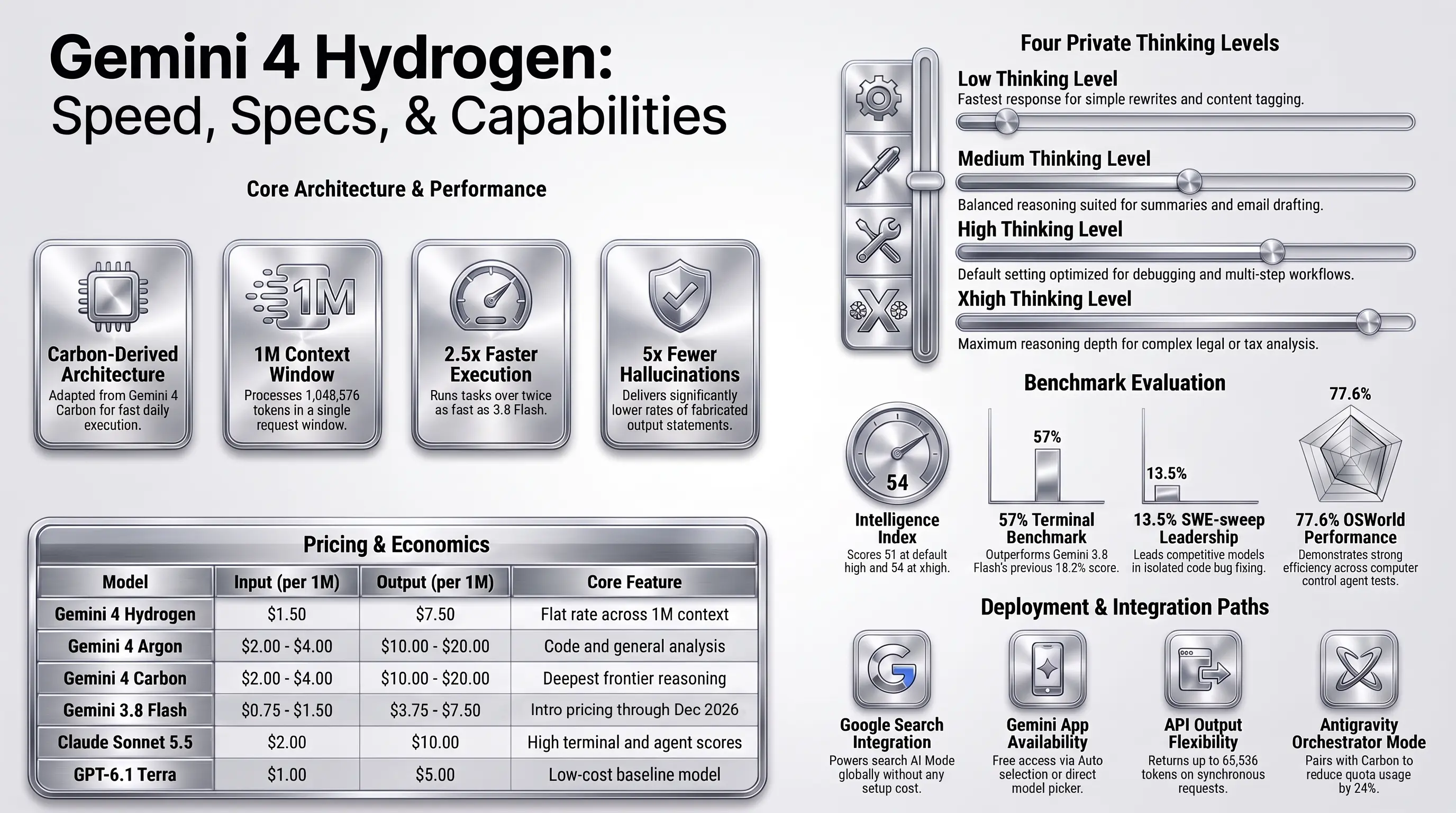
The second number to remember is the context window: 1,048,576 tokens, shared by your input, the model’s private thinking and its final answer. In fact, a token is a small chunk of text, roughly three quarters of an English word.
In plain terms, Hydrogen reads a full code repository or hours of transcripts in one go. Therefore, you stop cutting documents into pieces and start asking questions about the whole thing at once.
Where Does Hydrogen Sit in the Gemini 4 Family?
Google released the three Gemini 4 models within a few weeks. Argon arrived in October as the general purpose frontier model, Carbon was announced on 28 October and became generally available on 10 November, and Hydrogen followed on 12 November.
Meanwhile, inside the Gemini app, the model picker now labels them by job: Everyday help for 4 Hydrogen, Code & analysis for 4 Argon and Most complex work for 4 Carbon, with 3.5 Flash-Lite still handling quick answers. In short, Hydrogen is the daily driver, while the heavier models wait for the rare problem that needs hours of reasoning.
Note: Google dropped the old “Flash” name for this generation. If you search for “Gemini 4 Flash”, the model you want is 4 Hydrogen, and its API model ID is gemini-4-hydrogen.
Read this article: Gemini 4 Carbon vs Gemini 4 Argon: Which One Should You Use?
Why Did Google Build Hydrogen? The Speed Story Behind the Name
Frontier models think deeply, but deep thinking is slow and expensive. However, most daily tasks need a model that is smart and fast at the same time.
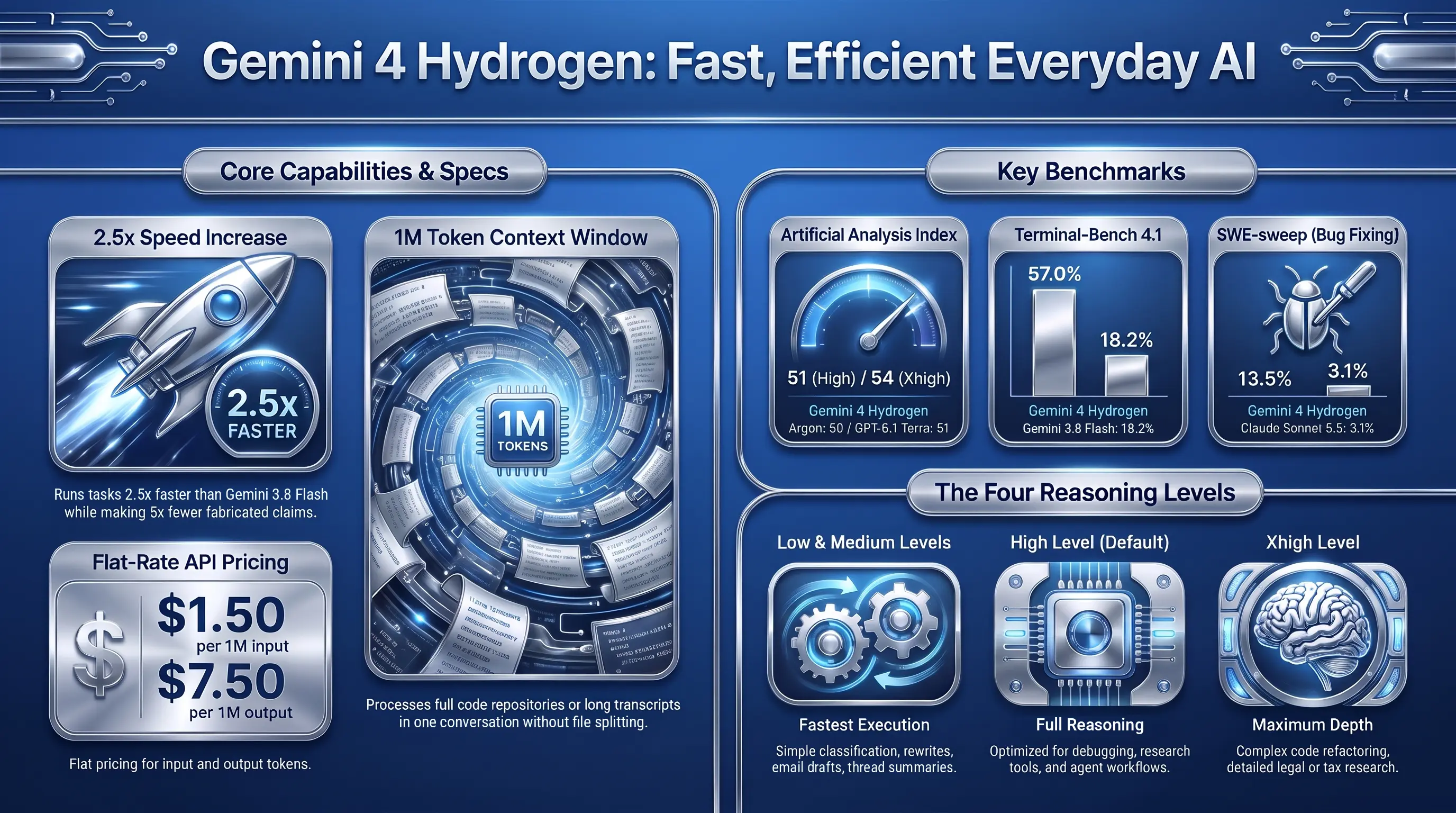
Google says Hydrogen finishes tasks about 2.5 times faster than Gemini 3.8 Flash at its default setting. Early enterprise partners saw runs 2 to 2.8 times faster, using 12% to 23% fewer tokens.
Speed alone is worthless if the answers are wrong. However, Google reports that Hydrogen makes more than five times fewer fabricated claims than 3.8 Flash. Moreover, it batches file reads and search calls in parallel when it explores a large code repository, instead of opening files one by one.
Additionally, it adapts cleanly when a tool call fails. As a result, you get a model built for long chains of small actions, which is exactly what agents do.
Phase 1: The Four Thinking Levels, Explained for Everyone
Every Hydrogen request runs at one of four thinking levels: low, medium, high and a new level called xhigh. High is the default. The level controls how long the model reasons privately before answering, and thinking tokens are billed as output.
Moreover, Google says quality, latency and cost scale in a predictable, step by step way, so you pay only for the reasoning depth a task needs. The table below shows how I would match each level to real work.
| Thinking level | What happens | Best for | Trending example |
|---|---|---|---|
| Low | Fastest reply with minimal private reasoning | Rewrites, short answers, classification | Turning 50 product names into Black Friday sale titles |
| Medium | Balanced reasoning and speed | Summaries, email drafts, simple data questions | Summarizing a 40 message holiday planning thread |
| High (default) | Full reasoning for multi step work | Debugging, research, tool use, agents | Fixing a checkout bug before the Cyber Monday rush |
| Xhigh | Maximum reasoning depth, slowest and most expensive | Hard refactors, tax or legal research, complex analysis | Comparing year end tax rules across two countries |
Xhigh deserves a warning. In fact, independent data from Artificial Analysis, reported by eesel AI, shows that Hydrogen at xhigh produced about 304 million output tokens across the full evaluation index, against a median of 72.8 million for comparable models. Use xhigh as a scalpel, never as your default.
Pro Tip: Start every new workflow at high. If the answers are good, try medium and compare. Drop to low only for repetitive tasks such as tagging or rewriting. Move up to xhigh only when high fails twice on the same problem.
Is Gemini 4 Hydrogen Free to Use?
Yes, for most people it is free. Free users of the Gemini app get Hydrogen through Auto model selection whenever it is the right model for the prompt, while paid users pick “4 Hydrogen” directly from the model menu.
Similarly, Google Search uses Hydrogen as the model behind AI Mode for all users globally, in every language AI Mode supports, at no cost. Additionally, developers get Hydrogen on the free tier of Google AI Studio and the Gemini API, subject to rate limits that Google publishes on a separate page.
Some surfaces require a subscription. Google Antigravity, the agentic coding platform, offers Hydrogen to paid Google AI Pro and Ultra subscribers and to enterprises. Likewise, Gemini in Google Sheets starts with AI Pro and Ultra subscribers and eligible business plans, and that rollout is still in progress.
Consequently, you test it for free today and upgrade only if your workflow demands Antigravity or Sheets.
Gemini 4 Hydrogen Pricing Explained: API Tokens in Plain English
For developers, Google lists Hydrogen at $1.50 per million input tokens and $7.50 per million output tokens, and the price stays flat across the full one million token window. Output pricing includes thinking tokens.
Data Studios reports that cached input costs $0.075 per million tokens for prompts of 4,096 tokens or more, a 95% discount on repeated context. However, batch pricing and explicit caching were not available at launch. For example, 1,000 summaries with 4,000 input and 800 output tokens each cost about $12, before thinking tokens.
| Model | Input (per 1M tokens) | Output (per 1M tokens) | Pricing note |
|---|---|---|---|
| 4 Hydrogen | $1.50 | $7.50 | Flat across the full window, from 12 Nov 2026 |
| Gemini 4 Argon | $2.00, then $4.00 | $10.00, then $20.00 | Introductory price through 30 Nov 2026 |
| Gemini 4 Carbon | $2.00, then $4.00 | $10.00, then $20.00 | Introductory price through 30 Nov 2026 |
| Gemini 3.8 Flash | $0.75, then $1.50 | $3.75, then $7.50 | Introductory price through 31 Dec 2026 |
| Claude Sonnet 5.5 | $2.00 | $10.00 | Current list price |
| GPT-6.1 Terra | $1.00 | $5.00 | Current list price |
Prices verified on 20 November 2026 from Google’s launch material and Data Studios’ pricing comparison. Pricing changes often, so confirm on the official pricing page before you budget.
Hydrogen costs well under half of Argon and Carbon from December, and it matches 3.8 Flash once Flash’s introductory price ends. However, GPT-6.1 Terra is still cheaper per token. Measure the full job cost instead of the price per token, because Hydrogen’s lower token use often closes that gap.
Gemini 4 Hydrogen Benchmarks: How Smart Is It Compared With Rivals?
The official Hydrogen model card from Google DeepMind publishes the benchmark results. On the Artificial Analysis Intelligence Index, Hydrogen scores 51 at high and 54 at xhigh, ahead of Argon at 50.
On Terminal-Bench 4.1, a test of real command line work, it scores 57% compared with 18.2% for Gemini 3.8 Flash, a threefold jump in one generation. Moreover, Google reports 58.8% on HLE-Diamond, first place on the Vals Tax Agent Bench at 52.3%, a tie for first on the Vals Legal Research Bench and 71.6% on Agents’ Last Exam v1.1.
| Benchmark | 4 Hydrogen | Claude Sonnet 5.5 | Other reference |
|---|---|---|---|
| Artificial Analysis Intelligence Index | 51 (high), 54 (xhigh) | 55 (max) | Argon 50, GPT-6.1 Terra 51 |
| Terminal-Bench 4.1 | 57.0% | 63.9% | Gemini 3.8 Flash 18.2% |
| OSWorld-2.1 (computer use) | 77.6% | 83.9% | Not published |
| SWE-sweep (bug fixing) | 13.5% | 3.1% | Not published |
Sources: Google’s launch post and model card, with Sonnet 5.5 and Terra comparison figures as reported by eesel AI from the model card table.
Read these numbers with care. Google reports every figure above, and most are not yet independently reproduced. Moreover, Hydrogen trails Claude Sonnet 5.5 on terminal tasks, computer use and science questions. On the other hand, it leads clearly on fixing bugs without breaking existing code.
The pattern is clear: Hydrogen is a fast, accurate executor, while the slower frontier models still win the hardest reasoning contests.
Read this article: Fable 5.1 vs 5.2: Is Claude’s Newest Model Worth It?
Phase 2: How to Use Gemini 4 Hydrogen, Step by Step
You reach Hydrogen through five doors, and each one suits a different kind of user. Pick the path that matches your work, follow the steps, and you will run your first prompt in under five minutes.
Path 1: The Gemini App (Free for Everyone)
Open gemini.google.com or the Gemini mobile app and sign in with your Google account. Free users simply type a prompt, and Auto model selection routes the request to Hydrogen when the task fits.
Instead, paid users open the model menu and choose 4 Hydrogen, labeled Everyday help. Additionally, it pulls context from Gmail, Google Drive and connected apps such as Airtable and Dropbox, so you ask questions about your own files without copying anything.
Path 2: Google Search AI Mode (Free, No Setup)
Go to Google Search and open the AI Mode tab. There is nothing to install, because Hydrogen is the default model there. Google says Search now handles multi part questions, messy typos and highly specific requests better than before.
Moreover, it runs several related searches at once and shows a wider range of websites. For example, a rushed query such as “cheapst flights delhi to goa new year week under 9000 rupees plus pet friendly hotel near baga beach” now returns a structured plan instead of ten unrelated links.
Path 3: Google AI Studio and the Gemini API (Developers)
Open Google AI Studio, start a new chat and select gemini-4-hydrogen from the model list. Set the thinking level, test your prompt, then create an API key and call the model through the Gemini API.
Google’s Hydrogen developer guide lists the migration rules. The most important ones: the minimal thinking level is rejected, temperature, top_p and top_k are ignored, explicit context caching is not supported, and tools must be declared natively instead of prompted as raw JSON text.
The Secret: A single synchronous call returns up to 65,536 output tokens, and that is also the default when you leave the output limit unset. For longer outputs, such as a full book draft or a large code migration, switch on background execution and raise the output limit. Hydrogen then writes up to one million output tokens.
Path 4: Google Antigravity (Paid AI Pro and Ultra)
Antigravity is Google’s agentic development platform, where AI agents read your repository, edit files and run commands. Subscribers on AI Pro or Ultra select Hydrogen as the agent model, or choose the new Orchestrator option described below.
Google highlights focused code edits, debugging, codebase questions and design to code work. In the meanwhile, a new Gemini front end design skill inside Antigravity helps Hydrogen produce polished web pages from a single instruction.
Path 5: Gemini in Google Sheets (AI Pro, Ultra and Business)
Open a spreadsheet, launch Gemini in the side panel and describe the model you want. Google says Hydrogen turns financial data into interactive models that change across forecasting scenarios, and that it generates outputs on the spreadsheet canvas more than 30% faster than previous models.
It suits founders and finance teams who want answers without writing formulas.
What Is Orchestrator in Google Antigravity, and Why Does It Matter?
Orchestrator is a new Antigravity mode that switches between Gemini models inside one session. Carbon plans the job, while several Hydrogen agents run as workers and verifiers in isolated workspaces.
As a result, Google reports that this setup reached a task success rate close to Carbon alone on Terminal-Bench 4.0, while using 24% less quota and finishing tasks 19% faster on average.
Why this works: Most agent steps are routine, such as reading a file or running a test, and frontier prices for those steps waste money. Orchestrator keeps Carbon for the few decisions that need deep reasoning and hands the routine work to Hydrogen, so you keep the quality and cut the cost.
Phase 3: Practical Examples Built on Trending Topics
The three case studies below are built on Google’s own published demos and on topics people are searching for right now, as Black Friday, Cyber Monday and year end planning take over the internet. Replace the curly bracket fields with your own details.
Case Study 1: A One Shot Black Friday Storefront
In its launch demo, Google showed Hydrogen in Antigravity, paired with the new front end design skill, building a complete ecommerce storefront in one shot. You apply the same idea to a Black Friday sale page. Run it at high, review the preview, then ask for one change at a time.
Prompt Template: Build a single page Black Friday storefront for {store name}, which sells {product category}. Include a hero banner with a countdown to {sale end date}, a grid of {number} products with prices from {product list}, a sticky “Add to cart” button, and a FAQ about shipping and returns. Use a {color palette} color scheme, make it mobile first, and keep all code in one HTML file.
Case Study 2: A Holiday Budget Model in Google Sheets
December spending catches families and small businesses off guard every year. With Gemini in Sheets, you describe your income, fixed costs and gift list, and Hydrogen builds an interactive model with scenarios. Run this at medium.
Prompt Template: Using the data in columns {columns}, build a holiday budget model for {month}. Create three scenarios: careful, normal and generous spending. Show total spend, remaining savings and a warning row when savings fall below {minimum amount}. Add a chart that compares the three scenarios.
Case Study 3: A Trending YouTube Video Turned Into Slides
Google also demonstrated Hydrogen generating a multi slide deck from a YouTube video and a template, followed by an automatic audit that fixed overlapping text. It suits creators, teachers and marketers.
Prompt Template: Watch {YouTube video link} and turn it into a {number} slide presentation for {audience}. Each slide needs one headline, three short points and a speaker note. Follow the layout of {template name}, then audit every slide for overlapping text and fix any issues you find.
Read this article: What Is GPT-6 Astra? Features, Pricing and Real Tests
Is Gemini 4 Hydrogen Safe to Use?
Google says Hydrogen brings its latest Gemini 4 safety and security stack to its broadest audience yet, combining training with real time safeguards on each product.
Compared with 3.8 Flash, Google reports up to 81% less overreach in agentic tasks, up to 79% less under service, twelve times fewer misaligned actions and task shortcuts, and up to two times lower odds of bypassing permission boundaries when a task is blocked. Additionally, it is more than 2.3 times more resilient to indirect prompt injection on the Gray Swan benchmark.
There are honest weaknesses too. In fact, Google’s model card records that unjustified refusals rose by 5.57 percentage points compared with 3.8 Flash, especially on multimodal prompts, and Google lists hallucinations as a known limitation.
Therefore, treat every answer on money, health or law as a first draft. AI is not a lawyer, a doctor or a financial advisor, so verify important decisions with a qualified professional, even when the model ranks first on a tax or legal benchmark.
Why Hydrogen Wins Where Generic Tools Fail, and Where It Does Not
Generic chatbots answer questions, while Hydrogen executes tasks. It reads many files in parallel, recovers when a tool fails and finishes with fewer tokens, all inside a flat priced one million token window.
However, Claude Sonnet 5.5 still leads on terminal work, computer use and science, GPT-6.1 Terra is cheaper per token, batch pricing is missing, and developers lose sampling controls such as temperature. Choose Hydrogen as your default worker, and keep a frontier model ready for the rare problem that needs deep, slow reasoning.
4 Hydrogen vs Similar AI Models: Comparison Table
| Model | What it does | Standout features | Strength / Weakness | Best for | Target audience |
|---|---|---|---|---|---|
| 4 Hydrogen | Fast everyday model | Four thinking levels, 1M token window, free in Search | Strength: speed. Weakness: verbose at xhigh | Daily coding, agents, research | Developers, startups, creators, students, analysts |
| Gemini 4 Carbon | Strongest frontier model | Deepest reasoning | Strength: hardest problems. Weakness: slower, pricier | Complex research | Enterprise engineers, researchers, AI Ultra users |
| Gemini 4 Argon | General purpose frontier model | Lower token use than Carbon | Strength: code and analysis. Weakness: costs more than Hydrogen | Code review, long tasks | Professional developers, data teams |
| Gemini 3.8 Flash | Previous fast Gemini model | Low introductory price, batch pricing | Strength: cheap until January. Weakness: weaker coding | Simple, high volume tasks | Budget focused developers |
| Claude Sonnet 5.5 | Anthropic’s balanced frontier model | Top computer use scores here | Strength: terminal tasks. Weakness: higher price | Agentic coding, computer use | Software teams, automation builders |
| GPT-6.1 Terra | OpenAI’s lower cost model | $1 / $5 pricing | Strength: lowest price. Weakness: below Sonnet 5.5 | Cost sensitive chat and support bots | Businessmen, support teams, SaaS founders |
My Honest Score Card
My scores below reflect Google’s official documentation, the published model card, independent benchmark data and verified third party reporting as of 20 November 2026.
| Criterion | Score (out of 10) | Why |
|---|---|---|
| Innovation | 8.5 | Four thinking levels and Orchestrator pairing are fresh ideas in a fast model |
| Speed | 9.2 | 2.5 times faster than 3.8 Flash at default, with fewer tokens per task |
| Output Quality | 8.4 | Matches Argon on the index, but trails Sonnet 5.5 on computer use and science |
| Ease of Use | 9.0 | Free in Search and the Gemini app, no setup required |
| Value for Money | 8.3 | Cheaper than Gemini frontier models, yet pricier per token than GPT-6.1 Terra |
| Safety and Trust | 8.5 | Large safety gains, offset by a rise in unjustified refusals |
| Overall Score | 8.7 | The best default Gemini model for daily work, with frontier models kept for rare hard cases |
Your Fastest Gemini Upgrade Starts With One Prompt
Hydrogen proves that speed and intelligence now arrive in the same package. You already have it in Google Search, the Gemini app gives it to you for free, and developers get a one million token window at a flat price.
Start small. Open AI Mode with a messy question, build one spreadsheet model, or ship one landing page before Black Friday. Raise the thinking level only when a task demands it.
As Google’s own Search upgrade announcement shows, the tools are ready. Pick the right level, let Hydrogen do the routine work, and keep your time and money for what matters.
FAQs About 4 Hydrogen
Here are clear answers to the questions people ask most about Gemini 4 Hydrogen.
Is Gemini 4 Hydrogen better than Gemini 3.8 Flash?
Yes, on almost every published measure. Google reports that Hydrogen finishes tasks about 2.5 times faster than Gemini 3.8 Flash at its default high thinking level, scores 57% on Terminal-Bench 4.1 against Flash's 18.2%, and makes more than five times fewer fabricated claims. The trade off is price in the short term. Flash keeps an introductory rate of $0.75 input and $3.75 output per million tokens through 31 December 2026, and it still offers batch pricing. From January, both models share the same list price, so Hydrogen becomes the clear upgrade for most teams.
What is the difference between 4 Hydrogen, Carbon and Argon?
All three belong to the Gemini 4 family and share the same 1,048,576 token context window, but each one serves a different job. Carbon is Google's strongest model and spends the most thinking per turn, which suits the hardest, long horizon problems. Meanwhile, Argon is the general purpose frontier model with lower token use than Carbon, labeled for code and analysis in the Gemini app. Hydrogen is adapted from Carbon and tuned for speed, with high as its default thinking level instead of medium, plus the new xhigh level. According to the official model card, it inherits Carbon's architecture and training data, which explains its strong scores at a lower price.
How much does Gemini 4 Hydrogen cost per million tokens?
Google lists Hydrogen at $1.50 per million input tokens and $7.50 per million output tokens on the Gemini API, flat across the full one million token window. Moreover, output pricing includes the model's thinking tokens, so higher thinking levels raise the bill. Reported cached input pricing is $0.075 per million tokens for prompts of 4,096 tokens or more, while batch pricing and explicit caching were not offered at launch. Regular users pay nothing to use Hydrogen in Google Search or through Auto selection in the Gemini app.
Does Gemini 4 Hydrogen power Google Search AI Mode?
Yes. Google states in its Search announcement that the model is now available globally in Google Search for all users. In AI Mode, Hydrogen interprets multi part questions, typo filled queries and highly specific requests better than before. Additionally, its upgraded query fan out runs simultaneous searches across related subtopics, which surfaces a wider range of websites, including sites you would not have found on your own. For publishers, this means clear, well structured pages with direct answers have a better chance of appearing among the cited links.
How does 4 Hydrogen score on the Artificial Analysis Intelligence Index?
Google reports that Hydrogen scores 51 on the Artificial Analysis Intelligence Index at its default high thinking level and 54 at xhigh, one point ahead of Gemini 4 Argon's 50 at default. However, the same independent data reveals a cost. At xhigh, Hydrogen generated about 304 million output tokens across the index, far above the 72.8 million median of comparable models. In practice, high gives you most of the intelligence at a much lower token cost, and xhigh is worth it only for the hardest tasks.
Priyanshu Khatri Founder & Chief AI Analyst, SoulAI Writes
Read more articles
Gemini 4 Neon: Price, Benchmarks and Is It Worth It?
Gemini 4 Neon: Is Google’s Newest AI Model Smarter Than Its Own Flagship? On the…
Gemini 4 Hydrogen: Is Google’s Fastest AI Free to Use?
What Is Gemini 4 Hydrogen, and Why Is Google Putting It Inside Every Search? Last…
Claude Opus 5.5 vs GPT-6 Astra: Which AI Model Wins?
Claude Opus 5.5 vs GPT-6 Astra: Which AI Model Truly Wins Your Work? Claude Opus…
Gemini 4 Carbon vs Gemini 4 Argon: Which One Should You Use?
Gemini 4 Carbon vs Gemini 4 Argon: Which Google Model Deserves Your Money Before December…
Fable 5.1 vs 5.2: Is Claude’s Newest Model Worth It?
Fable 5.1 vs 5.2: Which Claude Fable Model Wins on Price, Speed and Benchmarks? Fable…





Leave a Reply