


Gemini 4 Neon: Is Google’s Newest AI Model Smarter Than Its Own Flagship?
On the morning of 18 November 2026, a quiet new label appeared in the Gemini model picker, and almost nobody noticed it. The label read Deeper analysis, and it sat between two names Google had launched only days earlier.
Within hours, the model behind it climbed to third place on the most watched independent AI leaderboard and finished one point ahead of the flagship Google had released eight days before. So why would Google sell a cheaper model that outscores its own top model?
The answer hides inside four thinking levels, one million tokens and a price change that lands on 1 December. Stay with me, and I will walk you through every feature, price and setting, step by step, so you save your energy, your time and your money from the first prompt.
Gemini 4 Neon is the mid tier model in Google’s Gemini 4 family, announced on 18 November 2026 in the official Google launch post for Gemini 4 Neon. Google describes it as frontier level intelligence with fast end to end task completion for coding, knowledge work and science. In plain words, it thinks almost like Google’s biggest model, works faster and costs less per task.
Here are the short answers people search first. Is it free? No, it needs Google AI Pro, Ultra or the paid Gemini API. What does it cost? $3 per million input tokens and $15 per million output tokens. How do you use it? Pick Deeper analysis in the Gemini app, or call gemini-4-neon in Google AI Studio.
Moreover, this guide goes beyond the launch headlines. You will learn what each feature means, how the thinking levels change cost and speed, how Neon compares with Carbon, Hydrogen, Claude and GPT, and whether it is safe for business.
Additionally, you get three practical examples built around trending topics such as Black Friday deal checks. Every number is labeled with who measured it. Pricing and plans are verified as of 20 November 2026.
What Is Gemini 4 Neon and Why Did Google Launch It?
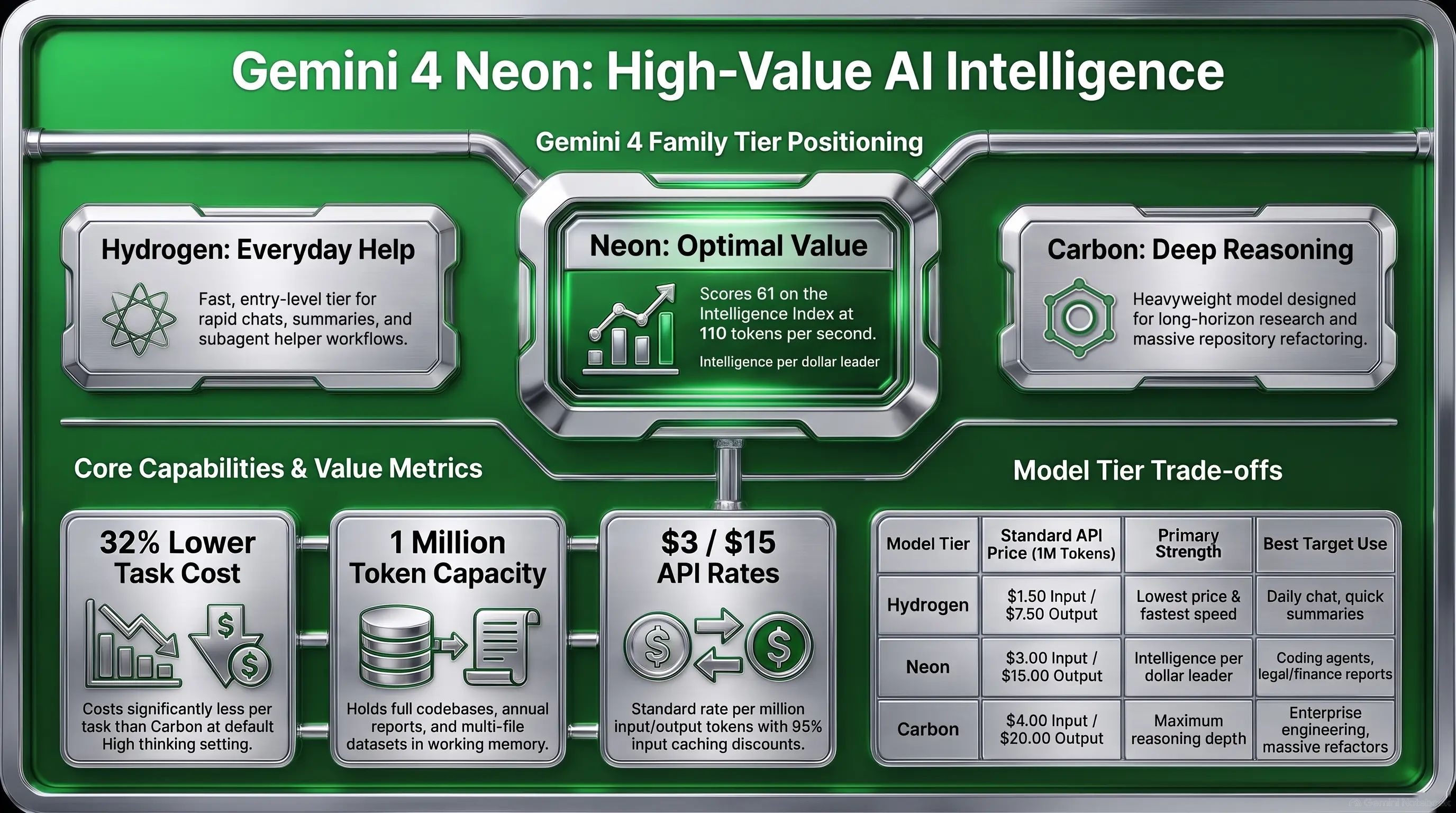
The Gemini 4 family has four models for four kinds of work. Hydrogen handles fast everyday help, Carbon handles the hardest long running projects, and Neon sits between them for complex work that happens often, such as contract reviews, debugging or financial models.
According to the official Gemini 4 Neon model card from Google DeepMind, Neon is adapted from Gemini 4 Carbon, so it inherits Carbon’s architecture, training data and safety stack. Therefore, Google kept most of the intelligence and trimmed the cost and the waiting time. Google says that at the default High thinking level, Neon costs 32% less per task than Carbon.
The release order explains the strategy. Argon arrived on 13 October 2026, Carbon on 10 November, Hydrogen on 12 November and Neon on 18 November.
Meanwhile, the Gemini app picker settled into four choices: Auto adapts to your request, Everyday help runs Hydrogen, Deeper analysis runs Neon, and Code and complex work runs Carbon. As a result, Neon replaces Argon in the app, and the older Gemini 3.1 Pro leaves it.
Note: In the Gemini app, Pro subscribers get Neon, while Carbon needs an Ultra plan. For most paying users, Neon is the strongest model they will touch every day.
Read this article: Gemini 4 Carbon: Is Google’s Strongest AI Worth It?
Gemini 4 Neon Features Explained in Simple Words
What Does the 1 Million Token Context Window Mean?
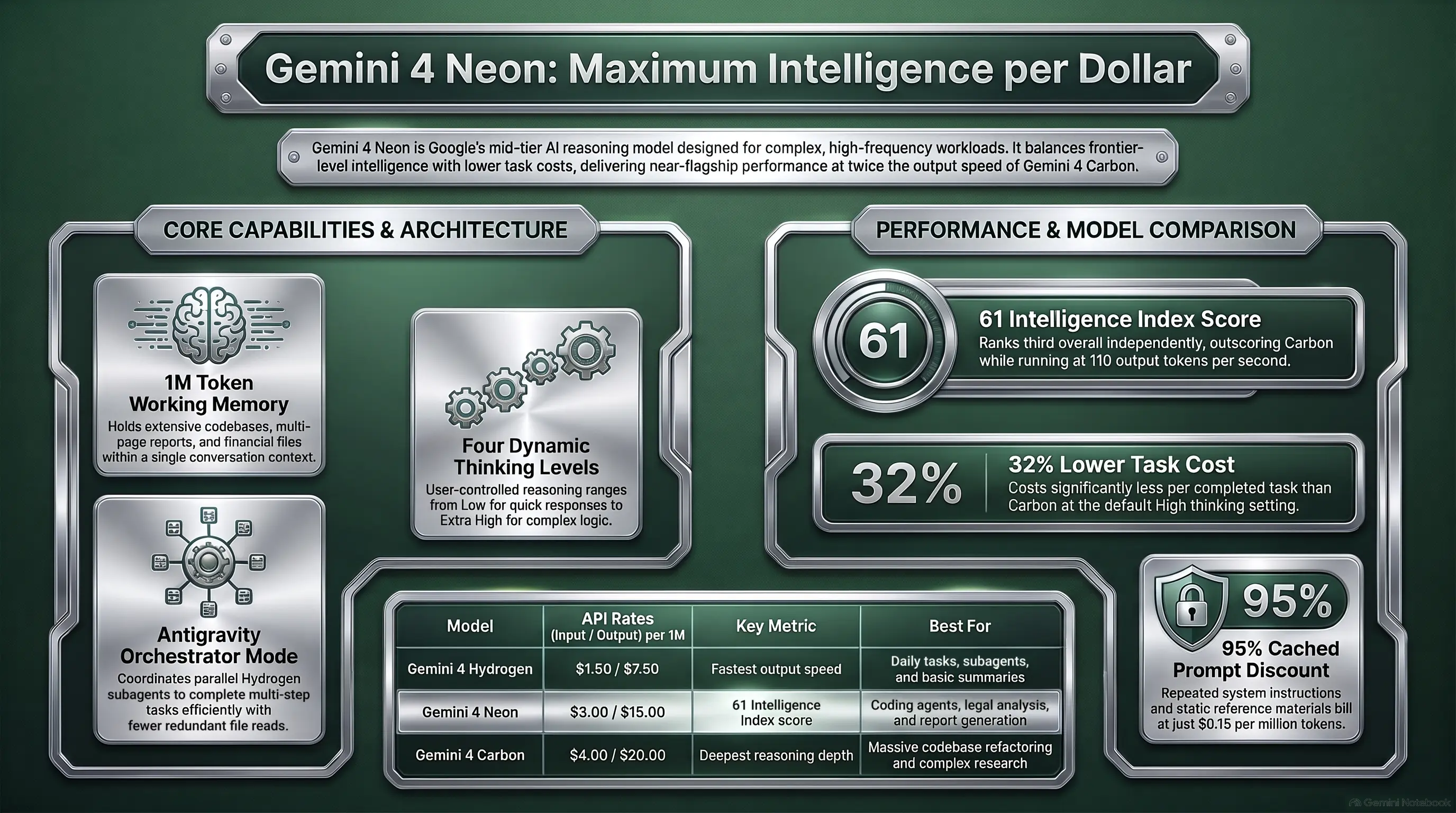
A token is a small piece of text, roughly three quarters of an English word. The context window is how much material the model holds in working memory at once. One million tokens equals several long books, a year of meeting notes or a large codebase in a single conversation.
For example, you are able to upload a 300 page annual report, a sales spreadsheet and an earnings call recording together, then ask one question that links all three. However, the window is shared by your input, the model’s thinking and its answer. Consequently, a huge upload leaves less room for reasoning, so keep your files focused.
How Do the Four Thinking Levels Work?
Neon thinks before it answers, and you choose how long. The levels are Low, Medium, High and Extra High, written as xhigh in benchmarks. Low gives quick, cheap replies, High is the default, and Extra High spends the most time on the hardest problems.
Independent tests show how much the choice matters: Artificial Analysis scores Neon at 44 on Low, 55 on Medium, 60 on High and 61 on Extra High. In fact, the gain from Low to High is large, while the gain from High to Extra High is small. Therefore, start with High and move up only when High fails.
Which Files and Formats Does Neon Understand?
Neon reads text, images, audio, video, spreadsheets, PDFs and charts, and it replies in text. Google says the model turns mixed files into structured deliverables, such as a summary table, a risk memo or a cleaned dataset.
Similarly, in the Gemini app, Google promises more precise reading of uploads plus the ability to pull details from Gmail and Google Docs. For a small business owner, that means one prompt compares an invoice PDF, a supplier email and a pricing sheet without any copying and pasting. Additionally, it pulls current web sources for topics such as vendor pricing.
What Is Orchestrator Mode in Google Antigravity?
Google Antigravity is Google’s development platform for coding agents. Inside it, Neon works solo or as an orchestrator, a project manager that splits a big job into parts and hands each part to faster Gemini 4 Hydrogen helpers running in parallel. Google’s launch post describes this setup through a /swarm command.
Moreover, Google says Neon cuts redundant file reads, shares progress while it works and handles context compaction well, which matters when an agent runs for an hour on a large repository. For developers, the result is fewer stalled agents and lower token bills.
What Are Tasks in Gemini, and What Is Neon for Cyber?
Tasks is the Gemini app feature that completes multi step jobs for you, such as explaining a sudden charge spike in your billing statements or cross checking receipts for a refund. With Neon behind Tasks for Pro and Ultra users, Google says jobs run faster and stretch usage limits further. On the other hand, free users keep Tasks on Hydrogen.
Separately, a cyber defense version reaches vetted members of Google’s Fairwind Program, with Google reporting 90.5% on SEC-bench Pro for finding vulnerabilities and 70.7% on CWE-bench v2 for patching them. Regular users will not see that version.
Gemini 4 Neon Benchmarks: How Good Is It in Real Numbers?
Benchmarks are standard tests that compare models on the same tasks. The strongest independent signal comes from Artificial Analysis, which tested Gemini 4 Neon and placed it third overall on its Intelligence Index with 61 at Extra High, behind GPT-6.2 Astra and Claude Fable 5.2, and one point ahead of Carbon at High.
Moreover, it measured Neon at about 110 output tokens per second, nearly twice Carbon’s roughly 57. Meanwhile, the detailed test scores below come mostly from Google, so read them as vendor results until more publishers retest them.
How Does Neon Perform at Coding?
Google reports first place on the Artificial Analysis Coding Agent Index with 58.6, plus 65.2% on Terminal-Bench 4.1, 46.2% on FrontierCode 2.0 at High and 65.4% on CursorBench 4.1. On SWE-sweep, Neon scores 12.8% with the basic mini-SWE agent and 39.0% inside Antigravity.
However, the race at the top is tight. Coverage by VentureBeat on the Gemini 4 Neon launch notes that Claude Opus 5.5 still edges Neon on Terminal-Bench 4.1 and FrontierCode 2.0 by under one and a half points. In other words, Neon matches the best coding models rather than crushing them.
How Does It Handle Business, Legal, Science and Math?
Google reports 70.9% on the Vals Index for legal, finance and tax work, with first place on Legal Research Bench and Tax Agent Bench. Additionally, Neon leads Zapier’s AutomationBench at 56.3%, ahead of Claude Opus 5.5 at 42.5% and GPT-6.2 Sol at 41.3%, and it ranks second on Arena’s Agent Arena Index with 1,336 points across more than 4,200 sessions.
For science and math, Google reports 70.5% on Terminal-Bench Science, 84.0% on RiemannBench and 71.3% on HLE-Diamond. As a result, analysts and researchers get strong multi step quantitative help.
Gemini 4 Neon vs Carbon vs Hydrogen: Which Model Fits Your Work?
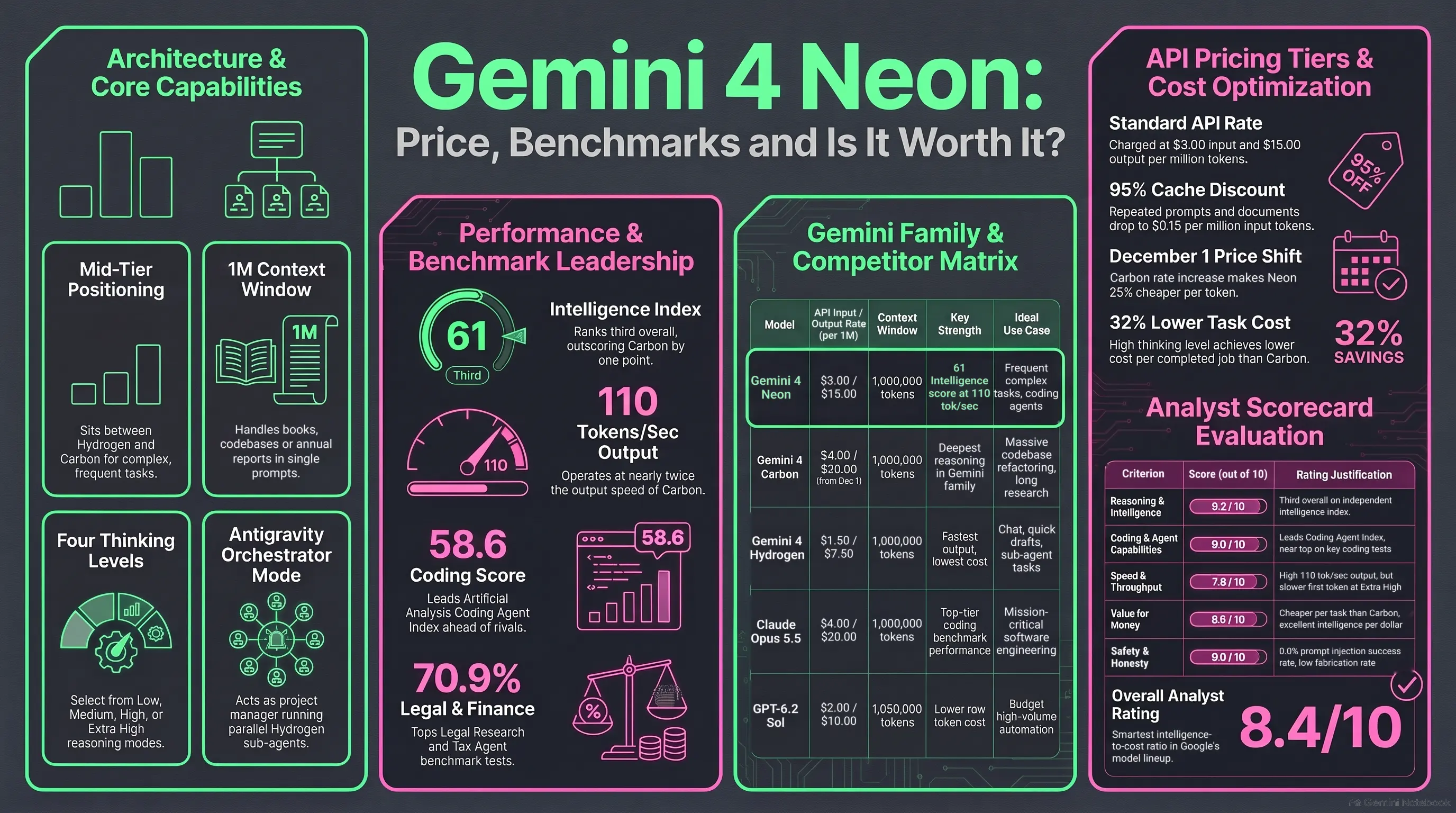
The table compares Neon with its siblings and closest rivals. Prices are API rates per million tokens, input then output, verified as of 20 November 2026.
| Model | What It Does | Standout Features | Strength / Weakness | Best For | Target Audience |
|---|---|---|---|---|---|
| Gemini 4 Neon $3 / $15 | Mid tier reasoning for complex, frequent work | 1M tokens, four thinking levels, orchestrator mode, Tasks | Strength: Intelligence Index 61 at 110 tokens per second. Weakness: slow first token at Extra High | Coding agents, legal and finance analysis, reports | Developers, analysts, consultants, business owners |
| Gemini 4 Carbon $2 / $10 to 30 Nov, then $4 / $20 | Google’s heavyweight for the hardest projects | Deepest reasoning in the family | Strength: depth. Weakness: slower and pricier per task than Neon | Huge refactors, long research | Enterprise engineering teams, Ultra users |
| Gemini 4 Hydrogen $1.50 / $7.50 | Fast everyday model | Fastest Gemini 4 output, powers free Tasks | Strength: cheapest and quickest. Weakness: Intelligence Index 54 | Chat, drafts, summaries, subagents | Students, creators, YouTubers, everyday users |
| Claude Opus 5.5 $4 / $20 | Anthropic’s top coding model | Slight lead on two coding tests | Strength: elite coding. Weakness: 25% higher price than Neon | Mission critical code | Senior engineers, AI product teams |
| GPT-6.2 Sol $2 / $10 up to 272K input | OpenAI model with lower token prices | Cheaper per token, 1.05M context | Strength: token cost. Weakness: lower Vals and AutomationBench scores | High volume, budget workloads | Startups, automation builders |
The pattern is clear. Hydrogen wins on speed and price, Carbon wins on raw depth, and Neon wins on intelligence per dollar for frequent complex work. Moreover, the gap shifts on 1 December, when Carbon’s introductory rate ends and Neon becomes 25% cheaper than Carbon per token.
Gemini 4 Neon Price: API Rates, Plans and the 1 December Twist
Pricing splits into two worlds. The Gemini app uses a monthly plan, while the Gemini API bills per token. On the API, standard rates are $3 per million input tokens and $15 per million output tokens, and output pricing includes thinking tokens.
Cached input, meaning text the model has already seen in a repeated prompt, costs $0.15 per million tokens, a 95% discount.
| API Tier | Input per 1M Tokens | Output per 1M Tokens | Best Use |
|---|---|---|---|
| Standard | $3.00 | $15.00 | Live apps and chat |
| Cached input | $0.15 | Not applicable | Repeated prompts and documents |
| Batch and Flex | $1.50 | $7.50 | Overnight and bulk jobs |
| Priority | $5.40 | $27.00 | Customer facing apps |
Here is the twist most articles miss. Until 30 November 2026, Carbon and Argon cost $2 input and $10 output, which beats Neon per token. From 1 December, both rise to $4 and $20. Therefore, Carbon looks cheaper this week, yet Neon becomes the better deal next week.
However, independent testing adds a caveat: Artificial Analysis reports that Neon uses about 15% more output tokens per task than Carbon, so the cost advantage narrows to roughly 17% at Extra High.
Pro Tip: Put long, unchanging instructions and reference files at the start of every prompt. That repeated text then bills at the $0.15 cached rate instead of $3.
Is Gemini 4 Neon Free to Use?
No. Every official route is paid. In the Gemini app, you need Google AI Pro or Ultra, and in the API you need the paid tier of Google AI Studio. Free Gemini users keep Hydrogen, so nothing changes for them.
However, Google says all Pro and Ultra subscribers are able to try Neon inside AI Studio, which lets you test prompts before you build anything. Consequently, a Pro plan covers both daily chat use and early developer testing, which makes it the most practical entry point for most readers.
What Is the Neon Price in India?
In India, the cheapest plan with Neon is Google AI Pro. Indian price trackers list Google AI Pro at ₹1,950 per month on Google One India as of late October 2026, with Ultra plans starting at ₹6,500. Meanwhile, Google AI Plus, the ₹399 entry plan, does not include the Gemini 4 reasoning models.
Introductory offers change often, so confirm the current figure on Google’s official subscription page before you pay. For developers in India, API billing follows the same dollar rates listed above.
How to Use Gemini 4 Neon: Step by Step Guide
Step 1: Use it in the Gemini app. Sign in with a Google AI Pro or Ultra account, open the model picker and choose Deeper analysis. Upload your file or type your request. For the best answer, state the goal, the format and the audience, such as a one page summary for my manager in a table.
Step 2: Test it in Google AI Studio. Choose gemini-4-neon from the model list and set the thinking level in the settings panel. Run the same prompt at Low and High, then compare quality and time. This shows you the cheapest level that still gives a correct answer.
Step 3: Call it through the Gemini API. Create an API key in AI Studio, enable billing and send a request with the model ID gemini-4-neon. Here is a minimal Python example with the Google Gen AI SDK.
from google import genai
from google.genai import types

client = genai.Client()
response = client.models.generate_content(
    model="gemini-4-neon",
    contents="Compare these two supplier quotes and flag hidden fees.",
    config=types.GenerateContentConfig(
        thinking_config=types.ThinkingConfig(thinking_level="high")
    ),
)
print(response.text)
Step 4: Run agents in Google Antigravity. Paid Pro and Ultra subscribers select Neon in the Antigravity desktop app, command line tool or IDE extensions. Give it a clear project goal, let it plan, and use orchestrator mode for large jobs so parallel Hydrogen helpers handle the smaller pieces.
Why this works: Testing in AI Studio first reveals the true cost per task at each thinking level, so your bills stay predictable once you build.
Read this article: What Is GPT-6 Astra? Features, Pricing and Real Tests
Practical Examples: Gemini 4 Neon on This Month’s Trending Tasks
Example 1: The Black Friday Deal Checker
Black Friday falls on 27 November 2026, and inflated “original” prices flood every store. Neon suits this job because Google promises research that draws on current web sources for price comparisons. Upload screenshots of three deals and let the model check them against recent prices.
Prompt Template: I am shopping for {product} on Black Friday with a budget of {budget}. Here are screenshots of three deals. Check current prices from major retailers, tell me which deal is a real discount, flag any inflated original price, and give me a final pick in a three row table.
Example 2: The Mystery Charge on Your Card Statement
Holiday season also brings surprise subscription renewals. This example mirrors Google’s own Tasks demo. Upload three months of card statements as PDFs, and Neon groups charges by merchant and explains what caused the spike. As a result, an hour with a highlighter becomes a few minutes.
Prompt Template: Here are my statements for {month 1}, {month 2} and {month 3}. Group every charge by merchant, show monthly totals, explain why spending rose in {month}, list every recurring subscription with its renewal date, and draft a short refund request for any duplicate charge.
Example 3: The Year End Creator Recap
December recap posts trend every year across YouTube and Instagram. Export your channel analytics as a spreadsheet, upload your best video, and let Neon connect the numbers to the content inside one conversation.
Prompt Template: This spreadsheet holds my {platform} analytics for 2026, and this video is my top performer. Find my three best months and explain why they worked, compare this video’s first 30 seconds with my average retention, and write a 60 second recap script with five on screen stats.
The Secret: Ask Neon to show its numbers in a table and name the file each number came from. Source tracing keeps the model honest and makes your fact check take seconds.
Is Gemini 4 Neon Safe to Use for Work?
Google says Neon keeps Carbon level protection against severe misuse and prompt injection, a trick where hidden text in a file or web page tries to hijack the model. On the Gray Swan prompt injection benchmark, Google reports a 0.0% attack success rate at the highest thinking level.
Moreover, it reports a 0.09% misaligned action rate on an agentic safety suite, a 99.2% pass rate on an agent honesty test and its lowest fabrication rate yet in internal Antigravity testing. Additionally, Neon refuses less legitimate work, with a 1.98% refusal rate on Terminal-Bench 4.0.
For business use, keep sensitive data inside a Gemini for business account and review any agent action that touches money, customers or production code. AI is not a lawyer, accountant or doctor, so verify legal, financial and medical outputs with a qualified professional.
Why Neon Wins Where Generic Models Fail, and Where It Falls Short
Generic chat models answer one question at a time. Neon is built for work that spans many files, steps and tool calls. Its thinking levels let you pay for depth only when needed, its one million token window keeps whole projects in view, and orchestrator mode splits big jobs across parallel helpers.
In fact, first place on Zapier’s AutomationBench shows strength in multi app workflows that trip up simpler models.
However, honest analysis includes the weak spots. Artificial Analysis measured about 56.5 seconds to the first answer token at Extra High, which feels slow in live chat. It also flags the model as verbose, at 283 million tokens across its tests against a median of 65.1 million, and verbosity raises bills.
Additionally, there is no free tier, most scores are vendor reported, and Opus 5.5 still leads two coding tests.
Who Should Choose Gemini 4 Neon?
Neon is the better choice when your work is both complex and frequent. Developers running daily coding agents gain near flagship quality at a lower cost per task. Similarly, analysts, consultants and finance teams gain strong document reading and first place legal and tax results, while researchers gain best in class science scores.
On the other hand, casual chat, short emails and quick translations belong on Hydrogen, which is faster and half the price. Likewise, the single hardest project of your year belongs on Carbon with an Ultra plan.
Read this article: Is Claude Fable 5.2 Worth It? Benchmarks, Pricing and API
My Honest Gemini 4 Neon Score Card
These scores reflect the published evidence as of 20 November 2026, including Google’s launch data, the DeepMind model card, Artificial Analysis measurements and independent press coverage.
| Criterion | Score | Reason |
|---|---|---|
| Intelligence and Reasoning | 9.2 / 10 | Third overall on the Intelligence Index, ahead of Carbon |
| Coding and Agents | 9.0 / 10 | First on the Coding Agent Index, slightly behind Opus 5.5 on two tests |
| Speed | 7.8 / 10 | Fast output at 110 tokens per second, slow first token at Extra High |
| Value for Money | 8.6 / 10 | Cheaper per task than Carbon, pricier per token than Sol and Sonnet |
| Ease of Use | 8.8 / 10 | Clear picker label, simple API ID, four easy thinking levels |
| Safety and Honesty | 9.0 / 10 | Low fabrication and misaligned action rates, mostly vendor reported |
| Accessibility | 6.5 / 10 | No free tier, paid plans and paid API only |
| Overall Score | 8.4 / 10 | The best intelligence per dollar in Google’s lineup today |
Your Smartest Move With Google’s Middle Model
Gemini 4 Neon proves that the middle model is often the smartest buy. It thinks close to Google’s flagship, works faster and costs less per finished task. Start in AI Studio, test the same prompt at Low and High, and keep the cheapest level that gets the answer right.
Then move your weekly heavy work, such as reports, code reviews and statement checks, into the Deeper analysis slot. Watch the 1 December price change if you use Carbon today, and use cached prompts to cut your API bill.
Get creative with your prompts, because the right model at the right thinking level saves you hours every week and real money every month.
Frequently Asked Questions About Gemini 4 Neon
Here are clear answers to the questions people ask most about Gemini 4 Neon.
What is Gemini 4 Neon used for?
Gemini 4 Neon is used for complex work that happens often, such as software engineering, coding agents, legal and tax research, financial analysis, spreadsheet modeling, science problems and multi step Tasks in the Gemini app. Google positions it between Hydrogen, built for quick everyday help, and Carbon, built for the hardest long running projects. Because it reads text, images, audio, video, PDFs and spreadsheets inside a one million token window, it suits jobs that combine many files, for example comparing a contract, a pricing sheet and an email thread in a single request.
Is Gemini 4 Neon better than Gemini 4 Carbon?
On intelligence per dollar, yes, and on the headline independent ranking, slightly. Artificial Analysis scores Neon at 61 on its Intelligence Index at Extra High, one point above Carbon at High, and measures Neon at roughly twice Carbon's output speed. Google reports 32% lower cost per task at the default High level. However, Google still recommends Carbon for the hardest long horizon projects, and Carbon is cheaper per token until 30 November 2026. From 1 December, Carbon rises to $4 input and $20 output, which makes Neon 25% cheaper per token.
How much does Gemini 4 Neon cost?
On the Gemini API, Neon costs $3 per million input tokens and $15 per million output tokens at standard rates, and thinking tokens bill as output. Cached input costs $0.15 per million tokens, a 95% discount for repeated content such as system prompts. Batch and Flex processing are listed at half the standard rate, and Priority processing at $5.40 input and $27 output. In the Gemini app, there is no per token charge, because access comes through a Google AI Pro or Ultra subscription, priced differently in each country.
Is there a free way to use Gemini 4 Neon?
No free access exists at launch. The official Google announcement lists only paid routes: the paid Gemini API in Google AI Studio and Android Studio, Gemini for business, Google Antigravity for paid Pro and Ultra subscribers, and the Gemini app for Pro and Ultra subscribers. Free Gemini users keep Hydrogen, and the free version of Tasks also runs on Hydrogen. Some third party developer gateways offer small monthly trial credits billed at API rates, yet daily use needs a Pro or Ultra plan.
What is the context window of Gemini 4 Neon?
Neon has a one million token context window, listed by developer platforms as 1,048,576 tokens. That window is shared by your input, the model's internal thinking and its final answer, so a huge upload leaves less space for reasoning and output. In practical terms, one million tokens holds several full books, a large software repository or a year of business documents in one conversation. For the best results, upload only the files the task needs, place stable reference material at the start of the prompt for cached pricing, and use the High thinking level unless the problem is unusually hard.
Priyanshu Khatri Founder & Chief AI Analyst, SoulAI Writes
Read more articles
Gemini 4 Neon: Price, Benchmarks and Is It Worth It?
Gemini 4 Neon: Is Google’s Newest AI Model Smarter Than Its Own Flagship? On the…
Gemini 4 Hydrogen: Is Google’s Fastest AI Free to Use?
What Is Gemini 4 Hydrogen, and Why Is Google Putting It Inside Every Search? Last…
Claude Opus 5.5 vs GPT-6 Astra: Which AI Model Wins?
Claude Opus 5.5 vs GPT-6 Astra: Which AI Model Truly Wins Your Work? Claude Opus…
Gemini 4 Carbon vs Gemini 4 Argon: Which One Should You Use?
Gemini 4 Carbon vs Gemini 4 Argon: Which Google Model Deserves Your Money Before December…
Fable 5.1 vs 5.2: Is Claude’s Newest Model Worth It?
Fable 5.1 vs 5.2: Which Claude Fable Model Wins on Price, Speed and Benchmarks? Fable…





Leave a Reply