



Aion 1.0 Instruct: Is Microsoft’s Tiny 2.3B Model the Future of Private AI on Your PC?
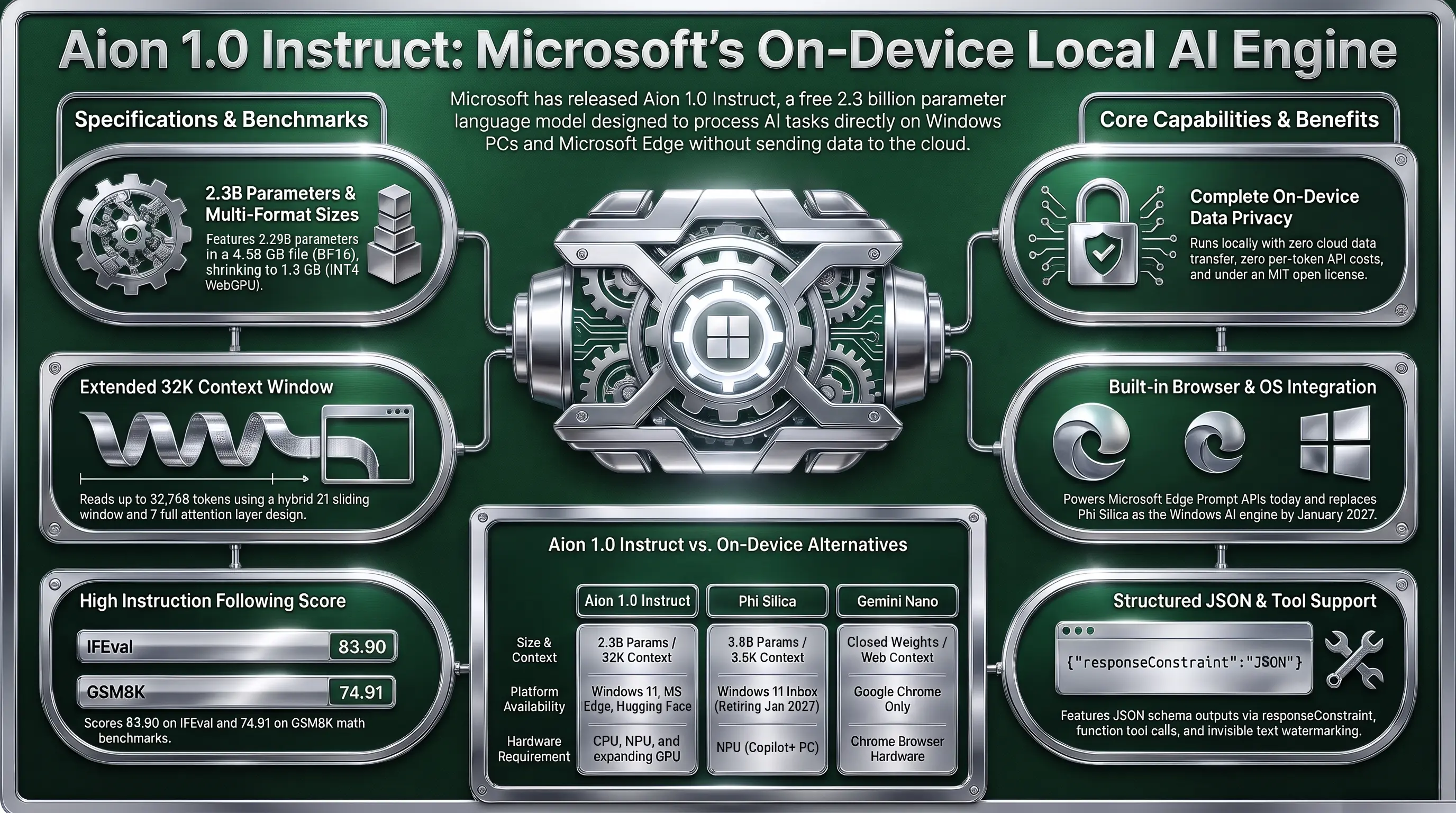
Aion 1.0 Instruct: On 18 November 2026, a 4.58 GB file landed on Hugging Face without a keynote, a countdown or a launch video. It came from Microsoft, and it holds the language model that will soon answer prompts inside Windows 11 and Microsoft Edge without sending a single word to the cloud.
That file is Aion 1.0 Instruct, and the twist is bigger than its size, because this small model is about to replace the AI engine already sitting on millions of Copilot+ PCs. Stay with me, and I will walk you through what it is, how it works and exactly how to use it, step by step, so you save your energy, your time and your money.
Aion 1.0 Instruct is Microsoft’s new on device small language model, built by the Windows Applied Sciences Group and released as open weights under the MIT license. In simple words, it is a compact AI that lives on your computer instead of a distant data center. It summarizes long pages, rewrites your drafts, answers questions about your documents and chats with you, all locally.
Moreover, Microsoft has confirmed that it becomes the built in model of Microsoft Edge today and the default language model behind the Windows AI APIs by late January 2027. That makes it one of the most important AI releases of the year for everyday Windows users.
However, most coverage so far reads like a spec sheet. In this guide, I translate every term into easy language, from parameters and tokens to sliding window attention and watermarking. I went through Microsoft’s official blogs, Microsoft Learn documentation and the Hugging Face model card line by line, so every number here comes from a verified source.
You will learn what changed from Phi Silica, which hardware runs the model, what the benchmarks mean and how creators and developers turn it into real projects. By the end, you will know whether this free local AI deserves a place in your workflow.
What Is Aion 1.0 Instruct? The Simple Answer
Aion Instruct is a small language model, or SLM, with about 2.3 billion parameters. A language model is software that predicts and writes text after learning patterns from huge amounts of writing. The word small matters here.
Cloud chatbots such as ChatGPT or Gemini run on giant models inside data centers, while an SLM is compact enough to run on a normal laptop. As a result, your text never leaves your device.
Microsoft designed this model for everyday text intelligence, which means summaries, rewrites, intent detection, document questions and accessibility features. In fact, the model card lists summarization, rewriting, document question answering and chat as its intended uses.
What Do “Instruct,” “Parameters” and “Tokens” Mean?
The word Instruct tells you the model was trained to follow instructions, such as “summarize this in three lines” or “make this email friendlier.” A base model only continues text, while an instruct model responds to requests.
Parameters are the internal numbers a model learns during training. More parameters usually mean more knowledge, but also more memory and slower speed. Tokens are small pieces of words that the model reads and writes. For example, the word “summarization” splits into a few tokens.
Finally, the context window is the amount of text the model reads at once. Aion 1.0 Instruct reads up to 32,768 tokens, which is roughly a long report.
How Did Aion Instruct Arrive? The Full Timeline
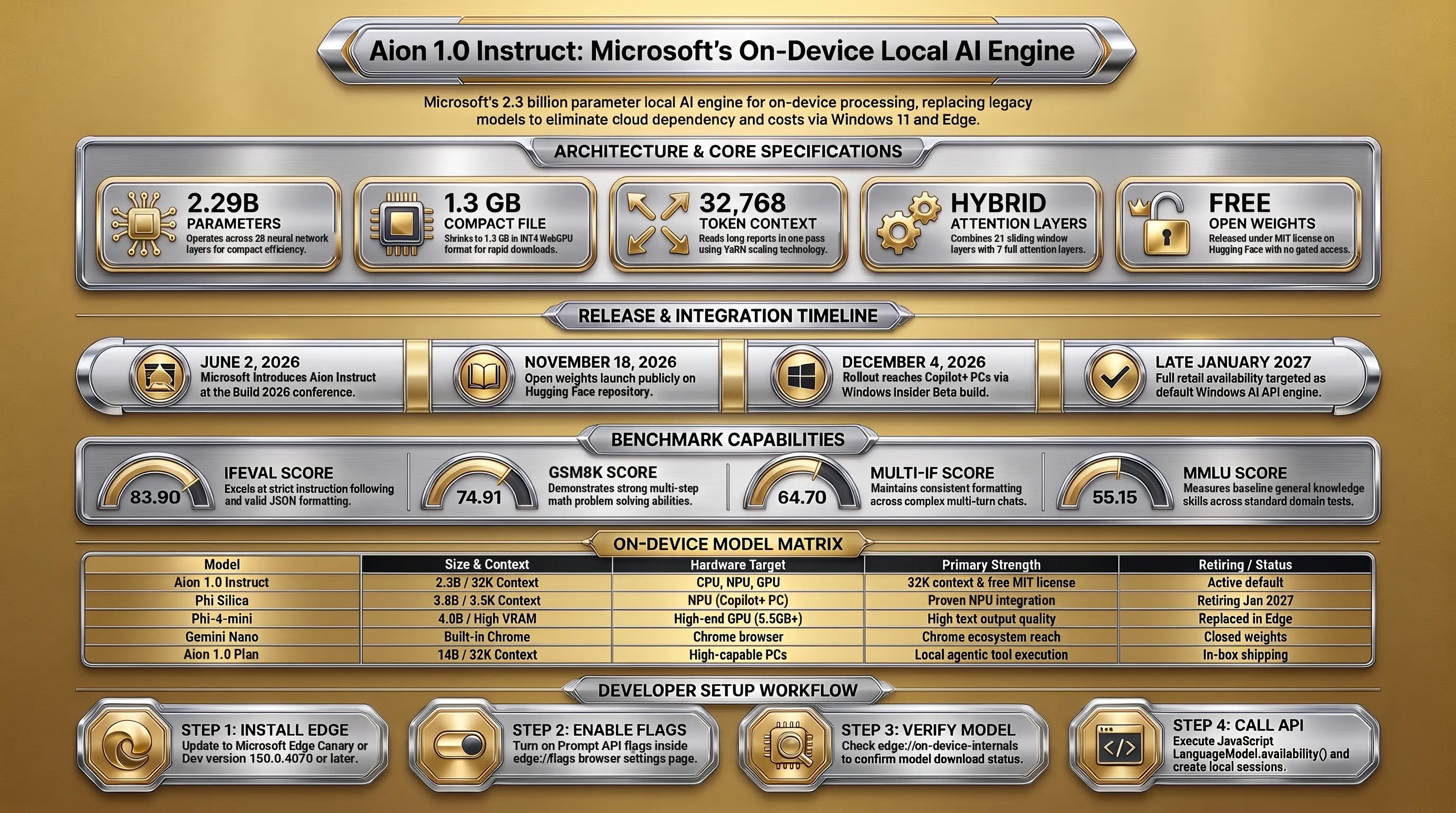
The story began at Microsoft Build on 2 June 2026. According to the Windows Developer Blog Build 2026 announcement, Microsoft introduced Aion Instruct as a smaller, faster and more efficient successor to its existing Windows OS model, alongside a bigger sibling called Aion 1.0 Plan.
Developers first tested it as a prerelease model in Edge Canary and Dev, starting with version 150.0.4070. Microsoft promised an open source release on Hugging Face in July. However, the weights arrived later than planned, on 18 November 2026, as the repository microsoft/Aion-1.0-Instruct-2.3B, followed by a quantized ONNX WebGPU version.
One day later, the Microsoft Edge team published Hybrid intelligence on the Web: Introducing Aion Instruct and Prompt API in Microsoft Edge. That post confirmed general availability in Edge and opened an origin trial for the Prompt API on live websites.
Meanwhile, the Windows side has its own schedule. A standalone testing package arrived in October at aka.ms/tryaion. Rollout to Copilot+ PCs through the Windows Insider Program starts between late November and early December, with the Beta build targeted for 4 December. Full retail availability is targeted for late January 2027.
Aion 1.0 Instruct Specs Explained in Plain English
Here are the verified specs from the model card, translated into normal language. The model holds about 2.29 billion parameters across 28 layers. Its full precision file weighs about 4.58 GB in BF16, a standard number format for AI weights.
The INT4 WebGPU build, which compresses each weight into fewer bits, shrinks to about 1.3 GB, so it downloads fast and fits in modest memory. The vocabulary holds 200,029 tokens, and the training knowledge stops at December 2025. Therefore, the model knows nothing about events after that month unless you paste the information into your prompt yourself.
Note: The architecture mixes 21 sliding window layers with 7 full attention layers. A sliding window layer looks only at the most recent 2,048 tokens, which saves memory and speeds up responses. The full attention layers look at the entire 32,768 token context.
Similarly, Microsoft used a technique called YaRN scaling on those full attention layers to stretch the context window beyond its original training range. This hybrid design explains how a 2.3B model handles long documents on ordinary hardware at a usable speed.
Which Languages Does Aion Instruct Support?
The model card lists eight languages: English, German, Spanish, Portuguese, Italian, French, Chinese and Japanese. Multilingual data makes up only about 6% of training, according to an analysis of the card, so English remains its strongest language.
Consequently, if you write in Hindi, Arabic or Korean, expect weaker results today. For creators in India, this matters. English summaries and rewrites work well, while Hindi content needs a cloud model for now.
Additionally, Edge offers separate on device Translator and Language Detector APIs, which support more than 145 languages and pair well with Aion for multilingual websites.
Read this article: Gemini 4 Carbon: Is Google’s Strongest AI Worth It?
Aion 1.0 Instruct vs Phi Silica vs Phi-4-mini: What Changed?
Microsoft’s official comparison is short and clear. According to the Foundry on Windows transition plan, Phi Silica holds 3.8 billion parameters with a 3.5K token input limit, while Aion Instruct holds 2.3 billion parameters with a 32K token input limit. In other words, the new model is smaller yet reads almost ten times more text in one go.
In Edge, Aion replaces Phi-4-mini, a 4B parameter model that demanded a high performance device with at least 5.5 GB of GPU memory. Aion, on the other hand, runs on devices with weaker GPUs and even on CPU alone.
Why this works: A smaller model with a longer memory fits the real way people use local AI. Most tasks involve one long input and one short output, such as a 20 page PDF turned into five bullet points. Phi Silica forced apps to cut long text into chunks, which often broke context.
Aion Instruct reads the whole document at once. Moreover, Microsoft removes the Limited Access Feature token that Phi Silica required, so independent developers no longer wait for approval before building with the Windows model.
Benchmarks: How Smart Is Aion 1.0 Instruct?
Microsoft published its own scores on the model card. Aion Instruct scores 55.15 on MMLU (general knowledge), 33.35 on MMLU-Pro, 74.91 on GSM8K (school math), 48.00 on MATH-500, 83.90 on IFEval (instruction following) and 64.70 on Multi-IF (multi turn instruction following).
The IFEval score stands out. It shows the model follows formatting rules well, such as “answer in three bullets” or “return valid JSON.” For on device assistants, that skill matters more than trivia. In fact, a summary in the wrong format breaks an app, while a missing fact rarely does.
However, read these numbers with care. They are vendor reported, and no independent lab has reproduced them yet. Some scores, such as GSM8K, use lenient answer matching, which tends to flatter results.
The model card also states plainly that the model “was not trained to excel at world knowledge.” Therefore, do not treat Aion as an encyclopedia. Instead, give it the facts inside your prompt and ask it to summarize, rewrite or extract. That is the job it was built for, and it handles that job well for its size.
Key Features of Aion 1.0 Instruct You Should Know
Five features decide how useful this model is in real projects. Here is each one in simple words.
Feature 1: Summarization, Rewriting and Writing Help
The core skill set covers summaries, rewrites, tone changes and short text generation. In Edge, these skills reach websites through the Prompt API and the Writing Assistance APIs, which include Summarizer, Writer and Rewriter.
Microsoft claims comparable quality to Phi-4-mini for common web tasks such as text generation, summarization, instruction following and structured outputs. For example, a news site adds a “Summarize this article” button that runs entirely on the reader’s laptop. The site pays nothing per request, and the reader’s reading habits stay private on their device.
Feature 2: Structured Output With JSON Schema
Structured output means the model returns data in a fixed shape instead of free text. Through the Prompt API, developers pass a responseConstraint with a JSON schema or a regular expression, and the model must follow it.
For example, a review widget asks for a sentiment field with only three allowed values: positive, negative or neutral. As a result, the website reads the answer directly in code without messy text parsing. This feature turns a chat model into a dependable building block for apps, forms, dashboards and browser extensions.
Feature 3: Tool Call Support and Long Context
According to an analysis of the model card, the chat template supports tool calls. A tool call happens when the model asks an app to run a function, such as checking a calendar or searching a file, and then uses the result in its answer.
Combined with the 32K context window, this lets developers build small local assistants that read a long document and trigger simple actions. However, heavy agent work belongs to Aion 1.0 Plan, the 14 billion parameter reasoning and tool calling model that Microsoft plans to ship in box on capable Windows devices.
Feature 4: Invisible Watermarking for Text Provenance
Microsoft added invisible watermarking to Aion Instruct to meet Text Provenance requirements in specific regions. Text provenance means proving where a piece of text came from, in this case an AI model. The watermark hides inside the output and stays invisible to readers.
Consequently, apps that parse model output with strict string matching need testing, because the hidden characters change the raw text. Microsoft specifically tells developers with custom output parsing to take action before the January 2027 rollout. For bloggers, this also means AI drafts carry a hidden signature.
Feature 5: The New Decisions API in Edge
The Decisions API is an experimental Edge API powered by Aion Instruct, available in Canary and Dev for prototyping. Instead of writing text, it answers yes or no, multiple choice or scoring questions about a piece of text. It returns probabilities and a confidence value in a single pass.
For example, an online store asks three questions about every review: which topic it covers, what rating it deserves and whether it needs a reply. Because no text is generated, the answer arrives faster and stays easy to use in code.
Read this article: Is Claude Fable 5.2 Worth It? Benchmarks, Pricing and API
Comparison of Similar On Device AI Models
Here is how Aion 1.0 Instruct compares with the other small models you can run on a PC or inside a browser today.
| Model | What it does | Standout Features | Strength / Weakness | Best For | Target Audience |
|---|---|---|---|---|---|
| Aion 1.0 Instruct | On device SLM for summaries, rewrites, document questions and chat in Edge and Windows | 2.3B parameters, 32K context, MIT open weights, CPU support in Edge, JSON schema output | Strength: small, free and private. Weakness: weak world knowledge, eight languages | Websites, extensions and Windows apps that need private text AI | Web developers, Windows app developers, bloggers, privacy focused professionals |
| Phi Silica | Previous Windows inbox SLM behind the Windows AI APIs | NPU tuned for Copilot+ PCs | Strength: proven on NPUs. Weakness: 3.5K input limit, LAF token, retiring by late January 2027 | Existing Copilot+ apps until migration | Windows developers maintaining current apps |
| Phi-4-mini (Edge) | Former built in Edge model for the Prompt and Writing Assistance APIs | 4B parameters, strong text quality | Strength: solid output. Weakness: needs a high performance device with 5.5 GB of GPU memory | High end PCs | Developers testing on high end GPUs |
| Gemini Nano (Chrome) | Google’s on device model built into Chrome | Powers Chrome’s built in AI APIs | Strength: large Chrome user base. Weakness: tied to Chrome, closed weights | Web features for Chrome users | Web developers, YouTubers and creators building Chrome tools |
| Aion 1.0 Plan | Local reasoning and tool calling model for agents | 14B parameters, 32K context, ships in box on capable devices | Strength: fully local agent workflows. Weakness: needs capable hardware, not yet broadly available | Local agents that call tools and manage files | Enterprise IT teams, agent builders, power users |
How to Use Aion 1.0 Instruct: Step by Step Guide
You reach Aion Instruct through three routes: Microsoft Edge, Windows 11 and Hugging Face. Edge is the fastest route for web developers and curious users. The steps below follow Microsoft Learn documentation for the Prompt API.
Additionally, check your device before you start. The model downloads only when a site or feature first needs it, and only on devices that run it well, so your first session takes a few minutes. Keep at least several gigabytes of free storage and use an unmetered connection for that first download.
- Install Edge Canary or Dev. Download Microsoft Edge Canary or Dev from the Microsoft Edge Insider page and update to version 150.0.4070 or later.
- Turn on the flags. Open
edge://flags, enable the Prompt API flag for the on device language model and the prerelease on device language model flag, then restart the browser. - Check your device and model. Open
edge://on-device-internals. Your Device performance class shows which model your PC supports, and Model Status should list Aion-1.0-Instruct as the Model Name. - Try the playground. Open the official Prompt API playground, type a request such as “Summarize this paragraph in two lines,” and wait for the first download to finish.
- Add it to your site. Paste the JavaScript below into your page or extension, test it, then handle the unavailable state with a friendly message or a cloud fallback.
- Go live with real visitors. Register your domain for the Prompt API origin trial at aka.ms/prompt-api-origin-trial so visitors on stable Edge reach the API on your live site.
// 1. Check whether the built in model is ready
const state = await LanguageModel.availability();

// 2. Create a session with a system prompt
const session = await LanguageModel.create({
  initialPrompts: [{ role: "system",
    content: "You summarize text in plain English." }]
});

// 3. Ask for a summary and print it
const result = await session.prompt("Summarize: " + articleText);
console.log(result);
Pro Tip: Always call LanguageModel.availability() before you create a session. It returns one of four states: unavailable, downloadable, downloading or available. Show a friendly message for the first three, and offer a cloud fallback for unsupported devices.
Microsoft calls this approach hybrid intelligence, where your site uses the on device model when available and switches to a configured cloud provider to reach more devices or heavier tasks.
How Do Windows App Developers Use Aion Instruct?
For Windows apps, nothing new needs installing in most cases. Aion Instruct takes over behind the familiar Windows AI APIs that previously used Phi Silica, so most features keep working without code changes. Microsoft offers a standalone testing package at aka.ms/tryaion and prompt guidance in the official Aion Instruct Preview Sample on GitHub.
However, three groups must act now: apps with highly custom system prompts, apps with custom LoRA adapters trained for Phi Silica and apps that parse model output strictly. LoRA adapters do not carry over, so retrain them for the new model.
How Do Python Developers Run the Open Weights?
Python developers download the weights from the official Hugging Face repository and load them with the transformers library. The model uses custom code, so loading requires the trust_remote_code=True setting and a transformers 5.x release.
Alternatively, the INT4 ONNX build runs through ONNX Runtime GenAI with WebGPU, either natively or inside a browser, and falls back to CPU without a WebGPU provider. On the other hand, popular local tools such as Ollama, LM Studio and llama.cpp do not support the new aion_instruct architecture yet, so wait for community support before you try those.
Practical Examples Using Trending Topics
Example 1: Summarizing Black Friday Review Threads
Black Friday falls on 27 November 2026, and shoppers scroll through long review threads. A browser extension built on the Prompt API reads a product page with hundreds of reviews and returns a short verdict, all on the shopper’s laptop.
Because the context window holds 32K tokens, the extension sends the full review text in one prompt. Here is a template you adapt for your own extension or test in the Edge playground.
Prompt Template: You are a shopping assistant. Read the reviews below for {Product Name}. Return three bullet points: the top praise, the top complaint and one warning about {Concern, such as battery life}. Keep each bullet under 20 words. Reviews: {Paste Reviews}
Example 2: Sorting Holiday Messages With the Decisions API
December brings a surge of customer messages about delivery dates, returns and gift wrapping. A small online store uses the Decisions API to route each message without generating text.
It asks whether the message is about delivery, returns or payments, scores how urgent it sounds and decides whether a human needs to reply. As a result, the support inbox sorts itself in the browser, and no customer data reaches a third party server during the sorting step.
Example 3: Rewriting a LinkedIn Post About Microsoft Ignite 2026
Microsoft Ignite 2026 dominated tech feeds this week, and many professionals want to share takeaways quickly. With Aion running locally, you rewrite rough notes into a clean post without pasting company details into a cloud chatbot.
This matters for employees under strict data policies. Use the template below and keep the facts inside the prompt, since the model’s knowledge stops in December 2025.
Prompt Template: Rewrite my notes into a LinkedIn post of {Word Count} words in a {Tone, such as warm and professional} tone. Keep every fact exactly as written. End with one question for my readers. Notes: {Paste Notes}
Is Aion 1.0 Instruct Free to Use?
Yes. Aion is free in every form. The open weights carry the MIT license, which allows personal and commercial use, modification and redistribution with the license notice. Inside Edge and Windows, it ships as a built in component, so there is no subscription, no API key and no per token bill.
Your only cost is the hardware you already own and the electricity it uses. In fact, this is the biggest financial difference from cloud APIs, where every summary and rewrite adds to a monthly invoice that grows with your traffic.
Is Aion 1.0 Instruct Safe to Use?
For privacy, the answer is strong. Your prompts and documents stay on your device, which suits personal notes, client drafts and internal company text. Additionally, Edge users turn off on device AI in settings, which removes the model and stops future downloads.
However, safety goes beyond privacy. Like every language model, Aion makes mistakes and invents details, and Microsoft’s own documentation for these Windows models warns against using them as the sole authority for medical, legal or financial decisions. Note: AI is not a lawyer or a doctor, so verify important outputs with a qualified professional.
What Hardware Do You Need to Run Aion 1.0 Instruct?
The answer depends on the route. In Edge, Aion targets far more devices than Phi-4-mini, including laptops with weaker GPUs and machines without any GPU through CPU inference. On Windows, the current validation package targets three NPU paths: Qualcomm Snapdragon, Intel Lunar Lake and AMD Ryzen AI.
Microsoft is also expanding Aion Instruct to supported GPUs, naming NVIDIA RTX series and AMD RDNA4 cards, in stages as each setup meets quality standards. Therefore, gaming desktops without an NPU gain local AI support over the coming months.
Read this article: Claude Fable 5.2 vs Gemini 4 Carbon vs GPT-6 Astra: Best AI?
Why Aion 1.0 Instruct Wins Where Cloud Chatbots Fail
Cloud chatbots lead on raw intelligence, but they lose on four practical points. First, privacy, because Aion keeps your text on your machine. Second, cost, because local inference has no per token fee, which helps developers with millions of small requests.
Third, availability, because the model works on a plane, in a rural area or during a network outage. Fourth, speed for short tasks, because no round trip to a server is needed. Consequently, Aion fits high volume, low complexity jobs, while frontier cloud models stay the right choice for deep research, coding and complex reasoning.
Pros and Cons of Aion Instruct
| Pros | Cons |
|---|---|
| Free under the MIT license with no per token cost | Weak world knowledge by design, so facts must sit in the prompt |
| Text stays on your device for strong privacy | Eight languages only, with no Hindi support listed |
| 32K token context reads long documents in one pass | Benchmarks are vendor reported with no independent results yet |
| Runs on CPU in Edge and expands to NVIDIA RTX and AMD RDNA4 GPUs | No Ollama, LM Studio or llama.cpp support yet |
| No Limited Access Feature token on Windows | Invisible watermark affects strict output parsing |
| JSON schema output for dependable app features | Phi Silica LoRA adapters must be retrained |
Monetization Guide: Earning With Local AI
Idea 1: Privacy First Browser Extensions. Build Edge extensions that summarize pages, clean up emails or score product reviews locally. Since inference costs you nothing, a one time price or a small subscription turns into nearly pure margin. Privacy becomes your selling point, especially for students and office workers who avoid uploading text to unknown servers.
Idea 2: Local AI Features for Small Business Software. Freelance developers on platforms such as Upwork add summaries, smart replies and document questions to Windows apps for clinics, accounting firms and agencies that handle sensitive files. Aion removes the cloud bill that usually scares these clients away.
Idea 3: LoRA Adapter Services. Every Phi Silica LoRA must be retrained for Aion, which creates demand for specialists who build and test new adapters before the January 2027 retail rollout.
My Honest Score Card
These scores reflect Microsoft’s published specifications, vendor benchmarks and official documentation as of 20 November 2026. I will update them after my own hands on testing on a Copilot+ PC.
| Criterion | Score (out of 10) | Why |
|---|---|---|
| Innovation | 8.5 | Hybrid attention design and a 32K context in a 2.3B model |
| Ease of Use | 7.5 | Simple JavaScript API, though flags and device classes confuse beginners |
| Output Quality | 7.0 | Strong instruction following, weak world knowledge |
| Privacy | 9.5 | All processing stays on the device |
| Value for Money | 9.5 | Free, MIT licensed, no API bill |
| Hardware Reach | 8.0 | CPU in Edge, NPU and GPU support rolling out in stages |
| Overall Score | 8.3 | A dependable free engine for everyday private text tasks |
Small Model, Big Shift: Your Next Move
Aion 1.0 Instruct will not beat frontier chatbots at deep reasoning, and it does not try to. Instead, it brings fast, private and free text intelligence to the browser and the PC you already own. For readers, that means summaries and rewrites without uploads. For developers, it means AI features without a monthly API bill.
Start small. Test one prompt in the Edge playground, then build one feature that solves a daily annoyance. The smartest AI move this season costs nothing to try, and it saves you hours of copy and paste plus every dollar you would spend on tokens.
Frequently Asked Questions About Aion 1.0 Instruct
Here are the most common questions about Aion 1.0 Instruct, answered from Microsoft’s official blogs, documentation and the model card.
What is Aion 1.0 Instruct used for?
Aion Instruct handles everyday text tasks directly on your device. Microsoft lists summarization, rewriting, intent detection and accessibility as its core jobs, and the model card adds document question answering and chat. In Edge, websites and extensions reach it through the Prompt API and the Writing Assistance APIs, which cover summarizing, writing and rewriting. On Windows, apps reach it through the Windows AI APIs that previously ran on Phi Silica. It performs best when you supply the facts inside the prompt and ask it to transform them, because the model card states that it was not trained to excel at world knowledge.
Is Aion 1.0 Instruct open source and free?
Yes. Microsoft released the weights on 18 November 2026 under the MIT license, and you download them from the official Aion Instruct model card on Hugging Face. The MIT license allows commercial use, modification and redistribution as long as you keep the license notice. Inside Microsoft Edge and Windows 11, the model ships as a built in component, so users pay no subscription and developers pay no per token fee. Keep in mind that Microsoft has shared weights and a model card, while a full technical report on training is still listed as coming soon on the Microsoft Command Line blog.
How do I enable Aion 1.0 Instruct in Microsoft Edge?
Microsoft now ships Aion Instruct as the built in model of Edge, and it downloads automatically when a site or feature first needs it on a capable device. For testing the developer APIs, install Edge Canary or Dev version 150.0.4070 or later, open edge://flags, enable the Prompt API flag and the prerelease on device language model flag, then restart the browser. Confirm the active model on the Model Status page inside edge://on-device-internals. The Microsoft Learn Prompt API documentation lists every flag, code sample and feedback channel. Website owners who want real visitors to test it should register for the Prompt API origin trial.
Will Aion 1.0 Instruct replace Phi Silica on my Windows PC?
Yes. Microsoft has announced a staged transition from Phi Silica to Aion Instruct. A testing package arrived in October 2026, rollout to Copilot+ PCs in the Windows Insider Program starts between late November and early December, and full retail availability is targeted for late January 2027. Most apps keep working without changes, because the same Windows AI APIs stay in place. However, apps with custom LoRA adapters, highly custom system prompts or strict output parsing need retesting, since output strings differ and invisible watermarking changes the raw text. Microsoft also removes the Limited Access Feature token requirement that Phi Silica carried.
What is the difference between Aion 1.0 Instruct and Aion 1.0 Plan?
Aion Instruct is the compact, everyday model with about 2.3 billion parameters, built for summaries, rewrites and chat across a wide range of hardware, including CPU only devices in Edge. Aion 1.0 Plan is the larger sibling, a 14 billion parameter reasoning and tool calling model with a 32K context window. Microsoft designed Plan for fully local agent workflows, where the model reasons over your intent, calls tools, manages files and coordinates sub agents. Plan ships in box on capable Windows devices and was announced as coming in the months after Build 2026. In short, Instruct writes and summarizes, while Plan thinks and acts.
Priyanshu Khatri Founder & Chief AI Analyst, SoulAI Writes
Read more articles

Aion 1.0 Instruct: Is Microsoft’s Free Local AI Worth It?
GPT-6.2 Astra: Features, Pricing and Is It Worth It?
What Is GPT-6.2 Astra, and Is OpenAI’s New Frontier Model Worth Your Money? GPT-6.2 Astra:…
What Is Gemini 4 Genie? Genie 4 Features, Pricing & Access
What Is Gemini 4 Genie and How Does Google’s Genie 4 Build Living Worlds? Gemini…
Gemini 4 Neon: Price, Benchmarks and Is It Worth It?
Gemini 4 Neon: Is Google’s Newest AI Model Smarter Than Its Own Flagship? On the…

Gemini 4 Hydrogen: Is Google’s Fastest AI Free to Use?
What Is Gemini 4 Hydrogen, and Why Is Google Putting It Inside Every Search? Last…

Claude Opus 5.5 vs GPT-6 Astra: Which AI Model Wins?
Claude Opus 5.5 vs GPT-6 Astra: Which AI Model Truly Wins Your Work? Claude Opus…






Leave a Reply