


What Is Gemini 4 Genie and How Does Google’s Genie 4 Build Living Worlds?
Gemini 4 Genie: You type one sentence about a snowy Christmas market at dusk, press Enter, and a few seconds later you are walking between wooden stalls while bells ring through the cold air, so who built that market? No designer did. Google’s Genie 4, the world model most people search for as Gemini 4 Genie, generated every frame and every sound while you walked.
Stay with me, because I will walk you through every feature, every price and every honest limit, step by step, so you save your energy, your time and your money before you spend a single dollar on it.
Gemini 4 Genie is the name searchers use for Genie 4, the newest world model from Google DeepMind, built on the Gemini family. According to the Google DeepMind Genie 4 research post, Gemini Omni anchors each simulation in real world appearance and behavior, while other Gemini models supply the reasoning that keeps a scene coherent. In plain words, Gemini plans and Genie renders.
You describe a place, and the model streams an explorable, interactive world with native audio that reacts to your keyboard and text prompts in real time. However, it is neither a game engine nor a video generator.
On 27 October 2026, Google DeepMind announced Genie 4 as a research preview for trusted testers. Then, on 18 November, eligible Google AI Ultra subscribers received access inside Project Genie, and on 19 November developers received access through the Gemini API and Google AI Studio. As a result, Genie 4 moved from a lab demo to a paid product in about three weeks.
Below you will learn how it works, how to use it, what it costs per second and where it breaks. Every fact here comes from official Google pages and named publications, verified on 20 November 2026.
What Is a World Model, and Why Does Genie 4 Matter?
A world model is an AI system that predicts the next moment of an environment instead of the next word of a sentence. For example, a chatbot such as GPT-6 Astra predicts text, while Genie 4 predicts the next frame of a street, a forest or a kitchen based on your last move. Consequently, every step you take creates new pixels.
Google calls world simulation a crucial step toward AGI, because it gives robots and agents a safe place to practice. Moreover, unlike a text to video tool such as Google Veo, which renders a finished clip you watch, Genie 4 generates the world while you explore it, so filmmakers, journalists, game designers and teachers get a scene they control.
Read this article: What Is GPT-6 Astra? Features, Pricing and Real Tests
Is Gemini 4 Genie a Real Product Name? The Naming Explained
Google has not released a product called Gemini 4 Genie. The official name is Genie 4, and it belongs to the Genie line of world models from Google DeepMind. However, the confusion makes sense. Genie 4 arrived in the same season as Gemini 4 Argon, Gemini 4 Neon and Gemini 4 Carbon, and Google states that Genie 4 builds on the Gemini family.
In fact, Google DeepMind names Gemini 3.8 Flash as the real time guiding agent inside the loop and Gemini 4 Argon as the planner in its robotics demos. So when you type Gemini 4 Genie into Google, you are looking for Genie 4 working together with Gemini, and both names point to the same model.
Read this article: Gemini 4 Carbon vs Gemini 4 Argon: Which One Should You Use?
How Did Genie Grow From Genie 1 to Genie 4?
The story moves fast. The first Genie model arrived in March 2024 and generated only two dimensional environments. Genie 2 followed in 2024 with three dimensional worlds that responded to keyboard input, though not in real time.
Then, on 5 August 2025, DeepMind announced Genie 3, its first world model with real time interaction at 720p and 24 frames per second, with a visual memory reaching back about one minute. In January 2026, Google opened Genie 3 to US based Google AI Ultra subscribers through Project Genie. According to TechCrunch’s launch coverage, Genie 4 arrived a little over a year after Genie 3, adding audio, more realistic worlds and real time steering.
What Are the Key Features of Genie 4?
Genie 4 combines five core abilities that earlier world models handled poorly or not at all. Google DeepMind showed them through demos such as a saxophone player on a floating lake platform, a hot air balloon ride over Antarctica, a first person dragon race and a magician with a live peacock in a box.
Therefore, understanding each feature helps you write better prompts and set honest expectations before you spend money. Here is what each one means in plain language.
Native Audio That Matches the Scene
Genie 4 is the first real time world model from Google DeepMind to generate audio natively. That means music, ambient sound and dialogue arrive together with the visuals instead of being added later in an editor. For instance, a beach scene carries the sound of waves, and a forest carries wind moving through the trees.
Characters also speak and react to your input. On the developer side, the Gemini API cookbook on GitHub lists synchronized 48 kHz stereo audio. As a result, one prompt produces a scene with a full soundscape.
Pro Tip: If you want only natural sound, add the words “No music” to your prompt. Google gives this exact advice in its official Genie prompt guide.
Mid Session Steering With Plain English
Earlier Project Genie sessions locked the world after creation. Genie 4 lets you type a new prompt while you walk, and the world changes on the fly. You change the weather, move the camera, add a character or redirect the action, and Gemini adapts each request so it fits the existing scene.
For example, a quiet Mumbai lane in the monsoon turns into a festival procession with drums after you type one line. Coverage of Google’s developer documentation puts the steering response at roughly one to two seconds. Google advises one clear change per prompt.
Physics and Natural Human Motion
Google DeepMind says Genie 4 simulates aerodynamics and collisions based on an advanced physical understanding of the world. Its demos include a maple seed spinning as it falls and a crowned crane walking through snow. However, the biggest jump sits in human characters.
People now move naturally, respond to their surroundings and accept real time direction, which DeepMind calls the most dramatic leap of this release. Therefore, scenes with crowds, musicians or riders look far more believable than they did in Genie 3. Complex physical interactions still sit on the research list.
Gemini as the Director Behind the Scenes
Here sits the part that explains the Gemini link. Gemini 3.8 Flash runs inside the loop as a guiding agent. It watches the scene, breaks your goal into steps, checks incoming frames to confirm each step worked and adapts the plan when you interfere. Meanwhile, between your prompts, Gemini keeps the world moving forward in a cohesive way.
DeepMind describes the division of labor in clear terms: Gemini maps the structure and plans the narrative timeline, while Genie renders how the world looks, sounds and responds, pixel by pixel. This hybrid design gives Genie 4 cause and effect that pure video models lack.
Why this works: A video model guesses motion frame by frame. Genie 4 receives a plan from Gemini, so an event you trigger, such as a door opening, leads to a logical next step instead of random movement.
Robotics and Agent Training
World models matter far beyond entertainment. In one DeepMind demo, Gemini 4 Argon and Genie 4 simulate Apptronik’s Apollo humanoid playing checkers, with the task broken into real time steps. In another, a Universal Robots UR5 arm holds a pipette over a lab plate.
Consequently, engineers test how a robot or an AI agent behaves in many imagined situations before it touches real hardware. Google calls this an infinite playground for robotics simulations. Additionally, the developer launch lists robotics and agent training as an intended use, next to visualizing spatial designs.
What Changed in Project Genie on 18 November 2026?
Project Genie is the browser app where consumers use Genie models, and the 18 November update brought four changes. First, Genie 4 joined the model picker. Second, a new Project Genie agent builds worlds from a natural conversation instead of a single prompt, producing opening visuals and custom background music that match the mood.
Third, a community gallery lets you publish worlds and remix creations from other users. Fourth, Genie 3 received longer sessions and new tools. You also bring Gemini into a session to offer suggestion chips and trigger events as you explore.
Genie 4 vs Genie 3: Which Model Should You Pick?
Both models sit side by side in the Project Genie picker, and each one wins a different job. Genie 4 delivers the highest fidelity visuals, physics and native audio, plus mid session prompting. However, Google DeepMind lists continuous interaction with Genie 4 at around one minute.
Genie 3 now runs up to three minutes per generation, up from 60 seconds, supports world chaining for longer journeys and seeds worlds from 360 degree panorama images. Therefore, choose Genie 4 for short, cinematic, sound rich scenes, and choose Genie 3 when you need a longer walk or a panorama based space. Google itself recommends Genie 3 for longer runs.
How to Use Gemini 4 Genie in Project Genie, Step by Step
Google published the official flow in its Project Genie update on The Keyword, and the steps below follow it closely. You need an eligible Google AI Ultra subscription on a personal Google account, and you must be 18 or older.
The app runs in any modern desktop browser, so you install nothing on your computer. Additionally, keep three or four prompt ideas written down before you start, because Genie 4 sessions are short and every second counts. Follow these eight steps in order.
- Sign in. Open labs.google/projectgenie with your eligible Google AI Ultra account.
- Pick a starting point. Jump into a gallery world, or create your own with a prompt, an image or the Project Genie agent.
- Choose the model. Select Genie 4 for fidelity and audio, or Genie 3 for longer runs and panorama based spaces.
- Check the preview. For text prompts, review the generated preview image before you enter the world, as Google’s prompt guide advises.
- Explore. Google’s Project Genie help page documents WASD to move, Spacebar to jump or ascend and the arrow keys to turn the camera.
- Steer live. Type a short prompt while you move, such as “Heavy snow starts falling,” and watch the world respond.
- Invite Gemini. Bring Gemini into the session for suggestion chips and automatic events.
- Publish. Share your world to the community gallery so other users explore and remix it.
Note: Google AI Pro members do not receive instant access yet. They join a waitlist on the same Project Genie page.
How to Write Prompts That Genie 4 Understands
Google DeepMind’s prompt guide splits a strong prompt into three parts: the scene and viewpoint, the live events and sound, and the world preview. In practice, you name the terrain precisely, such as a dirt path instead of a road, and you state the style, for example photorealistic, painterly or claymation.
Next, you state first person or third person directly, and you anchor the foreground with a detail such as a table edge or a stone archway. Finally, you add motion and surface sounds, like gravel underfoot. Short, declarative sentences beat long descriptions, and quoted dialogue works best with a single character.
Prompt Template: World Setup
Prompt Template: A {style} {place} at {time of day}. {First or third} person view of {character} walking on {surface}. {Foreground detail}. Sound of {ambient sound}. {Music choice}.
Example: A photorealistic German Christmas market at dusk. First person view walking on wet cobblestones between wooden stalls. A steaming mug sits on a wooden counter in the foreground. Sound of soft chatter and distant bells. No music.
Prompt Template: Live Event
Prompt Template: {One clear change in one short sentence}.
Example: Heavy snow starts falling. A brass band begins to play from the left side of the square.
Prompt Template: Character Dialogue
Prompt Template: Third person view of {character} with a {vocal tone} voice. The character says, “{line of dialogue}”.
Example: Third person view of a street food vendor in a rainy Mumbai lane with a warm, cheerful voice. The vendor says, “Fresh vada pav, hot from the pan!”
The Secret: Ask the Gemini app to rewrite and expand your rough idea before you paste it into Project Genie. Google recommends this step in its own prompt guide.
Genie 4 for Developers: The Gemini API and Google AI Studio
On 19 November 2026, Google opened Genie 4 to developers through the Interactions API in the Gemini API and through Google AI Studio, as the official Genie 4 Gemini API announcement confirms. Developers start from a text prompt, a reference image or both, and generate continuous 720p worlds at 24 frames per second with synchronized native audio.
Real time keyboard controls and live text prompts change weather, lighting, objects or events during a session. Moreover, AI Studio adds an interactive canvas and starter apps, so you test ideas before you write code. The model code is genie-4, and every output carries an invisible SynthID watermark.
PPC Land’s review of Google’s Genie documentation adds the details. Sessions run up to 120 seconds at 1280 by 720 pixels in a 16:9 frame only, the first frame appears in roughly five to nine seconds, and apps connect over WebRTC or WebSocket.
However, several familiar features are missing: no Batch API, no function calling, no Google Search grounding, no structured outputs, no session resumption and no 9:16 portrait output. Therefore, creators of Reels and Shorts need a crop step. The same documentation also warns that visual stability tends to degrade after 60 to 90 seconds.
Note: Prompts or reference images with identifiable real people, public figures or copyrighted brand IP get blocked at session start, or they end a running stream.
Read this article: Fable 5.1 vs 5.2: Is Claude’s Newest Model Worth It?
How Much Does Gemini 4 Genie Cost?
Pricing splits into two paths. For consumers, Genie 4 comes with an eligible Google AI Ultra subscription. In the US, Google AI Ultra starts at $99.99 per month, with a higher usage tier at $199.99 per month, after Google cut its prices at I/O 2026. Google AI Pro at $19.99 per month gives you a waitlist spot, not access.
For developers, a paid tier Gemini API key is required, and Google’s documentation puts the rate at about $0.10 per second of streamed output, with stereo audio included. Reports also cite $17.50 per one million video output tokens, billed at 5,760 tokens per second.
Here is what that means in real money. One minute of world streaming costs about $6.05, and a full 120 second session costs about $12.10. For example, a game studio testing 50 two minute prototypes in a week spends roughly $605. Consequently, Genie 4 suits short, high value experiments rather than long casual play through the API.
Google’s pricing page did not list Genie 4 when PPC Land reviewed it, so check the live Gemini API pricing page before you set a budget. Prices were verified on 20 November 2026.
Genie 4 vs Marble, Odyssey, Runway and Veo: Feature Comparison
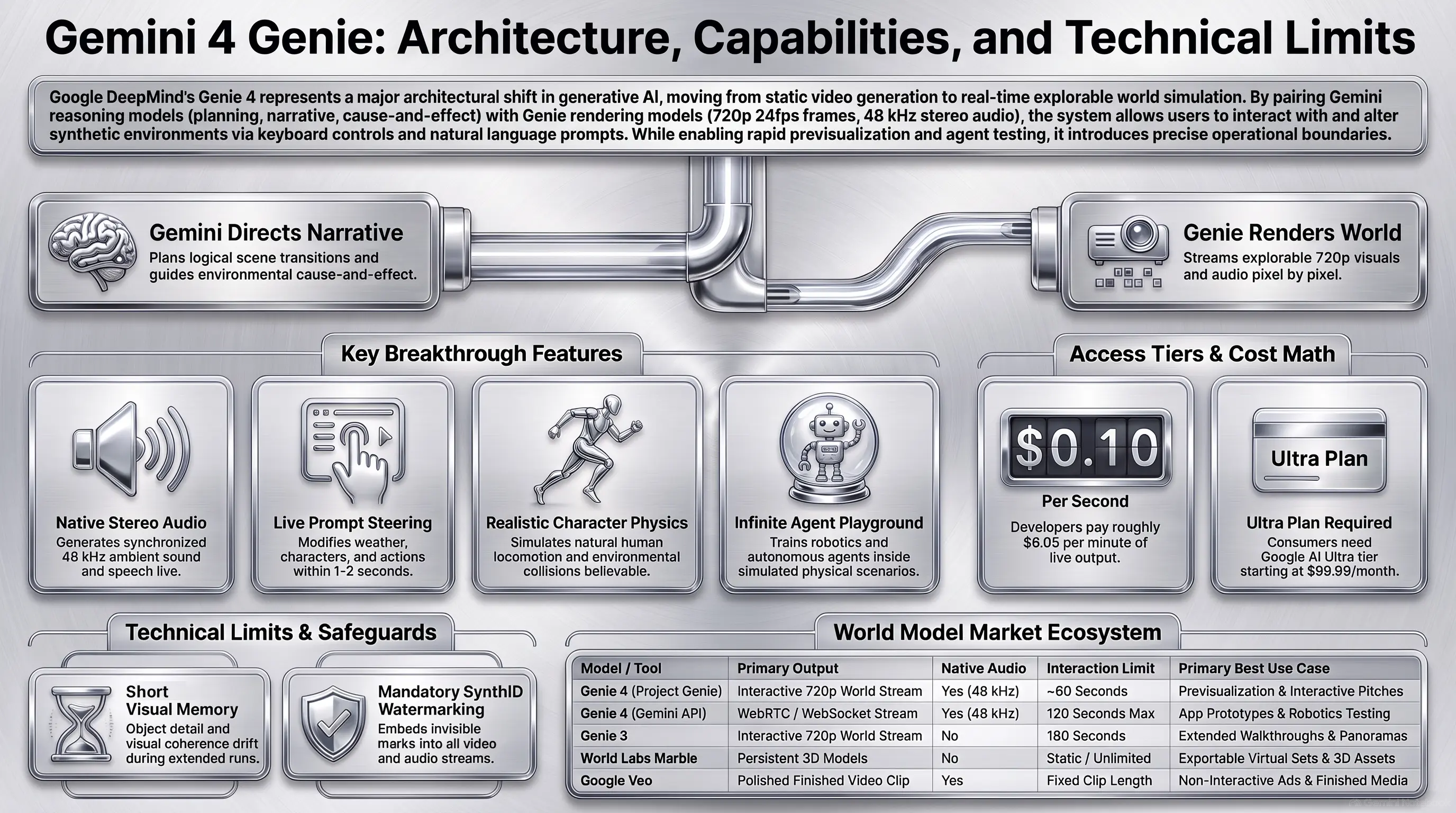
Genie 4 does not stand alone. World Labs, founded by Fei-Fei Li, ships Marble for persistent 3D worlds. Odyssey offers real time interactive video through its API, and Runway ships its GWM-1 world model. Meanwhile, Google Veo covers finished video clips with synchronized audio.
Each tool solves a different problem for a different buyer, so the right choice depends on whether you need a live simulation, an exportable space or a polished clip. The table below compares them side by side.
| Tool | What It Does | Standout Features | Strength / Weakness | Best For | Target Audience |
|---|---|---|---|---|---|
| Genie 4 (Project Genie) | Explorable worlds with audio from text or images | Native audio, live prompts, Gemini agent | Realism and sound / about one minute of interaction | Previsualization, pitches | Filmmakers, YouTubers, Creators |
| Genie 4 (Gemini API) | Streams 720p, 24 fps worlds into your app | Keyboard plus text steering, SynthID | Custom products / $0.10 per second, no portrait | App prototypes, agent tests | Developers, Startups, Robotics teams |
| Genie 3 | Earlier Google world model in Project Genie | 3 minute runs, world chaining, panoramas | Longer sessions / lower fidelity | Longer walkthroughs | Teachers, Hobbyists, Creators |
| World Labs Marble | Persistent 3D worlds from images and text | Exportable spaces | Reusable 3D output / no live audio simulation | Virtual sets, 3D scenes | 3D Artists, Game Designers, Architects |
| Odyssey-3 | Real time interactive video via API | Streaming worlds that react to input | API access / fewer creator tools | Interactive media tests | Developers, Researchers |
| Google Veo | Text and image to video with audio | Polished cinematic clips | Final quality / not interactive | Ads, Shorts, finished scenes | Marketers, Businessmen, YouTubers |
Who Should Use Genie 4? Real Use Cases That Pay Off
Trusted testers came from creative industries, journalism, education, gaming and engineering, and their work shows where the value sits today. Filmmakers use Genie 4 as a draft mode for previsualization, running several takes and adjusting camera, lighting, dialogue and action live.
Photojournalists turn a single archival photograph into a simulation in seconds, and teams test flash floods and wildfires for safety planning. Game developers move from an idea to an explorable prototype in seconds, checking visual styles and mechanics before writing engine code. Meanwhile, enterprise partners evaluate it for rapid scenario generation.
For everyday creators, the practical angle is content and teaching. A YouTuber covering space exploration records a walk through a Mars habitat for a video intro, and a history teacher recreates a 1980s rural Japanese train station, one of DeepMind’s own demos, to start a class discussion. Additionally, an interior designer previews the mood of a room before a client meeting.
However, remember one hard limit. The output is a stream of video and sound, not meshes or game assets, so nothing exports into a game engine as a playable level.
Is Gemini 4 Genie Safe to Use?
Google built several protections into the release. Every video and audio output in Project Genie carries a SynthID watermark, and all model inputs and outputs pass through safety screenings. DeepMind also ran internal safety evaluations before the preview and started with trusted testers to gather feedback.
Additionally, the API blocks identifiable real people, public figures and copyrighted brand IP. For you, this means two things. First, disclose AI generated footage when you publish it. Second, never upload private photos of other people without their consent.
Where Does Genie 4 Fall Short? The Honest Limitations
Google is candid here, and so am I. Visual details and object permanence drift over time, especially in longer sessions, after several complex prompt edits or while you move through the scene. Legible text usually appears only when you include it in the prompt.
Real world locations are not simulated with perfect accuracy, and modeling several agents interacting stays an open research problem. Moreover, real time audio accuracy and camera latency are still improving. On top of that, the price wall is high, since consumers need a Google AI Ultra plan and developers pay by the second with no free tier. Google has also published no benchmarks.
My Honest Score Card
Note: These scores reflect Google’s published specifications, pricing and documented limitations as of 20 November 2026.
| Criterion | Score | Why |
|---|---|---|
| Innovation | 9.5/10 | Native audio, live steering and Gemini planning together |
| Output Realism | 8.5/10 | Photorealistic scenes, drift in longer sessions |
| Ease of Use | 8.5/10 | Browser app, agent and simple keys |
| Session Length | 6.5/10 | About one minute in the app, 120 seconds on the API |
| Developer Flexibility | 7.5/10 | WebRTC and WebSocket, no portrait or batch |
| Value for Money | 6.5/10 | Ultra plan or $0.10 per second |
| Overall Score | 7.8/10 | A real leap, best for short experiments |
The Verdict: Should You Step Into Genie 4 Today?
Genie 4 marks the moment world models left the research paper and reached paying users. For filmmakers, game designers, educators and robotics teams, it turns a sentence into a scene you walk through, hear and change in seconds. However, the short interaction window, the drift and the Ultra price wall mean it rewards focused experiments, not long play.
If you already pay for Google AI Ultra, open Project Genie tonight and test three prompts from this guide. If you build products, run one API session before you commit a budget. Prompt one change at a time, and let Gemini 4 Genie save your time and money on every concept you pitch.
Frequently Asked Questions About Genie 4
Here are the most common questions about Gemini 4 Genie, answered from Google’s official pages and trusted reports.
What is Gemini 4 Genie?
Gemini 4 Genie is the popular search term for Genie 4, the real time world model from Google DeepMind that builds on the Gemini family. Gemini Omni anchors how each world looks and behaves, and Gemini 3.8 Flash acts as a guiding agent that plans events and checks that each step succeeds. You describe a place with text or an image, and Genie 4 streams an explorable world with native audio, including ambient sound and dialogue. Google announced it on 27 October 2026 and opened it to Ultra subscribers and developers in November.
Is Genie 4 free to use?
No. Genie 4 has no free tier today. Consumers need an eligible Google AI Ultra subscription, which starts at $99.99 per month in the US, with a higher tier at $199.99 per month. Google AI Pro members at $19.99 per month join a waitlist instead of getting instant access. Developers need a paid tier Gemini API key, and Google's documentation puts usage at roughly $0.10 per second of streamed output, or about $12 for a full 120 second session. Confirm current figures on Google's official pricing pages before you subscribe.
How do I get access to Genie 4, and who is eligible?
Consumers open labs.google/projectgenie with an eligible Google AI Ultra subscription and choose Genie 4 from the model picker. According to the official Project Genie help page, you must be 18 or older and Project Genie is available where Google AI Ultra is available. Google has not published a full country list for the Genie 4 rollout, so readers outside the US should check eligibility on the Project Genie page itself. Developers instead create a paid tier key and call models/genie-4 through the Interactions API, or test it in Google AI Studio.
How is Genie 4 different from Google Veo?
Google Veo is a text to video model that renders a finished clip you watch, while Genie 4 is a world model that generates the scene while you explore and control it. In Veo, a wrong detail means generating the clip again. In Genie 4, you type a short prompt mid session to change the weather, add a character or redirect the action, and the world adapts within seconds. Therefore, choose Veo for polished ads, and Genie 4 for previsualization, prototypes and agent testing.
Does Genie 4 work for robotics and AI agent training?
Yes, and this is one of its main research goals. In the Google DeepMind Genie 4 announcement, Gemini 4 Argon breaks a task into steps and feeds them to Genie 4 as text captions while the simulation renders, as in the demo of an Apptronik Apollo humanoid playing checkers. The goal is to test robots and agents in many imagined scenarios before real world deployment. However, Genie 4 outputs video and sound rather than physics engine data, so treat it as a scenario generator alongside traditional simulators, not a replacement for them.
Priyanshu Khatri Founder & Chief AI Analyst, SoulAI Writes
Read more articles
What Is Gemini 4 Genie? Genie 4 Features, Pricing & Access
What Is Gemini 4 Genie and How Does Google’s Genie 4 Build Living Worlds? Gemini…
Gemini 4 Neon: Price, Benchmarks and Is It Worth It?
Gemini 4 Neon: Is Google’s Newest AI Model Smarter Than Its Own Flagship? On the…
Gemini 4 Hydrogen: Is Google’s Fastest AI Free to Use?
What Is Gemini 4 Hydrogen, and Why Is Google Putting It Inside Every Search? Last…
Claude Opus 5.5 vs GPT-6 Astra: Which AI Model Wins?
Claude Opus 5.5 vs GPT-6 Astra: Which AI Model Truly Wins Your Work? Claude Opus…
Gemini 4 Carbon vs Gemini 4 Argon: Which One Should You Use?
Gemini 4 Carbon vs Gemini 4 Argon: Which Google Model Deserves Your Money Before December…

Fable 5.1 vs 5.2: Is Claude’s Newest Model Worth It?
Fable 5.1 vs 5.2: Which Claude Fable Model Wins on Price, Speed and Benchmarks? Fable…






Leave a Reply